Display form label when text is within field | Community
Skip to main content
Tim_Marcacci
New Participant
November 22, 2018
Solved

Display form label when text is within field

  • November 22, 2018
  • 2 replies
  • 6487 views

Hi everyone,

I'm trying to build out a form where the labels hidden until a user types into that field and the label then appears above. Below is a screenshot of what I'm trying to do. The hint text is in place and everything is styled and good to go, I am just not familiar enough with javascript to get this to work (I'm assuming its a javascript solution?). Note that this needs to happen on a per-field basis. I don't want all field to appear when you start typing into just 1 field. @Sanford Whiteman​, I know you're the go-to guy with this sort of javascript question.

Any help would be great!

Thanks,

Tim

Best answer by SanfordWhiteman

MktoForms2.whenReady(function (form) {

    var formEl = form.getFormElem()[0];

    $(".mktoLabel" , formEl).css('visibility','hidden');

    function toggle(ele){

        if($(ele).val()!=""){

            $("label[for="+$(ele).prop('name')+"]" , formEl).css('visibility','visible') 

        } else { 

            $("label[for="+$(ele).prop('name')+"]" , formEl).css('visibility','hidden') 

        }

    }

    $(":input" , formEl).keyup(function(){toggle(this)}).change(function(){toggle(this)});

});


Y'left out one important case with Marketo forms.

Also, you need only listen for the input event to cover both key events and clipboard events. See

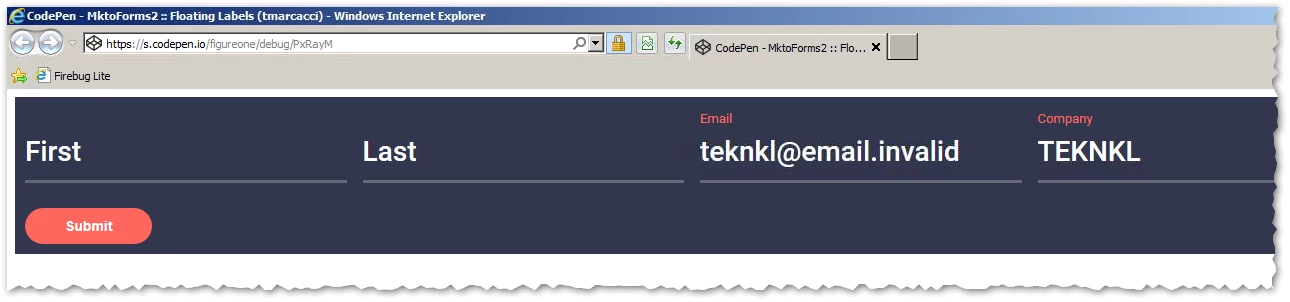
     MktoForms2 :: Floating Labels (tmarcacci)

which is tested back to IE 10.

Also, note to Tim: the placeholders aren't great in IE 10-11 because they're the same white color as user-entered text:

2 replies

Jay_Jiang
New Participant
November 22, 2018

Using some jQuery

$(".mktoForm .mktoLabel").css('visibility','hidden');

$(".mktoForm :input").keyup(function(){

if($(this).val()!=""){

  $("label[for="+$(this).prop('name')+"]").css('visibility','visible')

} else {

  $("label[for="+$(this).prop('name')+"]").css('visibility','hidden')

}

})

/* // uncomment this if you care about people right clicking and CLICKING paste

$(".mktoForm :input").change(function(){

if($(this).val()!=""){

  $("label[for="+$(this).prop('name')+"]").css('visibility','visible')

} else {

  $("label[for="+$(this).prop('name')+"]").css('visibility','hidden')

}

})

*/

SanfordWhiteman
New Participant
November 23, 2018

Remember to constrain all selectors to only the current form element, or else the effect will be really bizarre.

Jay_Jiang
New Participant
November 23, 2018

MktoForms2.whenReady(function (form) {

    var formEl = form.getFormElem()[0];

    $(".mktoLabel" , formEl).css('visibility','hidden');

    function toggle(ele){

        if($(ele).val()!=""){

            $("label[for="+$(ele).prop('name')+"]" , formEl).css('visibility','visible') 

        } else { 

            $("label[for="+$(ele).prop('name')+"]" , formEl).css('visibility','hidden') 

        }

    }

    $(":input" , formEl).keyup(function(){toggle(this)}).change(function(){toggle(this)});

});

SanfordWhiteman
New Participant
November 22, 2018

I'm away for Thanksgiving but will update tonight.

You should link to your form in progress, though.

Tim_Marcacci
New Participant
November 22, 2018

Thanks for your help, Sanford. I wan't expecting to hear from anyone on this thread until after the holiday, so please do enjoy your thanksgiving!

In the meantime, I have placed the form on a test page here: www.xifin.com/info/test-page-visualstrata-styled-form

SanfordWhiteman
New Participant
November 22, 2018

Not directly related to your question, but you're not using one of those DoS-vulnerable pre-fill methods on that page, are you?