Do manually imported leads (via CSV) get saved to the lead database? | Community
Skip to main content
December 14, 2016
Solved

Do manually imported leads (via CSV) get saved to the lead database?

  • December 14, 2016
  • 4 replies
  • 4573 views

Will manually imported leads count towards the total leads within my lead database?

This post is no longer active and is closed to new replies. Need help? Start a new post to ask your question.
Best answer by Emmanuelle_Biss

Hi Rachel,

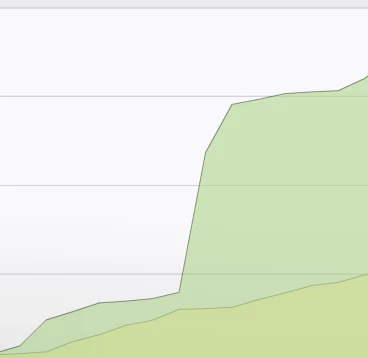
Indeed it will. You will see a big increase in the total number of leads after you import them:

Emma

4 replies

December 21, 2016

If I delete a statically uploaded list will all the corresponding leads be automatically deleted too?

Thanks,

Sara_Greaves
New Participant
December 21, 2016

You won't automatically delete the leads in the list. You can think of the list as a container for the leads. Just because the container is deleted, the leads inside of it aren't. When you're looking at the leads tab of your static list, you will see that you have the option to delete the leads you want to remove from the database. There are other ways you can delete leads too, but it just depends on your preferences.

December 26, 2016

Hi Sara,

What's the best way to delete these leads from the database if I've already deleted the corresponding list?

Thanks,

Rachel

Chris_Willis1
New Participant
December 15, 2016

Hi Rachel - it is correct that your CSV list imports will be added to the lead database.  However, if you have pre-existing leads in your Marketo org, you may not see the lead database count increase by the number of leads in your CSV, as Marketo will de-duplicate any leads that already exist in your org with their counterpart in the text file. 

December 20, 2016

Hi Chris,

I'm actually noticing a much larger amount of leads in my lead database than there should be (having checked my CRM) is there a way to automatically check that there aren't duplicate leads?

Emmanuelle_Biss
New Participant
December 20, 2016

Hi Rachel,

You should have a smartlist in your Lead Database to verify and clean any duplicates in your Marketo. Here's where you can find it:

And then you can merge, delete or modify these duplicates to clean your total leads.

Sara_Greaves
New Participant
December 14, 2016

Hi Rachel,

What Emma said is correct. Any time that you add a lead (csv file upload, manual creation), the lead will be added to your lead database. If you're concerned about the total leads in your database, I would comb through them to see if you can delete any. We just deleted a good number of leads with invalid email addresses to free up some space.

Emmanuelle_Biss
Emmanuelle_BissAccepted solution
New Participant
December 14, 2016

Hi Rachel,

Indeed it will. You will see a big increase in the total number of leads after you import them:

Emma