
Does the Random Sample flow step work in a Trigger campaign? | Community
Skip to main content
Marisa_Rybar
New Participant
September 19, 2017
Solved

Does the Random Sample flow step work in a Trigger campaign?

  • September 19, 2017
  • 2 replies
  • 8176 views

Hey everyone,

I am building out a new sales territory, which is assigned in a totally unique way in comparison to how the rest of our territories are assigned. The way this new territory needs to be set up is that there are 7 states which are going to be shared by 4 different sales teams. This is what needs to happen:

  • Sales Team 1 should receive 32% of incoming leads in this territory
  • Sales Team 2 should receive 26% of incoming leads in this territory
  • Sales Team 3 should receive 22% of incoming leads in this territory
  • Sales Team 4 should receive 21% of incoming leads in this territory

The way I'm thinking this needs to be set up is that I have a smart campaign with a trigger of "person is created" and the states defined as filters, then the flow steps set up with the random sample as established above.

However, I wasn't sure if the random sample flow step would work outside of a batch campaign with a static list because that's the only way I've seen it referenced in other discussions, in which case I would imagine the way it would need to be set up would be that I'd have a smart campaign listening for when new people are created in this shared sales territory, with a flow step to add them to a new static list. Then, I'd have a second smart campaign set up with a trigger "Is Added to List" and the flow steps set up with the random sample as established above.

My other question though is this. Will this random sample work as a triggered campaign with the "person is created" trigger, or on a static list as it grows, or can it only work once on a static list through a batch campaign? (In other words, will the random sample flow step recognize the changes in list size and adjust the %'s accordingly?)

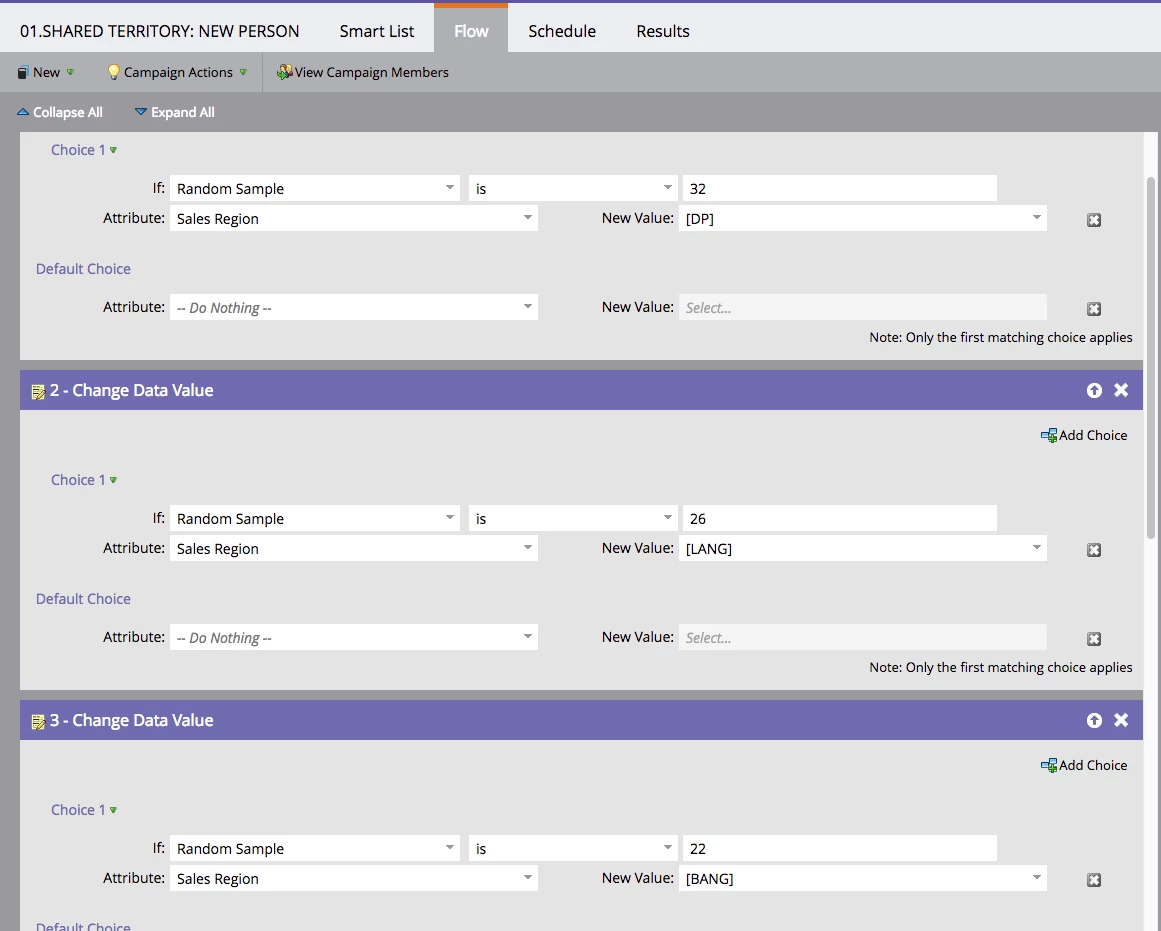
Here's how I have it set up right now (but haven't turned it on since I don't know if it will work):
This post is no longer active and is closed to new replies. Need help? Start a new post to ask your question.
Best answer by Devraj_Grewal

Marisa,

The random sample functionality will work for trigger or batch campaigns. Also make a note that it's best to include all of the random samples as their own choice condition in the same flow step:

Change Data Value

Choice 1: Random sample is: 32

Attribute: Sales Region: [DP]

Choice 2: Random sample is: 26

Attribute: Sales Region: [LANG]

The way you have it set up now is that after that first 32% gets that state region updated, they will then qualify again and could have their region updated again since it takes the next random sample of all those still in the flow. If you list them all in the same flow step as different choices, all people running through will have that state region updated and only once since you cannot qualify for multiple choice conditions in the same flow step.

2 replies

December 15, 2017

Hi,

I would like your advice.

I have done an email blast.

As I did not want sales people to receive all the MQL's at the same time  I switch off that alert.

  • Then I transfer all the MQL leads to a list and from them call the from a Batch campaign with the random filter. I have tried 2 for 2 times at 12 an at 13. It worked great.

below it is the second run as I excluded the ones already sent to sales in the 1st run

I wanted to automatized this so I put a trigger in the batch campaign so that when a person  reaches MQL and it's added to that list  gets send to Sales ( as the random filter is 10... I am not sure how this will work....

Any advice?

Then to make sure the All sales areas receive the same % of lead I am creating segmentation. Any advice on how to set this up?

Devraj_Grewal
Devraj_GrewalAccepted solution
New Participant
September 19, 2017

Marisa,

The random sample functionality will work for trigger or batch campaigns. Also make a note that it's best to include all of the random samples as their own choice condition in the same flow step:

Change Data Value

Choice 1: Random sample is: 32

Attribute: Sales Region: [DP]

Choice 2: Random sample is: 26

Attribute: Sales Region: [LANG]

The way you have it set up now is that after that first 32% gets that state region updated, they will then qualify again and could have their region updated again since it takes the next random sample of all those still in the flow. If you list them all in the same flow step as different choices, all people running through will have that state region updated and only once since you cannot qualify for multiple choice conditions in the same flow step.

Marisa_Rybar
New Participant
September 19, 2017

Ah, great suggestion. Thank you, Devraj! Like this?

Devraj_Grewal
New Participant
September 19, 2017

Actually, since these are the only 4 options and you want all those in the flow to have one of those values for the sales region, then instead of Choice 4, make that last sales region the default value. This ensures that any remaining will be assigned that last sales region to total 100%.

Ex.

Choice 3: Random sample is: 22

Attribute: Sales Region: [BANG]

Default: Sales Region: [TWIN]