don't send emails to unengaged users | Community
Skip to main content
New Participant
October 13, 2022
Solved

don't send emails to unengaged users

  • October 13, 2022
  • 2 replies
  • 1997 views

hi everybody,


I have a question: in other email tools such as Hubspot it is possible to automatically exclude unengaged users, i.e. users that did not open the last emails we've send them, from receiving emails.


Is there a simple way to do that in Marketo? Or do I have to work with smart lists to get that done?


My goal is to reduce the number of emails send to recipients that did not open the last emails we've send them. 


Thank you & kind regards,
This post is no longer active and is closed to new replies. Need help? Start a new post to ask your question.
Best answer by Balkar_Singh

One way to achieve this is using the Marketing Suspended field. This field, if marked TRUE, disables all marketing communication to lead.


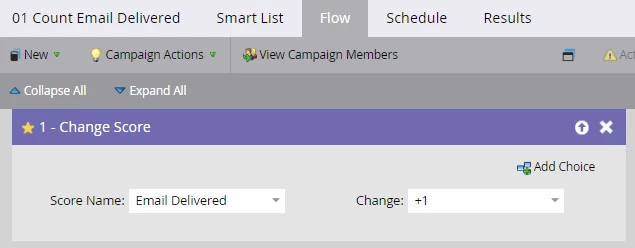
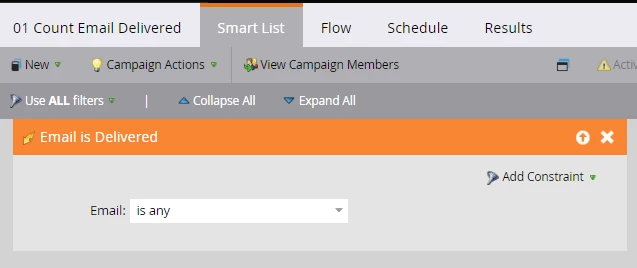
1 - Create a listening campaign for trigger 'Email is Delivered' and count the number of times any email is delivered in a separate field (type score) - say, Email Delivered = +1 (set this to run everytime)


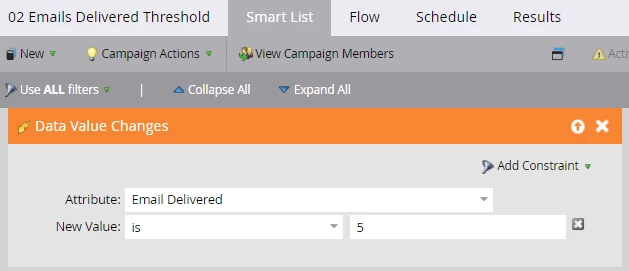
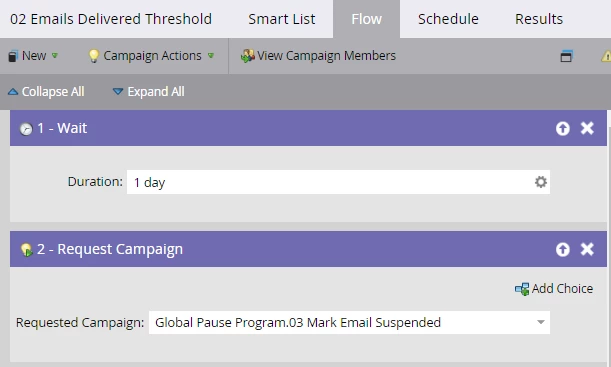
2 - Create another smart campaign to identify the event when Email Delivered updates to 5, wait for a day (or two, depending upon how much time you want to give for the person to engage) and request the 3rd campaign which...


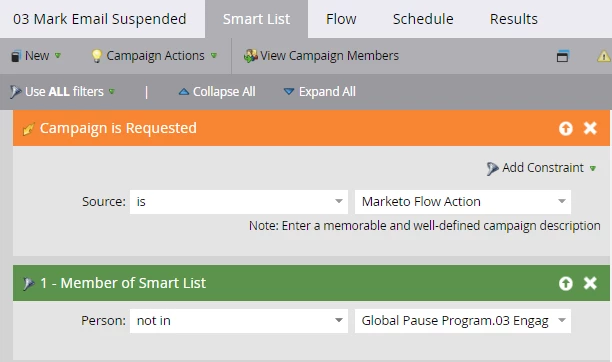
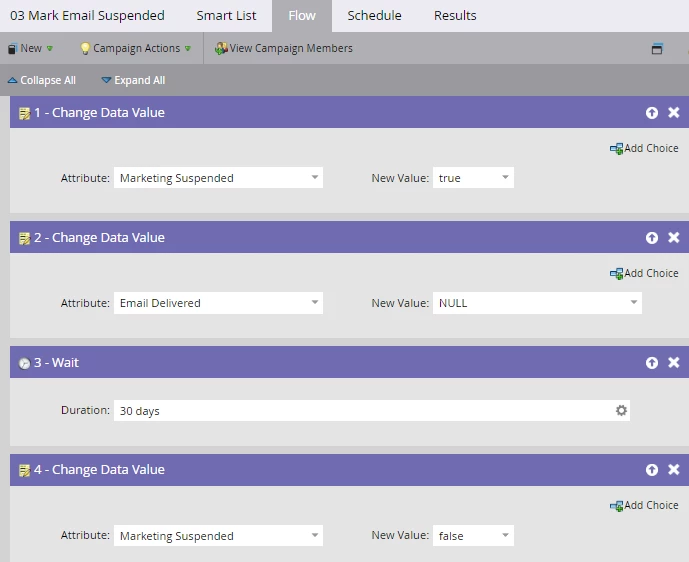
3 The 3rd smart campaign filters people who have not engaged in past five days, and marks them Marketing Suspended to TRUE, erases 'Email Delivered' back to NULL, waits 30 days (or the duration you want to pause the leads) and marks Marketing Suspended back to FALSE.


This program can pause your dormant leads for a while.


Hope this helps!

2 replies

Balkar_Singh
Balkar_SinghAccepted solution
Community Manager
October 14, 2022

One way to achieve this is using the Marketing Suspended field. This field, if marked TRUE, disables all marketing communication to lead.


1 - Create a listening campaign for trigger 'Email is Delivered' and count the number of times any email is delivered in a separate field (type score) - say, Email Delivered = +1 (set this to run everytime)


2 - Create another smart campaign to identify the event when Email Delivered updates to 5, wait for a day (or two, depending upon how much time you want to give for the person to engage) and request the 3rd campaign which...


3 The 3rd smart campaign filters people who have not engaged in past five days, and marks them Marketing Suspended to TRUE, erases 'Email Delivered' back to NULL, waits 30 days (or the duration you want to pause the leads) and marks Marketing Suspended back to FALSE.


This program can pause your dormant leads for a while.


Hope this helps!

New Participant
October 13, 2022

Hi @efrisch 
Yes, but I would recommend that your should go for simple smart list in order to reduce compilcay  

1. you can simply create a smart filter


2. Or you can create a simple smart campaign and use same filters in the campaign mentioned above and can also add a filter named- Email is delivered and replace it from was delivered email to make it a trigger and then in flow you can add it separate list.


Additionally, you add a Program status filter for knowing how many users are unengaged if you have used program status field in the campaign. 

Hope That works for you,
Have a great day