Downloading Opportunity Influence Analyzer data into Excel | Community
Skip to main content
April 22, 2013
Question

Downloading Opportunity Influence Analyzer data into Excel

  • April 22, 2013
  • 10 replies
  • 2993 views
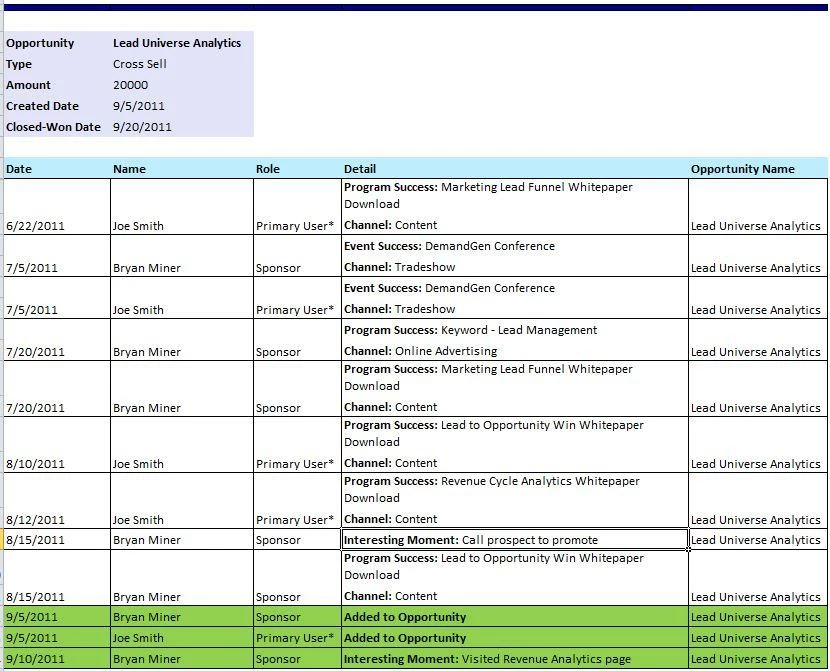
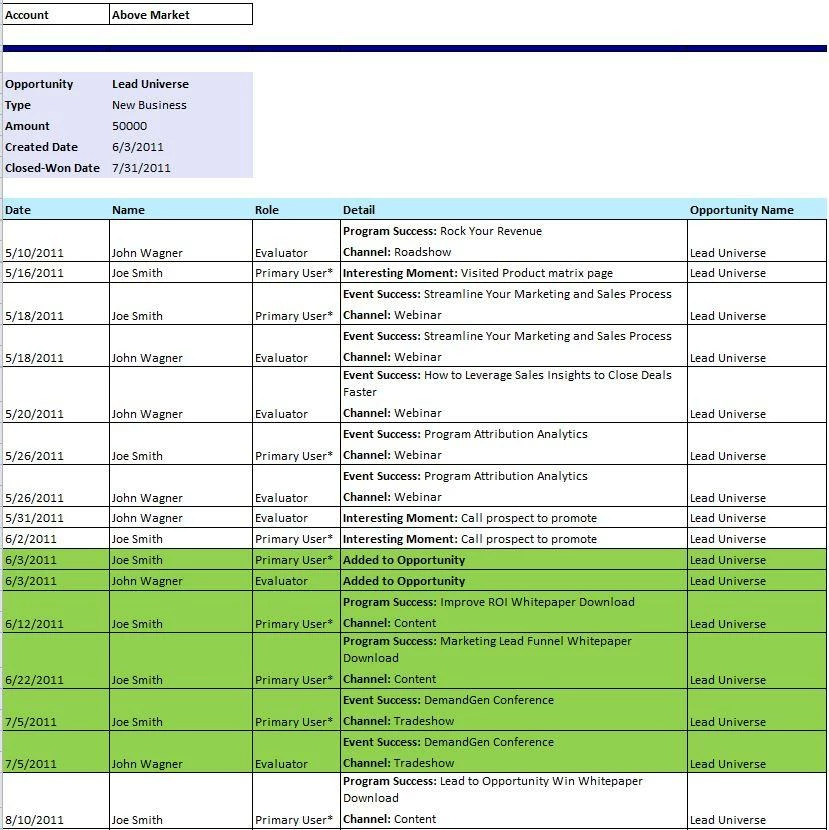
We’ve been working on a new feature that would allow users to export the Opportunity Influence Analyzer data into Excel.  Please see an example screenshot below.  If the account has multiple opportunities, the Excel would include those.  The green area represents all the interactions when the opportunity was open.
 
I’d love to hear your feedback and suggestions.  Thanks.


This post is no longer active and is closed to new replies. Need help? Start a new post to ask your question.

10 replies

Ron_Olech
New Participant
April 7, 2020

I'm here because I am looking for help on filtering by Opportunity status in a different context, but I think that could be useful here too.  Also, it would be helpful  add the External Opportunity ID to this.   A  nice-to-have would be a feature to select the additional fields you want to include, i.e. sales rep or custom fields we have on the company and opportunity.

October 29, 2013
Hi Ed,

Your screenshot shows the correct extract, although it seems that there were no program successes and/or interesting moments for the account you selected.  The screenshots in my original post are from a pre-release prototype and we've changed the feature in the final product based on feedback from various users.

The primary reason we don't have the oppty name and role as columns is that for accounts with more than one opportunity it's not simple to tie the program successes or interesting moments to the right opportunity.

TJ

Edward_Masson
New Participant
October 25, 2013
Hi TJ,
I don’t get the same extract as your above examples.
 
After playing with this feature I can see the export is consolidated the excel data in to less cells than your examples above. I actually prefer your examples as your data is in more columns which would allow me to create pivot tables in excel.
 
Your example has the opp data spread out in 5 columns while my extract is only 4.
The ‘detail’ is all in one column cell for my extract while your example is spread out on to several rows making it perfect for pivot tables.
 
Also, I’m missing ‘role’ column.
 
Was this changed before launching this feature or my set up in SFDC is a cause?

October 10, 2013
Great suggestion, Jessica.  Please post it as an idea if you haven't already done so.

Also, the OIA export feature was released in September:  http://community.marketo.com/MarketoArticle?id=kA050000000LBSsCAO#export-opportunity-influence-analyzer

Thanks.

TJ
October 10, 2013
This is fantastic!  Another feature that I'd personally love to see (because I was just asked to manually create this), would be a way for the Program Successes to be hyperlinked from the Excel report back into the Opportunity Influence Analyzer so that they can be immediately referenced.
August 21, 2013
This would be a great feature and extremely helpful. Any idea of when this feature could potentially be available?
July 29, 2013
Excited to see you are working on this! One small thing- it would also be good to show the amount of time between interesting moments visually. I know we could figure it out in the excel file, but some sort of color code might help to see time of inactivity, since we don't have the timeline view included. Or maybe you could still include a snapshot of the analyzer timeline graph to reference? I can see myself doing that when sharing the excel file.
April 30, 2013
This would be especially useful for accounts with many opportunities.  Great feature.
April 24, 2013
This looks excellent. I'd love to play around with this feature!
April 23, 2013
TJ, this is awesome and I think it would actually be more digestible for the average salesperson than the graphic that you have to click on repeatedly to get the full picture. 

It would be great to be able to email this to the Salesperson at certain points (e.g. Interesting moment, Opp Creation, Opp Close).

Would it be able to include those Contacts at the Account that don't have a Contact Role on the Opp, but did have meaningful activity before the Opp was created and/or during the time that the Opp was open? 

Can the start date prior to the Opp creation be restricted to a certain number of months (e.g. 3 months, 6 months, etc.) vs. all time?

If there are multiple Opps, can we restrict the export to just those of a certain Opportunity Type?  For example when we close/win an Opp a renewal Opp is created, but we normally want to see the non-renewal and non-upsell Opps.

The Opportunity Name column seems to be redundant since there is a heading with the Opportunity Name.