Dropdown of Checkboxes on Marketo Form | Community
Skip to main content
New Participant
May 18, 2023
Question

Dropdown of Checkboxes on Marketo Form

  • May 18, 2023
  • 1 reply
  • 777 views

hi 

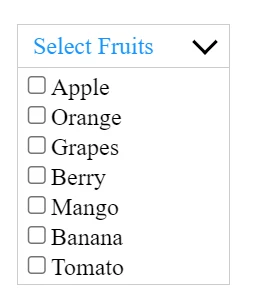
Anyone has Marketo Form showing Dropdown of Checkboxes like below.


I need a Dropdown with Checkboxes in it.

Working example is helpful.


I have tried this example on Marketo form, but it did not render as Dropdown, instead it showed bunch of Check boxes

<div id="list1" class="dropdown-check-list" tabindex="100">
  <span class="anchor">Select Fruits</span>
  <ul class="items">
    <li><input type="checkbox" />Apple </li>
    <li><input type="checkbox" />Orange</li>
    <li><input type="checkbox" />Grapes </li>
    <li><input type="checkbox" />Berry </li>
    <li><input type="checkbox" />Mango </li>
    <li><input type="checkbox" />Banana </li>
    <li><input type="checkbox" />Tomato</li>
  </ul>
</div>
thanks

-Sree

This post is no longer active and is closed to new replies. Need help? Start a new post to ask your question.

1 reply

SanfordWhiteman
New Participant
May 18, 2023

What you’re showing isn’t a standard HTML input type.


And when you add custom HTML with fields inside it to a Marketo form, you have to wire up the fields to the Marketo Forms JS API (i.e. onSubmit()).


Otherwise Marketo would have no idea they exist and the values won’t be submitted along with the form.


If you have a specific JS plugin that creates this kind of form widget, please point to it and we can help explain how it could be introduced into a Marketo form.