Duplicate folder issue | Community
Skip to main content
New Participant
August 7, 2023
Question

Duplicate folder issue

  • August 7, 2023
  • 2 replies
  • 1378 views

I created a folder for a campaign and built out the assets etc... but every time I log in to Marketo I first see a duplicate of the folder and I'm not able to expand or see the assets in either:
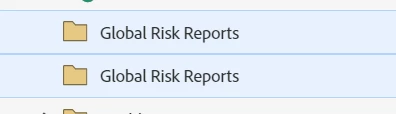
When I refresh the page, I then see a single folder and can expand it as normal
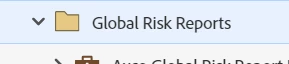
It doesn't matter how many times I log out and in, close the browser, restart my computer etc... it always appears this way when I first log in to Marketo and it's been doing this ever since I first created the campaign a month ago. 


It's a minor annoyance but does anyone know what causes this and how I can fix it?

This post is no longer active and is closed to new replies. Need help? Start a new post to ask your question.

2 replies

Community Manager
August 7, 2023

I've had this issue before. You'll want to reach out to support, and they can assist in removing the duplicate folder. 

Darshil_Shah1
Community Manager
August 7, 2023

Many users have been seeing similar Marketing tree update issues lately (especially after the last release). The most common ones are the names not updating in the tree post renaming, assets not appearing in the right location when moved until refreshing the window, etc. Your issue could probably be related to the series of issues users have been noticing with the marketing tree. However, I wasn't able to replicate the issue you're seeing in my sandbox which is hosted in Sydney (SN) datacenter. FWIW, this could be a temporary thing, and you can always log a ticket with Marketo so they're aware about it, and could also help fixing it.