Dynamic Buttons | Community
Skip to main content
January 16, 2018
Solved

Dynamic Buttons

  • January 16, 2018
  • 3 replies
  • 7897 views

We noticed that CTA buttons for two or three columns does not have the functionality to be dynamic. So we created and inserted a table inside the text element.

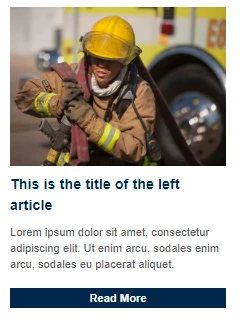
In preview and gmail, the buttons look great(see below image).

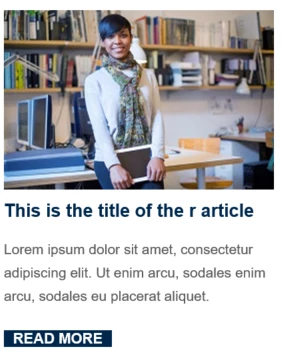
On the other hand, outlook strips the styling elements for the button(see below image).

Does anyone have a solution for this?

This post is no longer active and is closed to new replies. Need help? Start a new post to ask your question.
Best answer by Trevor_Parsell

Hey Sanford,

So I should replace my button template with something like this in order to track those who click it from outlook?

<table width="100%" border="0" cellspacing="0" cellpadding="0">

<tbody>

<tr>

<td style="text-align: center;">

<div><!--[if mso]>

  <a:roundrect

    xmlns:a="urn:schemas-microsoft-com:vml"

    xmlns:w="urn:schemas-microsoft-com:office:word"

    href="#"

    style="height:43px; v-text-anchor:middle; width:200px;"

    arcsize="8%"

    strokecolor="#4C4C93"

    fill="t">

    <a:fill type="solid" color="#4C4C93" />

    <w:anchorlock/>

    <center style="color:#ffffff;

      font-family:sans-serif;

      font-size:13px;

      font-weight:bold;">Read More</center>

  </a:roundrect>

<![endif]--><a href="#" style="background-color: #4c4c93; border: 1px solid #4C4C93; border-radius: 4px; color: #ffffff; display: inline-block; font-family: sans-serif; font-size: 13px; font-weight: bold; line-height: 43px; text-align: center; text-decoration: none; width: 200px; -webkit-text-size-adjust: none; mso-hide: all;">Read More</a></div>

</td>

</tr>

</tbody>

</table>
3 replies

January 16, 2018

Wow! This has been super helpful!
I was able to plug this into our 2.0 template and tested it. It's beautiful

Thank you guys!

Trevor_Parsell
New Participant
January 16, 2018

Hey Albert,

The button template below has worked really well for me in outlook and in other email clients. It basically shows one version of the button if viewed in Microsoft and another version when viewed in other email clients. Please note that you will need to update both versions when using this button. The bolded sections below are the link, button color, stroke color, and CTA text that would need to be updated for each new button.

<table width="100%" border="0" cellspacing="0" cellpadding="0">

<tbody>

<tr>

<td style="text-align: center;">

<div><!--[if mso]>

          <v:roundrect xmlns:v="urn:schemas-microsoft-com:vml" xmlns:w="urn:schemas-microsoft-com:office:word" href="#" target="_blank" style="height:36px;v-text-anchor:middle;width:150px;" arcsize="5%" strokecolor="#f0ab00" fillcolor="#f0ab00">

            <w:anchorlock/>

            <center style="color:#ffffff;font-family:Helvetica, Arial,sans-serif;font-size:16px;">Read More</center>

          </v:roundrect>

        <![endif]--> <a target="_blank" href="#" style="background-color: #f0ab00; border: 1px solid #f0ab00; border-radius: 5px; color: #ffffff; display: inline-block; font-family: sans-serif; font-size: 16px; line-height: 44px; text-align: center; text-decoration: none; width: 150px; -webkit-text-size-adjust: none; mso-hide: all;">Read More</a></div>

</td>

</tr>

</tbody>

</table>
Thanks!

Trevor

SanfordWhiteman
New Participant
January 16, 2018

Hmm, those buttons won't track in Outlook unless you do it like this: http://blog.teknkl.com/those-bulletproof-buttons-are-also-tracking-proof/

Trevor_Parsell
Trevor_ParsellAccepted solution
New Participant
January 16, 2018

Hey Sanford,

So I should replace my button template with something like this in order to track those who click it from outlook?

<table width="100%" border="0" cellspacing="0" cellpadding="0">

<tbody>

<tr>

<td style="text-align: center;">

<div><!--[if mso]>

  <a:roundrect

    xmlns:a="urn:schemas-microsoft-com:vml"

    xmlns:w="urn:schemas-microsoft-com:office:word"

    href="#"

    style="height:43px; v-text-anchor:middle; width:200px;"

    arcsize="8%"

    strokecolor="#4C4C93"

    fill="t">

    <a:fill type="solid" color="#4C4C93" />

    <w:anchorlock/>

    <center style="color:#ffffff;

      font-family:sans-serif;

      font-size:13px;

      font-weight:bold;">Read More</center>

  </a:roundrect>

<![endif]--><a href="#" style="background-color: #4c4c93; border: 1px solid #4C4C93; border-radius: 4px; color: #ffffff; display: inline-block; font-family: sans-serif; font-size: 13px; font-weight: bold; line-height: 43px; text-align: center; text-decoration: none; width: 200px; -webkit-text-size-adjust: none; mso-hide: all;">Read More</a></div>

</td>

</tr>

</tbody>

</table>

keithnyberg
New Participant
January 16, 2018

Hey Albert,

I'm not aware of a solution to this as variables in 2.0 emails are not dynamic. Definitely a pain... Following this thread to see what others have to offer as a workaround here, best we have done is just loose the fancy button styling a stuck to basic hyperlinks in rich-text that can be made dynamic. Not as clean as a button, but better that outlook stripping the button formatting.

Couple ideas to resolve this issue that should be upvoted:

Sincerely,

Keith Nyberg