
Dynamic Chat on hours vs off hours dialogue | Community
Skip to main content
RaulEr
New Participant
December 28, 2023
Solved

Dynamic Chat on hours vs off hours dialogue

  • December 28, 2023
  • 2 replies
  • 1400 views

Hi community!

Wondering if Dynamic Chat has the dialogue option to show a different message when the agents are offline vs online?


So if there's one connected (on hours) it will assign the chat or calendar to the agent, but if nobody is connected (off hours) it will show an "I'm sorry" dialogue.

This post is no longer active and is closed to new replies. Need help? Start a new post to ask your question.
Best answer by Darshil_Shah1

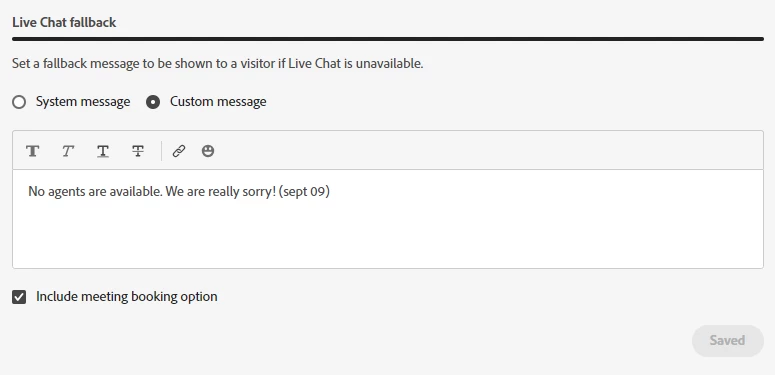
As far as I know, all you can do today is display a fallback message if the person doesn't qualify to chat with the sales agent (in the case of custom routing logic) or if sales agents are offline or unavailable. You can configure this in the Agent Management > Live Chat fallback option. When creating a custom message, you can style the font, use links, and even insert emojis! You can also select the meeting booking option in the fallback setting (see the little checkbox in the below snapshot) that would allow the visitor to book a meeting instead. I hope this helps. Please let us know if you have any questions.

2 replies

Darshil_Shah1
Darshil_Shah1Accepted solution
Community Manager
January 1, 2024

As far as I know, all you can do today is display a fallback message if the person doesn't qualify to chat with the sales agent (in the case of custom routing logic) or if sales agents are offline or unavailable. You can configure this in the Agent Management > Live Chat fallback option. When creating a custom message, you can style the font, use links, and even insert emojis! You can also select the meeting booking option in the fallback setting (see the little checkbox in the below snapshot) that would allow the visitor to book a meeting instead. I hope this helps. Please let us know if you have any questions.

Zoe_Forman
Community Manager
December 29, 2023

Dynamic Chat you can configure custom routing rules for live chat agents based on multiple criteria, one of these can be office hours. I'm not sure how you would manage regional time Zones - IP address/website domain?


It's a little simpler with Agent calendars connected to Dynamic Chat as visitors can choose an available agent slot that you make available to book a meeting from chatbot.

@rauler I'd be interested if you find a multiple time zone solution.