Solved
Edit or Remove Member of Engagement Program Filter in Smart List
I am trying to edit the stream in the Member of Engagement Program filter in my smart list but am unable to. There is no function to remove or edit. Any insight is appreciated.
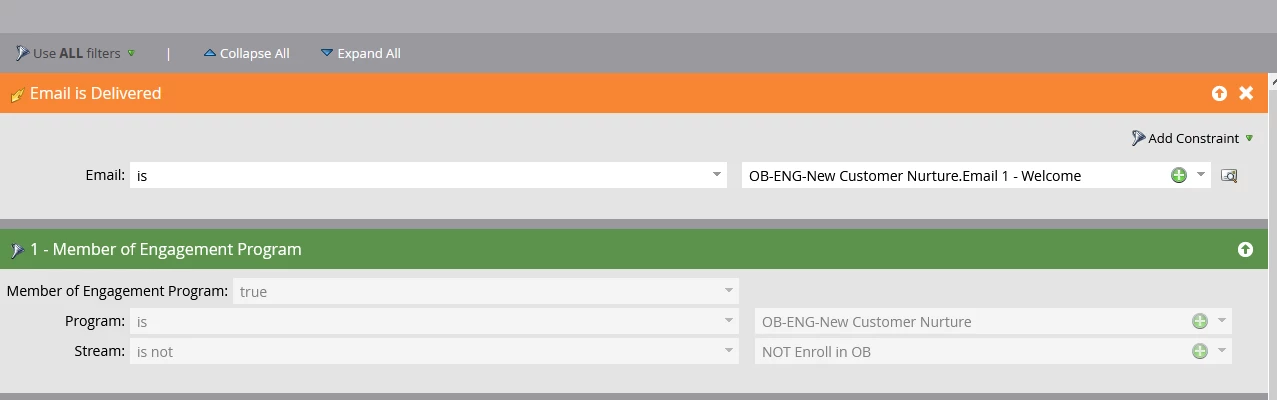
I am trying to edit the stream in the Member of Engagement Program filter in my smart list but am unable to. There is no function to remove or edit. Any insight is appreciated.
Hi You must be editing in transition rules in stream. For stream transition rules you cannot edit this filter as it is a mandatory filter along with program name and with stream value is not current stream name. As transition rules are used to add leads in particular stream where you are using transition rules.
As per this filter it is just checking for the lead if they are member of this program and are not part of this stream and then only will add leads in this stream.
To change stream or to add in another stream you can use smart campaign or add transition rules in particular stream you want to add the leads.
Enter your E-mail address. We'll send you an e-mail with instructions to reset your password.