
Editing Known HTML Form Area? | Community
Skip to main content
John_Westley
New Participant
December 16, 2015
Solved

Editing Known HTML Form Area?

  • December 16, 2015
  • 2 replies
  • 2790 views

Hello,

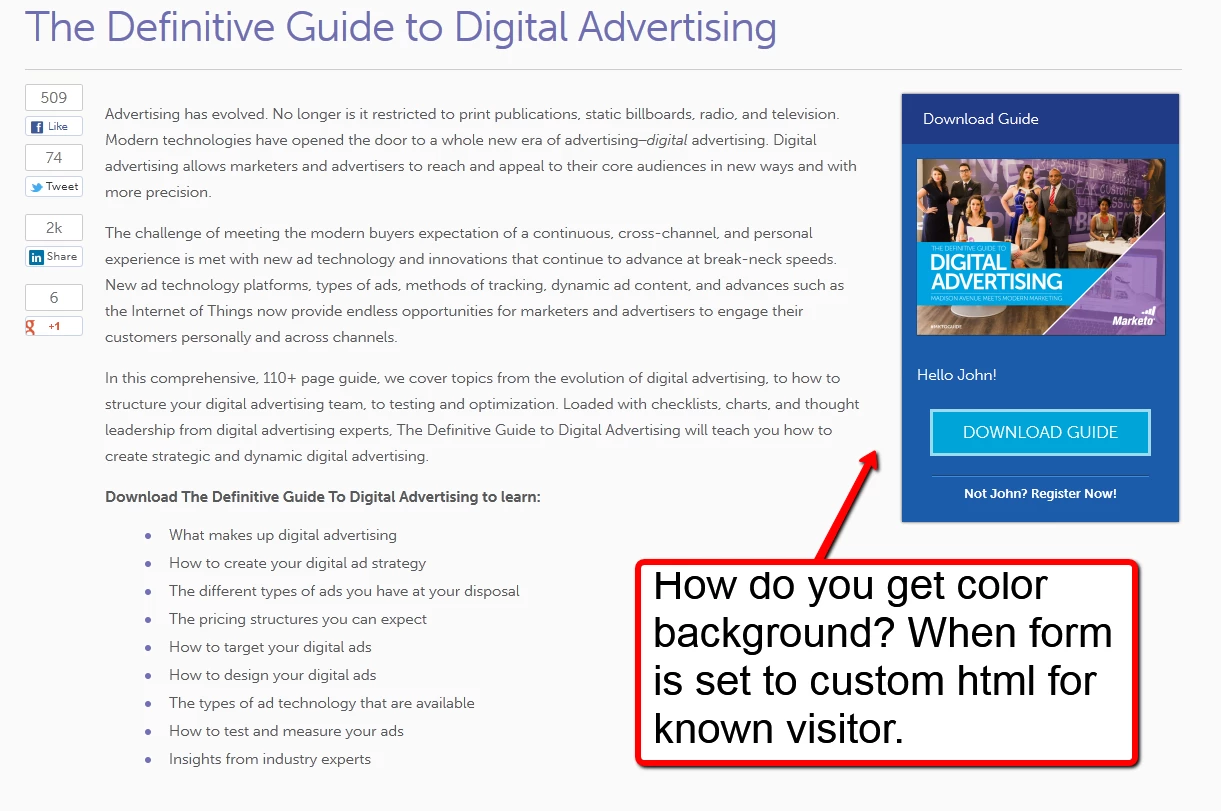
Can anyone help me with the HTML code needed to add a background color or border to the known visitor section of a form?

I really like what Marketo had done in this example but we currently don't have a developer on staff to figure out how.

I've tried adding basic HTML but Marketo seems to be stripping it out when I save it. Is this something that would require JS?

Thanks in advance for the help!
This post is no longer active and is closed to new replies. Need help? Start a new post to ask your question.
Best answer by Kenny_Elkington

The class of the known lead box is "mktoTemplateBox" so you can just apply style to it, either in the custom CSS of your form, you in your landing page.  For example, if you add this to your custom CSS, the box will be red:

.mktoTemplateBox{

     background-color: red;

}

Edit the CSS of a Form Theme - Marketo Docs - Product Docs

2 replies

Kenny_Elkington
Kenny_ElkingtonAccepted solution
New Participant
December 16, 2015

The class of the known lead box is "mktoTemplateBox" so you can just apply style to it, either in the custom CSS of your form, you in your landing page.  For example, if you add this to your custom CSS, the box will be red:

.mktoTemplateBox{

     background-color: red;

}

Edit the CSS of a Form Theme - Marketo Docs - Product Docs

John_Westley
New Participant
December 16, 2015

Thanks Kenny I can manage that amount of coding! Appreciate the info.

Frank_Breen2
New Participant
December 16, 2015
