Editing/ reformatting long list of values on a form | Community
Skip to main content
New Participant
February 16, 2016
Question

Editing/ reformatting long list of values on a form

  • February 16, 2016
  • 3 replies
  • 5812 views

Hi,

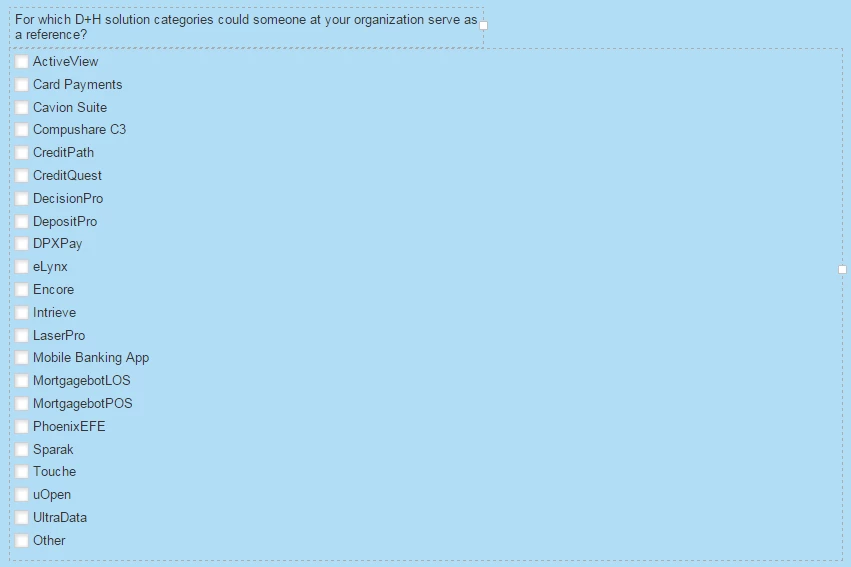
I have a form with a really long list of product values. The field type is set to be a check-box (see below).

Is there any way to split this list into columns to make the form more user-friendly and also fill the empty space?
Thanks,

Tom

3 replies

New Participant
February 17, 2016

Here's the link to the landing page where I want to reformat the form: info.dh.com/GCProgram-Registration.html

If you know a quick way to resolve please let me know!

Tom Kerlin
Grégoire_Miche2
New Participant
February 17, 2016

Hi Tom,

add

#mktoForm_64 .mktoCheckboxList .mktoField {

    float: left !important;

    clear: none !important;

}

#mktoForm_64 .mktoCheckboxList label {

    width: 31% !important;

    float: left !important;

    margin-left: 5px !important;

}

-Greg

New Participant
February 17, 2016

Thanks Greg,

The top row looks pushed to the right a little...

Tom Kerlin
New Participant
February 16, 2016

You should be able to put this into columns. Try dragging "Card Payments" to the right of "Active View" You should see an orange arrow.

SanfordWhiteman
New Participant
February 16, 2016

The Checkboxes data type (which I think Tom is using, even though he said Checkbox) doesn't allow repositioning that way, AFAIK.  You have to use CSS to column-ize it.

New Participant
February 17, 2016

Hi Sanford,

Thanks for clearing that up. I posted a link to the landing page in case you want to view the source code.

Tom Kerlin
Grégoire_Miche2
New Participant
February 16, 2016

Hi Tom,

I would probably look into the CSS to display them in 2 or 3 columns and in a responsive way.

-Greg

New Participant
February 16, 2016

Thanks Greg,

How can I edit the HTML/CSS in an individual Landing Page if I'm using a global template in design studio?

Tom Kerlin
Grégoire_Miche2
New Participant
February 16, 2016

Hi Tom,

You will have to add some styles that will use the form id in the css styles. you styles will look like:

#mktoForm_XXXX .mktoCheckboxList .mktoField {

     width:20px !important;

     float:left !important;

}

#mktoForm_XXXX .mktoCheckboxList label {

     width:26% !important;

     float:left !important;

     margin-left: 5px !important;

}

where XXXX is your form ID. This is not tested, so it may need some adjustments.

-Greg