Email 2.0 Modules Tab | Community
Skip to main content
Jason_Scott
New Participant
July 8, 2016
Solved

Email 2.0 Modules Tab

  • July 8, 2016
  • 1 reply
  • 3888 views

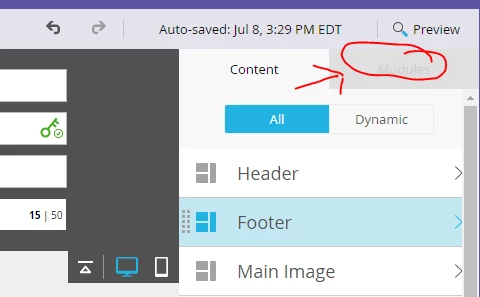
I started to create an email template using 2.0 editor.  I've figured out how to get the basic structure setup, however I can't figure out how to get the modules to show in the "modules" tab on the right hand side.  Do I need to tag the modules?  Anyone else run into this? 
Best answer by Justin_Cooperm2

Yep, I would recommend you take a look at the code that will appear by default when you say "New Email Template" in Marketo. Then, read our syntax doc: https://docs.marketo.com/display/DOCS/Email+Template+Syntax

Your code must have a mktoContainer that contains a series of "Modules" that are tagged with "class=mktoModule"

1 reply

Justin_Cooperm2
Justin_Cooperm2Accepted solution
New Participant
July 8, 2016

Yep, I would recommend you take a look at the code that will appear by default when you say "New Email Template" in Marketo. Then, read our syntax doc: https://docs.marketo.com/display/DOCS/Email+Template+Syntax

Your code must have a mktoContainer that contains a series of "Modules" that are tagged with "class=mktoModule"

Jason_Scott
New Participant
July 11, 2016

Thanks for the reply.  I used the doc you referenced to build the email and have the mktoContainer and mktoModule in the template.  Are there any other reasons why it would show in the content tab but not the Modules tab?

Jason

Justin_Cooperm2
New Participant
July 11, 2016

Yes, if you pasted in the code via the "Edit Code" button from the email itself. The "Modules" tab is populated by the email's underlying Email Template. If you've pasted in tons of code you've "broken" the email from its template so you won't see that tab.
