Email deployment/smart campaign delay | Community
Skip to main content
Aug 21, 2014 7:08 PM UTC
Solved

Email deployment/smart campaign delay

Hi there,

There's been a couple of times when we've scheduled a smart campaign with an email attached, and for some reason the email deployment doesn't go out at the time we scheduled it for.

For instance, I scheduled an email earlier today to go out at 1:30 p.m. this afternoon. I included our staff list in the email. We have yet to receive the email and when I look in Marketo it says it's scheduled to send at 1:30 p.m. (it is now 2:05 p.m.) and that it hasn't run yet.

The list is not that large and most times when we schedule deployments they do send out at the correct time. But this has happened once or twice and I thought I'd start investigating :)

Does Marketo run behind sometimes if you have a lot going out in one day? How far in advance should you schedule something in order for it  to deploy at the correct time?

This post is no longer active and is closed to new replies. Need help? Start a new post to ask your question.
Dory_Viscoglio
Dory_ViscoglioAccepted solution
Level 10
Aug 21, 2014 8:31 PM UTC
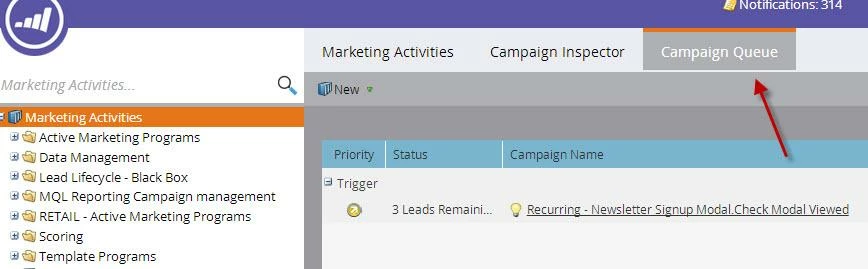
Yes, it should prevent dupes from going out, but I'd wait. You can also go into the Campaign Queue at the top of Marketing Activities (you have to be in the Marketing Activities item on the tree, not just the Marketing Activities section of Marketo), to see what is pending.

You can also see the last time a batch campaign was run by clicking on the actual campaign and then looking at the status tab at the very bottom. 


7 replies

Aug 22, 2014 9:45 PM UTC
Good to know -- thank you, guys!
Translate
Aug 21, 2014 9:53 PM UTC
When we first started using Marketo, we noticed a delay in sends of an hour. It happend for everything we scheduled. We couldn't figure out what was happening for the longest time. Turned out it was our time zone settings, our account was set to central standard time, but we are on eastern standard time.
Translate
Dory_Viscoglio
Dory_ViscoglioAccepted solution
Level 10
Aug 21, 2014 8:31 PM UTC
Yes, it should prevent dupes from going out, but I'd wait. You can also go into the Campaign Queue at the top of Marketing Activities (you have to be in the Marketing Activities item on the tree, not just the Marketing Activities section of Marketo), to see what is pending.

You can also see the last time a batch campaign was run by clicking on the actual campaign and then looking at the status tab at the very bottom. 

 
Translate
Persephanie_Are
Level 1
Feb 5, 2020 10:09 PM UTC

I just had the issue of an email campaign delay occur to me today, but when I go to the campaign queue in marketing activity it's empty which I know shouldn't be the case. Any insight on this?

Translate
Aug 21, 2014 8:06 PM UTC
Ah, I see. So when something like this does happen, and we see that it's scheduled to go out but it hasn't sent yet -- should we just wait until it eventually deploys? I've made the mistake in the past of going in and hitting send again after panicking when I realized it hadn't sent. Then it ends up going out twice.

With communication limits turned on to limit emails to 1 per day, this should prevent duplicates, right? (We've just started implementing the communication limit feature so I'm still learning -- before we'd been de-duping manually -- but that's a whole different discussion!)
Translate
Dory_Viscoglio
Level 10
Aug 21, 2014 7:42 PM UTC
Sometimes, depending on the criteria of the list, it can take a while to get a send out. The list will begin processing at the time at which you set the send for, but can be held up from the intial time that you thought it would go out. Also, if a lot of other people are sending at the same time it could be impacting your send.

Unfortunately, you don't always know if your mailing will be held up, or how long the delay will be so there isn't really a way to get it to deploy at the "correct time". 
Translate
Aug 21, 2014 7:12 PM UTC
Edit: It just sent out at 2:10 p.m. -- 40 minutes after it was supposed to send.
Translate