Email Footer Edit? | Community
Skip to main content
New Participant
May 14, 2020
Question

Email Footer Edit?

  • May 14, 2020
  • 2 replies
  • 2306 views

Hi all!


Recent accidental Marketo Admin here. I have some front-end dev and other marketing automation knowledge, but really green in Marketo. Tried a fair amount of googling / Marketo Help section / searching these boards, but not finding what I need so going to fire out a question that probably is lacking many important details that I am unaware of. Thanks for your bearing with me!


I have been asked to change a URL in an email footer.  I went into the email template, found the two references to the URL and changed them. The URL's are changing from "xxxabc.com" to "abc.com". Pretty easy, I thought. On save, I'm getting the following errors:
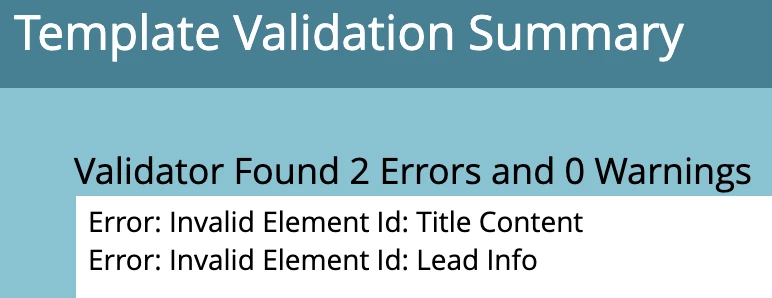
 

Does this have to do with  the mce:protected designation from this line of code?  "<!--mce:protected %3C%21==//mainContainer%20Section==%3E-->"


Thanks!


This post is no longer active and is closed to new replies. Need help? Start a new post to ask your question.

2 replies

SanfordWhiteman
New Participant
May 14, 2020

The errors are referring to the id attributes on those 2 elements. In HTML4, which is the standard you have to adhere to for HTML email (not HTML5) id cannot have spaces.


P.S. If you need a dummy domain, please don't use somebody's private registered domain. Use the actual 2LD and TLD designed for examples: example.com, abc.example and another.example are all designed for use in examples/documentation.

zinovoAuthor
New Participant
May 14, 2020

And also, how do I fix this?   🙂