Email link performance not matching smart list or smart campaign results | Community
Skip to main content
New Participant
October 26, 2022
Solved

Email link performance not matching smart list or smart campaign results

  • October 26, 2022
  • 2 replies
  • 4069 views

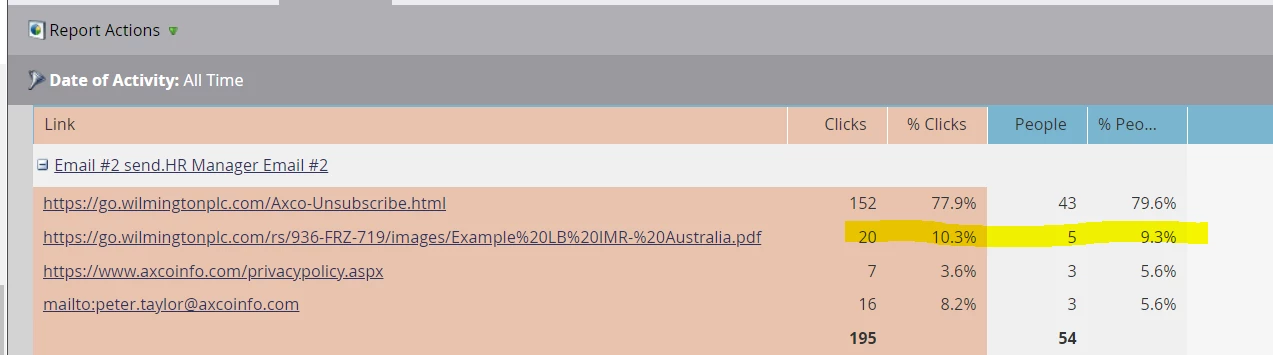
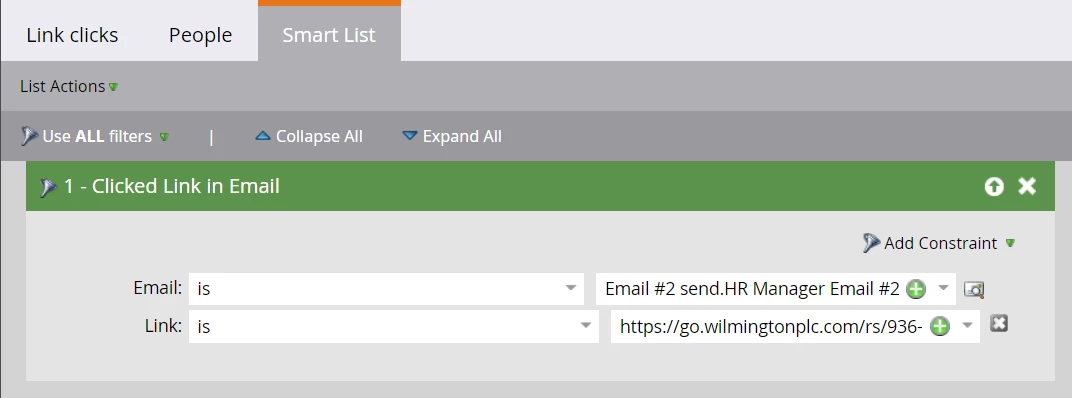
Hi, we're running a smart campaign and from the email link performance we can see that 5 people have clicked on a link to download an asset (image 1), however,  when I run a smart list to see who has downloaded the asset it doesn't return any results (image 2). There was also a separate smart campaign flow that was supposed to push any clicks in to a Salesforce campaign but no one has been pushed through that either, which was what made us question this. Can anyone explain why those 5 people that clicked aren't showing up anywhere?


This post is no longer active and is closed to new replies. Need help? Start a new post to ask your question.
Best answer by Darshil_Shah1

Ideally, if the people who clicked the link are not deleted, and assuming the link and the email name values in the smart list filter constraint are accurate, you should see the people in the SL.


Can you try using a broader operator in the link constraint instead of the exact match, e.g., contains, and see if you're able to see people in the SL?


2 replies

Balkar_Singh
Community Manager
October 26, 2022

Can you see if those leads actually exist within DB? One reason this happens is because the leads have been deleted.

Email Link Performance Report is just maintaining the Performance data of Email Link (i.e. how many people clicked the link) - this will stay 5 even if the leads are deleted, and when you apply the rule in smart list and try to find people who have clicked - they won't show up if they have been deleted

trevlarrrAuthor
New Participant
October 27, 2022

Hi Balkar, the list was only added last week when the email went out, nothing has been deleted from it so it shouldn't be that

Darshil_Shah1
Community Manager
October 26, 2022

Are you able to see people in the SL if you change to link to other than what you're using in the filter right now? e.g., the Unsubscribe link, privacy policy, or just any link. This will help verify whether you're also seeing similar behavior for other links in the email as well or not. Also, how old are these activities?


trevlarrrAuthor
New Participant
October 27, 2022

Hi Darshil, yes, if I change the SL to any other link then it shows the people but for some reason nothing shows for that link. The activity is all from the last week since the email went out

Darshil_Shah1
Darshil_Shah1Accepted solution
Community Manager
October 27, 2022

Ideally, if the people who clicked the link are not deleted, and assuming the link and the email name values in the smart list filter constraint are accurate, you should see the people in the SL.


Can you try using a broader operator in the link constraint instead of the exact match, e.g., contains, and see if you're able to see people in the SL?