Email performance report not pulling correct result | Community
Skip to main content
New Participant
April 12, 2024
Question

Email performance report not pulling correct result

  • April 12, 2024
  • 3 replies
  • 4094 views

Hello All,


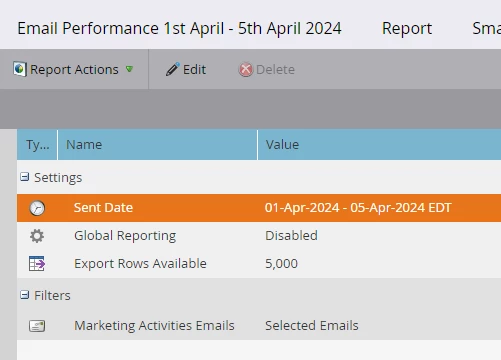
I am not sure if its me or anybody else is seeing the same issue. I am trying to pull email performance report using date filter which logically should give me all the email sent during this period but I could see no results are coming. Although there are emails which were sent out during this period.( *I know I can setup email manually but I don't want to use that approach as I am intending to pull report for entire year alter on). Any leads is appreciated


This post is no longer active and is closed to new replies. Need help? Start a new post to ask your question.

3 replies

adiller
New Participant
April 24, 2024

I'm experiencing the same issue, with no smart list filters on and my Email Link Performance report is pulling in nothing, on an email that had clicks.

Katja_Keesom
Community Manager
April 15, 2024

From the screenshot there is one additional thing I would want to check. I see global reporting being disabled, which makes me think you may have different workspaces active. Any chance the emails you are expecting to see were built in a different workspace and you need to enable global reporting?

And finally, as the UI may have had something to do with it, have you tried to set it to all emails, so removing the filter for selected emails in the setup entirely?

bhupenderAuthor
New Participant
May 8, 2024

@katja_keesom  I am pulling report for same workspace even post you sighted I have changed setting to global still don't see outcome.


#2 tried setting up all email but not working. Only way it works is if you are manually selecting each emails. It will work for few email but If I need last three months email then its not possible.


Hoping to get solution.

Katja_Keesom
Community Manager
May 14, 2024

I would actually suggest to start from a fresh email performance report, so create a whole new copy and only update the send date range in your report settings. There can be all sorts of things wrong with the existing report, but short of having an actual look at it I think it will be difficult for us to help you fix that one.

Darshil_Shah1
Community Manager
April 12, 2024

You can check the following things to debug this:

  • Ensure correct emails are selected in the Marketing Activities filter in the report's Setup tab.
  • Ensure that filter(s) in the report's smart list are filtering out the activities you anticipate to see in the report. Try removing the filter from the report's smart list tab and see if you see any data in the report.
  • Check whether you have email send activities in that period range (you mentioned in your question you have, but no problem in double checking via a smart list; you can use Was Sent Email, select the emails that you have selected in the report's Setup tab (under the Marketing Activities Emails filter), and use the same date range in the Date of Activity constraint in the filter).

I hope this is helpful. Please let us know if you have questions. 🙂

Community Manager
April 12, 2024

Echoing everything @darshil_shah1 is saying, but want to add one additional point to his item #1.


In the new UI for the setup filter "Filter by Email" window, it's very easy to add additional date ranges thinking that it's the same as the date range that's in the setup tab. Make sure there isn't anything in the Created Date Range/Modified Date Range selectors in the Filter by Email window that will filter out activity. 

bhupenderAuthor
New Participant
April 14, 2024

Thanks @christianero1 


Agree that the new UI for the setup filter "Filter by Email" window, is easy to add additional date ranges but it also has the issue. Once you have select the date in setup it won't consider the dates in Filter by Email date range. It will show you that dates are selected but actual result will be based on setup field dates. Basically it won't refresh the result. e.g. in my snapshot its showing it has 1003 emails which is incorrect.