Email Script Editor not showing Standard Object tree | Community
Skip to main content
New Participant
June 28, 2018
Solved

Email Script Editor not showing Standard Object tree

  • June 28, 2018
  • 2 replies
  • 5223 views

As title says.

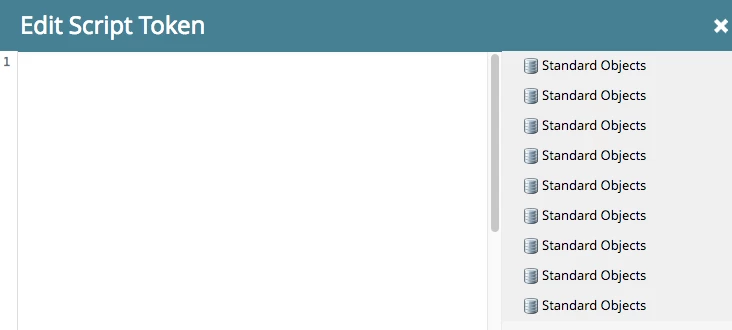
When I try to add an email script token the script editor the tree on the right just contains a list of items labeled "Standard Objects" that keeps growing as I try to (unsuccessfully) add script tokens.

Here's what my editor looks like. Note the growing list of "Standard Objects" on the right, none of which are trees that allow me to drag tokens into the script editor window:
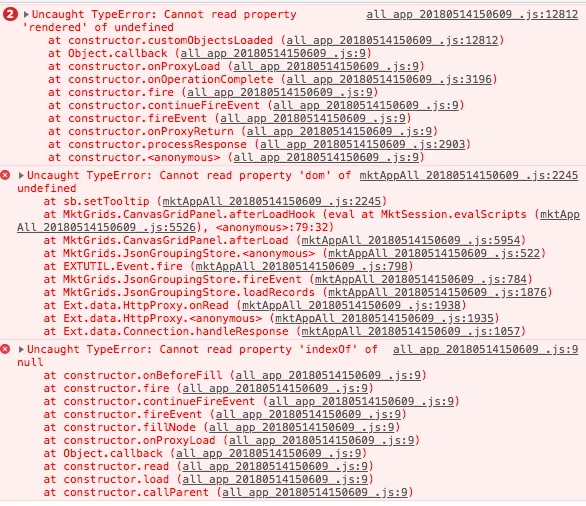
If I look in the Console (Chrome 67, latest) I see the following errors when I drag an email script token to the page:
I have no ad blockers installed in this profile.

Anyone else seen this or know what's causing it?

This post is no longer active and is closed to new replies. Need help? Start a new post to ask your question.
Best answer by Mark_Price

This has been happening to me periodically as well!    I just log out / log back in or retry in a few minutes and it seems to fix itself more or less (but is rather annoying and slows down workflow)

FWIW:  It seems like a new 'Standard Objects' entry populates the sidebar each time the window is opened when this bug occurs

2 replies

New Participant
September 15, 2020

I'm seeing a similar issue: no objects visible when I first open the editor. But if I close and re-open the editor, I see a Standard Objects icon without any tree. Closing and re-opening again causes another Standar Objects icon to appear. Logging out/in has not solved the issue.


Could it be a configuration issue in the database? Our account has been established for years, but has never used scripts. I don't see any obvious issues and have searched the forums in vain. 

SanfordWhiteman
New Participant
September 16, 2020

It's unlikely to be a problem with your db. My clients' Instances have this exact trouble from time to time. I recommend checking in another browser to see if there's any difference right now (although broadly the feature works in both Webkit & Firefox).

Mark_PriceAccepted solution
New Participant
June 28, 2018

This has been happening to me periodically as well!    I just log out / log back in or retry in a few minutes and it seems to fix itself more or less (but is rather annoying and slows down workflow)

FWIW:  It seems like a new 'Standard Objects' entry populates the sidebar each time the window is opened when this bug occurs

New Participant
June 28, 2018

Good thanks, will retry. Same thing here for the appearance of the "Standard Objects" nodes. Every time I open a window I get another one. Frustrating.