Question
Email spacing disappears on Mac
Hi,
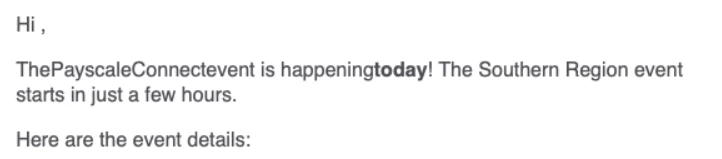
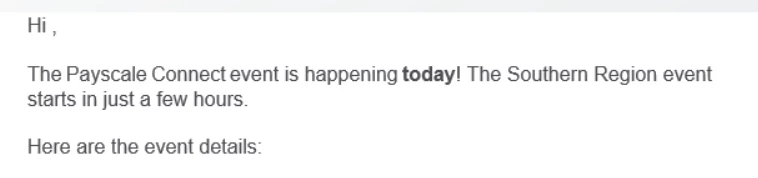
We started having an issue where spacing randomly disappears in emails sent to Mac devices. Do you know what could cause this?
<table id="free-text" style="-webkit-text-size-adjust: 100%; -ms-text-size-adjust: 100%; mso-table-lspace: 0pt; mso-table-rspace: 0pt; border-spacing: 0; border-collapse: collapse;" align="center" border="0" cellpadding="0" cellspacing="0" width="100%" class="mktoModule m_free-text" mktoname="Free-text">
<tbody>
<tr>
<td style="-webkit-text-size-adjust: 100%;-ms-text-size-adjust: 100%;mso-table-lspace: 0pt;mso-table-rspace: 0pt;word-break: break-word;-webkit-hyphens: none;-moz-hyphens: none;hyphens: none;border-collapse: collapse;background-color:${freeTextBackgroundColor};" bgcolor="${freeTextBackgroundColor}" valign="top">
<center>
<table class="table600" style="-webkit-text-size-adjust: 100%; -ms-text-size-adjust: 100%; mso-table-lspace: 0pt; mso-table-rspace: 0pt; border-spacing: 0; border-collapse: collapse; margin-top: 0; margin-right: auto; margin-bottom: 0; margin-left: auto;" align="center" border="0" cellpadding="0" cellspacing="0" width="560">
<tbody>
<tr>
<td class="primary-font text" style="hyphens: none;-webkit-text-size-adjust: 100%;mso-table-lspace: 0pt;mso-table-rspace: 0pt;word-break: break-word;-webkit-hyphens: none;-moz-hyphens: none;-ms-text-size-adjust: 100%;font-family: 'Inter', sans-serif;color: #4c4d52;font-size: 16px;line-height: 20px;text-align: left;border-collapse: collapse;">
<div class="mktoText" mktoname="Text" id="text">
<p>Hi {{lead.First Name:default=edit me}},</p>
<p>The Payscale Connect event is happening <strong>today</strong>! The Southern Region event starts in just a few hours.</p>
<p>Here are the event details:</p>
<ul>
<li><strong>Date:</strong> Thursday, September 23rd</li>
<li><strong>When:</strong> 2PM Central, 3PM Eastern</li>
<li><strong>Where:</strong> Zoom Link: <span style="color: #0388ee;"><a href="https://payscale.zoom.us/j/92435345340?pwd=NUFhNUViaHJ3ZDJ0dGZ0dDllaE8xUT09" target="_blank" id="" style="color: #0388ee;">https://payscale.zoom.us/j/92435345340</a></span></li>
<li><strong>Duration:</strong> 1 hour</li>
</ul>
<p>We look forward to connecting Comp and HR professionals in the Southern Region and giving you the opportunity to strategize and discuss the hottest compensation topics!</p>
<p>See you soon,</p>
<p>The Payscale Team</p>
</div></td>
</tr>
<tr>
<td style="-webkit-text-size-adjust: 100%;-ms-text-size-adjust: 100%;mso-table-lspace: 0pt;mso-table-rspace: 0pt;word-break: break-word;-webkit-hyphens: none;-moz-hyphens: none;hyphens: none;border-collapse: collapse;line-height:${freeTextSpacer};font-size:${freeTextSpacer};" height="${freeTextSpacer}"> </td>
</tr>
</tbody>
</table>