Hey Christina-
Thanks for pointing out an issue here that I'm sure lots of folks have run into with some of the free email templates in Marketo. I checked out this template a bit and it looks like it could use a "Button Text Color" variable in that module, which is a pretty quick thing to setup from a development perspective (but maybe a little technical). There is some pretty good documentation on variables you could check out here: Email Template Syntax - Marketo Docs - Product Documentation You'd probably want to add a color variable to the template and swap out the purplish colors for the text with the variable.
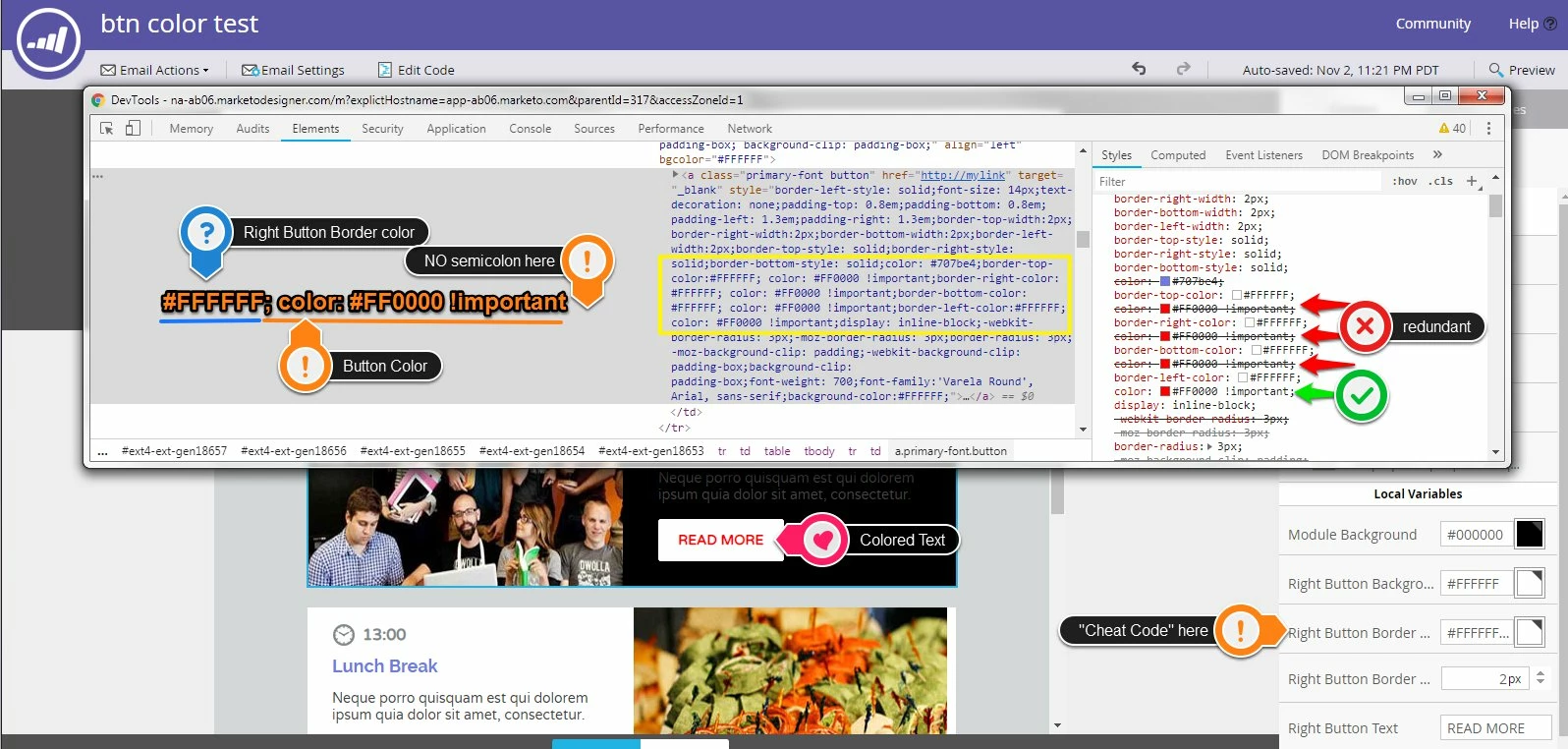
All that said, without making any modifications to the template, there might be another way to change that button color. All you'll need is..... a cheat code  I had a look at the way the HTML is written here and how the different color and string variables in this module write out to the code. The Right Button Border Color variable is writing the color of the border four times (one for each side) into the style attribute on the link (your button). Albeit redundant, we can "tag-along" a little bit of code with the color value (#FFFFFF) that's initially in the Border Color variable. Said another way, we'll just add another rule to the CSS after each of the border-color styles.
Your mission: Install this cheat code into the Right Button Border Color variable
#ffffff; color:#FF0000 !important (updated answer: do not include !important)
That's a mash-up of the border color (first) followed by the text color. It's important to NOT INCLUDE a semicolon at the end of the last style (there is already one waiting there on the template).
I've included a screenshot of the inspector below to point out what this is doing in the code. You'll notice in the top right (red arrows) that the first three color rules are crossed out and the last (4th, green arrow) is the one that gets read. It's really all the same in terms of performance, just a bit of extra bloat in the code.
I sent myself a copy of the modified email below and it looked good in gMail and Apple Mail, but it'd be a good idea to test something like this out yourself before sending it.
Let me know if that worked out for you or if you've got any questions about what's going on here?
High Five!
-Dave