Error when approving: Illegal characters in options string | Community
Skip to main content
July 1, 2016
Solved

Error when approving: Illegal characters in options string

  • July 1, 2016
  • 3 replies
  • 3228 views

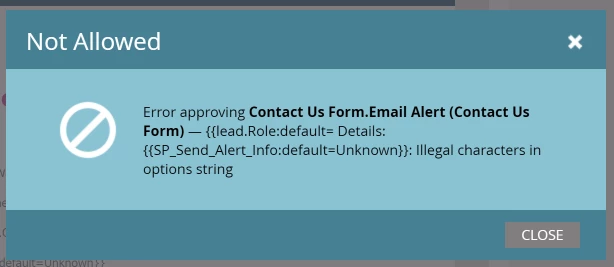
Anyone know what this error means? Trying to approve an alert email and it's giving me this message:
This post is no longer active and is closed to new replies. Need help? Start a new post to ask your question.
Best answer by Jim_Thao7

That is indeed weird.  Anything funky in the plain-text version of the email?

3 replies

July 1, 2016

Thanks @Jim Thao​ and @Iryna Zhuravel​.

I think the error message is just condensing the actual copy...my actual email looks like this:

Jim_Thao7
Jim_Thao7Accepted solution
New Participant
July 1, 2016

That is indeed weird.  Anything funky in the plain-text version of the email?

July 1, 2016

Aha! You are correct. The text version was parsed. Take the rest of the day off (boss permitting)!

Iryna_Zhuravel4
New Participant
July 1, 2016

Seems like you are missing closing brackets in the "Role" token, Marketo does not recognize it, hence the error

Jim_Thao7
New Participant
July 1, 2016

This doesn't look like a legitimate token, you have a token w/in a token here it looks like.  The {{lead.Role}} token was not properly closed from what I can see in the screenshot.