
Event not appearing in app | Community
Skip to main content
Jessie_Coluccio
New Participant
February 4, 2019
Solved

Event not appearing in app

  • February 4, 2019
  • 1 reply
  • 1982 views

Morning Team,

This one is driving me a little nuts this morning- I have been researching and modifying all morning and I am stuck!

I've created an event scheduled for today- confirmed it.

Created and added new role- for access mobile application - edited current users (except admin)

Added members

Downloaded the app and logged in- no events?

Also is it possible to go to an event with no one on the list purely to add leads?

Thanks so much for your help
This post is no longer active and is closed to new replies. Need help? Start a new post to ask your question.
Best answer by Jessie_Coluccio

Found the answer!

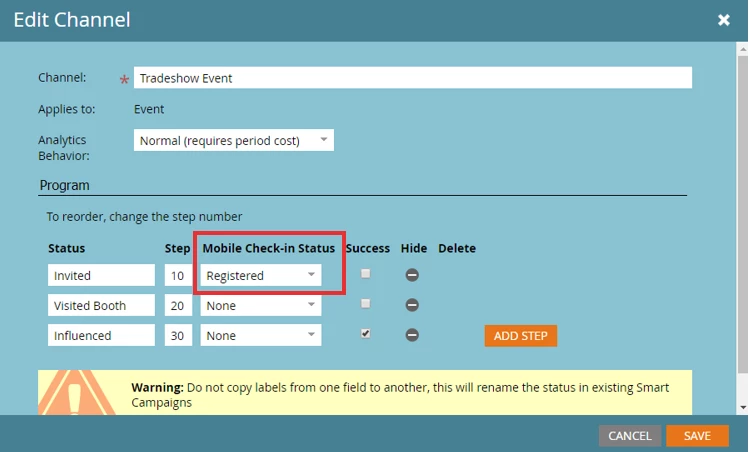
To configure this, go into Admin > Tags, and edit the Event channel. Change the 'Mobile Check-in Status' field next to your default status (mine is "Invited"), and save. Once done, your events should immediately begin appearing within the app.

Big thanks too @Matthew Barnett​ for his response on this thread https://nation.marketo.com/message/104397#comment-104397

1 reply

Jessie_Coluccio
Jessie_ColuccioAuthorAccepted solution
New Participant
February 4, 2019

Found the answer!

To configure this, go into Admin > Tags, and edit the Event channel. Change the 'Mobile Check-in Status' field next to your default status (mine is "Invited"), and save. Once done, your events should immediately begin appearing within the app.

Big thanks too @Matthew Barnett​ for his response on this thread https://nation.marketo.com/message/104397#comment-104397