
Explain advanced filters for smart lists like I am 5 years old | Community
Skip to main content
kylecelinski
New Participant
February 11, 2022
Solved

Explain advanced filters for smart lists like I am 5 years old

  • February 11, 2022
  • 1 reply
  • 4658 views

I have been using Marketo for over a year now and just when I think I have advanced filters figured out, I am left scratching my head wondering why I am not getting the audience number I am expecting. 


The below smart list screenshot has 30,159 members currently but there is a suppression list of around 2,600 people some of which still seem to be lingering on the audience.  Can someone weigh in on the set up and what I am doing wrong?
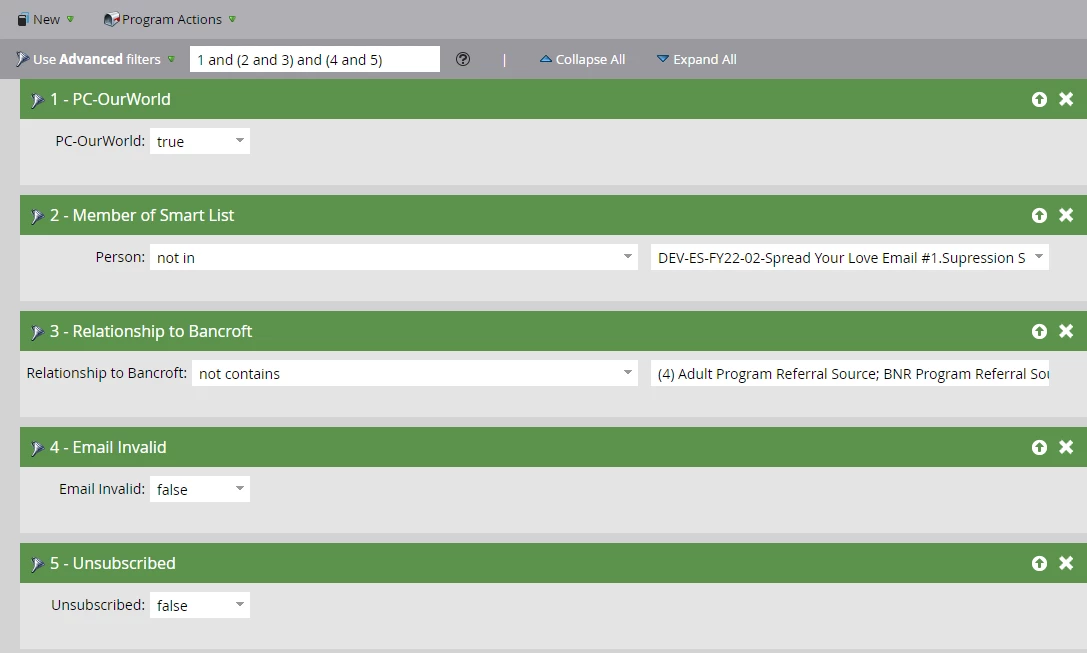


I want the OurWorld preference center in step 1 to be captured MINUS steps 2-5...it seems so easy to type and yet like I am in a high school match class I loathe in my attempts. Appreciate any and all help!


This post is no longer active and is closed to new replies. Need help? Start a new post to ask your question.
Best answer by Kaitlyn_Simko

Hi Kyle,


I guess my question here is why do you want to use advanced filters?  If you want "step 1 to be captured MINUS steps 2-5," the ALL filter would work because you are saying you want all filters to apply.


Advanced filters are best when you have different conditions for different types of people.  One example of this would be you want to send an email to an audience of US, UK and DE leads.  Per GDPR rules, this campaign will require 3 different types of opt in's (US, no opt in; UK, single opt in; DE, double opt in).  You do not want double opt in applying to US or UK, because that will limit your audience, just like you do not want single opt in applying to DE folks (that's illegal!).


You would then set up the smart list like this:


1. Country = US

OR

(2. Country = UK AND 3. OK to Email = Yes)

OR

(4. Country = Germany AND 5. OK to Email = Yes, Double)


Here are the advanced filters


1 or (2 and 3) or (4 and 5)

1 reply

Kaitlyn_Simko
Kaitlyn_SimkoAccepted solution
New Participant
February 11, 2022

Hi Kyle,


I guess my question here is why do you want to use advanced filters?  If you want "step 1 to be captured MINUS steps 2-5," the ALL filter would work because you are saying you want all filters to apply.


Advanced filters are best when you have different conditions for different types of people.  One example of this would be you want to send an email to an audience of US, UK and DE leads.  Per GDPR rules, this campaign will require 3 different types of opt in's (US, no opt in; UK, single opt in; DE, double opt in).  You do not want double opt in applying to US or UK, because that will limit your audience, just like you do not want single opt in applying to DE folks (that's illegal!).


You would then set up the smart list like this:


1. Country = US

OR

(2. Country = UK AND 3. OK to Email = Yes)

OR

(4. Country = Germany AND 5. OK to Email = Yes, Double)


Here are the advanced filters


1 or (2 and 3) or (4 and 5)

kylecelinski
New Participant
February 11, 2022

Thank you for the detailed explanation Kaitlyn.  I am still left with at least 268 internal associates that are part of filter 2 included in the overall audience. These individuals are marked as true for filter 1, but my intention is to remove them by way of filter 2. 

Kaitlyn_Simko
New Participant
February 11, 2022

Are you sure the logic in the nested smart list is correct?