
Feedback wanted: Using tokens inside Triggers in Smart Campaigns | Community
Skip to main content
Chris_Willis1
New Participant
February 4, 2016
Solved

Feedback wanted: Using tokens inside Triggers in Smart Campaigns

  • February 4, 2016
  • 6 replies
  • 4244 views

I would like to, as part of my campaign framework, to use the My Tokens in my template programs as much as possible.  In some cases (such as video views, etc.) I would like to use a token to supplant the video name and the video ID code that I receive from Vidyard (our video marketing tool). 

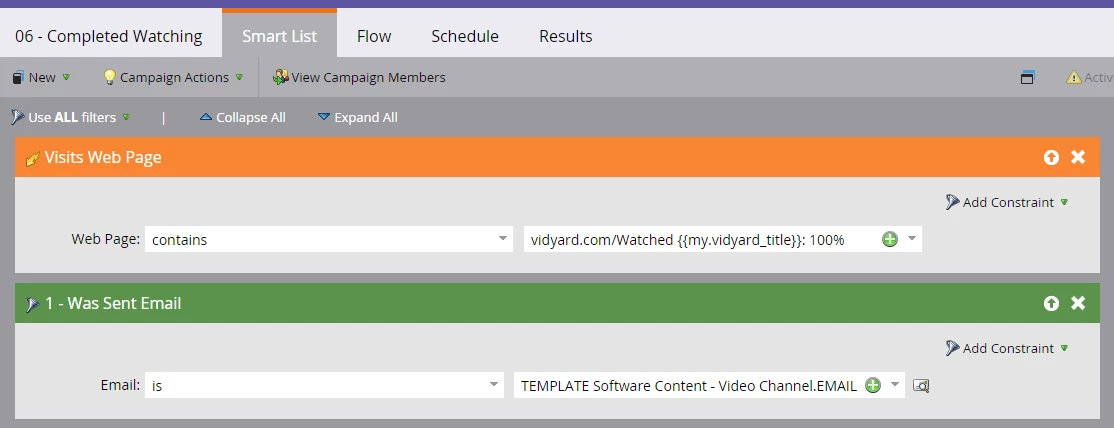
I am able to get the page and the video to render/play, but in the cases where I've inserted the token for the video URL into the Smart Campaign trigger (screenshot below) the trigger is not firing even though the URL from Vidyard matches the title I provided in the {{my.vidyard_title}} token in my program.

Are there ways to work around this issue, or is it not currently possible to trigger off My Tokens? 
This post is no longer active and is closed to new replies. Need help? Start a new post to ask your question.
Best answer by Grégoire_Miche2

Hi again Chris,

You will find a workaround here:

(and also the opportunity to vote)

-Greg

6 replies

Grégoire_Miche2
New Participant
February 5, 2016

Hi Chris,

You may also want to vote here:

-Greg

SanfordWhiteman
New Participant
February 5, 2016

Chris, you might like my method here: https://nation.marketo.com/ideas/7093#comment-21200

Grégoire_Miche2
New Participant
February 5, 2016

Hi Sanford,

I had already pointed to your workaround in my first answer, in fact

-Greg

SanfordWhiteman
New Participant
February 5, 2016

Oh, nice!

Dan_Stevens_
New Participant
February 5, 2016

Tokens aren't supported in Smart Lists of Smart Campaigns. Meaning you cannot use them at all in triggers or filters.

February 5, 2016

Hi Chris,

Have you tested different variations token/url combination? For example, I would suggest trying one or both of the following variations:

  • Visits web page contains vidyard.com/Watched{{my.vidyard_title}}:100 where your token value is [title] but you exclude the % symbol at the end to avoid potential url encode issues (I would consider this the most likely source of trouble, given the example you posted)
  • Visits web page contains vidyard.com/Watched{{my.vidyard_title}} where your token value is [title]:100 just in case the issue is caused by trying to concatenate [string] {{my.token}} [string] instead.

It might also be worth including the http or https (whichever of those is appropriate) in your URL field.

Chris_Willis1
New Participant
February 5, 2016

Thanks Amelia!  I believe Vidyard adds that space after "Watched" and the player title, but these are great ideas. 

Grégoire_Miche2
Grégoire_Miche2Accepted solution
New Participant
February 4, 2016

Hi again Chris,

You will find a workaround here:

(and also the opportunity to vote)

-Greg

Chris_Willis1
New Participant
February 5, 2016

Thanks for the link to the Idea... Do you have any feedback from the Product team regarding adding this feature? 

Grégoire_Miche2
New Participant
February 5, 2016

Hi Chris,

No I have not, unfortunately

-Greg

Grégoire_Miche2
New Participant
February 4, 2016

Hi Chris,

Why are there some spaces in the URL?

Greg

Chris_Willis1
New Participant
February 5, 2016

The spaces in the URL are generally how Vidyard pushes the "Views Web Page" actions through the API.
