Filled out form - landing page segmentation | Community
Skip to main content
Jennifer_Bisho1
New Participant
September 21, 2017
Solved

Filled out form - landing page segmentation

  • September 21, 2017
  • 2 replies
  • 5583 views

I was wondering if there is some way I can make the following happen:  after a person unsubscribes, we want them to land on an unsubscribe exit survey (landing page with a form).  If they fill out the form, we want them to then land on a page that has links to our website/social media, in hopes they may want to engage with us in other ways aside from email. The problem is that we have multiple geographies/workspaces, so depending on what workspace the person is in, we want them to land on either a page that contains North America links, or a page for Europe.  I thought I could setup some kind of triggered campaign to make this happen, but I keep hitting a roadblock. 
This post is no longer active and is closed to new replies. Need help? Start a new post to ask your question.
Best answer by Trevor_Parsell

Hey Jennifer,

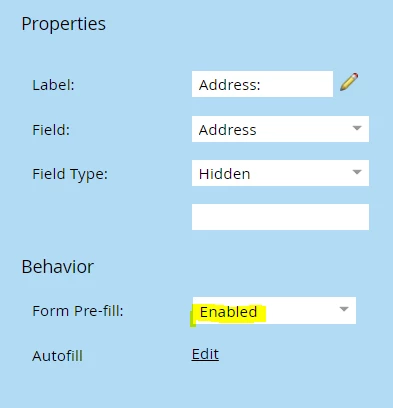
If you have a field that stores the "NA-CAT" region information for each lead, you can add that field as a hidden field and enable the pre-fill functionality. The Country/Region info should then populate in the hidden field for that person when they arrive at the form.

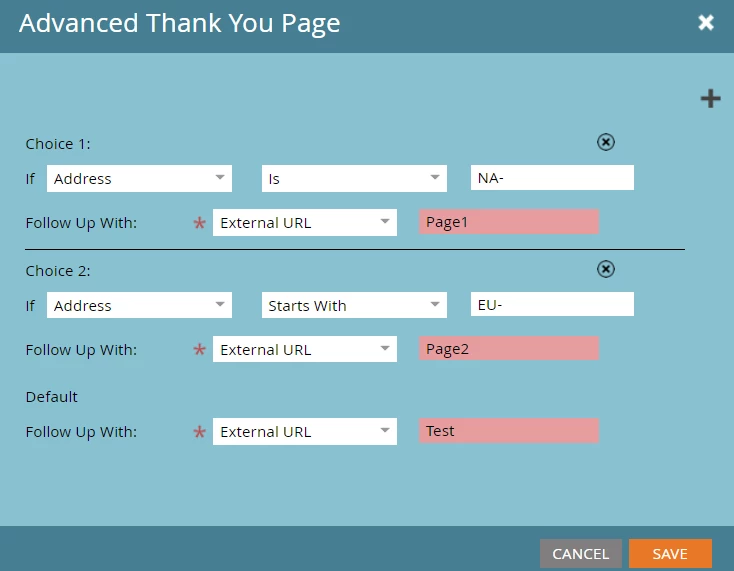
You would then create the rule that sends the person to a different page based on the information in that field. "Address" would represent the Country/Region field in the example below. You should be able to test this to confirm it works as expected.

Thanks!

2 replies

Jennifer_Bisho1
New Participant
October 23, 2017

Hey Trevor!

Finally getting a chance to work on this issue again.  How exactly would I add this as a hidden field in the form and have it pre-filled?  We have 6 options for North America that the person could have as an attribute in their profile (NA-CAT, NA-COMM, etc.), and 2 for Europe.  Or is there some way I can setup an option/campaign that says "If the person's partition is North America and they fill out the form, show them this page" and "If they person's partition is Europe and they fill out the form, show them a different page"?

Trevor_Parsell
Trevor_ParsellAccepted solution
New Participant
October 23, 2017

Hey Jennifer,

If you have a field that stores the "NA-CAT" region information for each lead, you can add that field as a hidden field and enable the pre-fill functionality. The Country/Region info should then populate in the hidden field for that person when they arrive at the form.

You would then create the rule that sends the person to a different page based on the information in that field. "Address" would represent the Country/Region field in the example below. You should be able to test this to confirm it works as expected.

Thanks!

Jennifer_Bisho1
New Participant
October 23, 2017

Hey Trevor -

The "NA-" and "EU-" fields that we have are boolean options (TRUE or FALSE).  I had setup the field properties you have above, and have set the following choices in the form, but it does not work   Am I doing something wrong?

Trevor_Parsell
New Participant
September 21, 2017

Hey Jennifer,

You can go to the form on the unsubscribe follow-up page and then go to Settings>Thank-You page>Add Choice. Once there you can select which page someone will go to depending on a field in Marketo. You would just need a field to determine North America or Europe for the example above. You will also need to add this as a hidden field on your form.

Another option would be to use dynamic content on the social links page that will change based on someone's location.

Thanks!

Jennifer_Bisho1
New Participant
September 21, 2017

Hey Trevor -

Ahhhh, I was not even aware that you could add choices in form settings.  Great to know.  It looks like I would need to have a field in that form itself to base the choice off of.  Is there some way Marketo can recognize what partition the person is in (either North America or Europe) and based on that have them land on one of the pages?  I'm trying to avoid making them fill out what geography they're in.  I guess my other option could be to have just one landing page with all geography links on it, but I'd prefer not to do that if there is a workaround.

Thank you!

Trevor_Parsell
New Participant
September 21, 2017

Hey Jennifer,

If you have a field that contains the NorthAmerica/Europe info, you can add it as a hidden field in the form and make sure it is pre-filled with the current value for each person.

You could then make your thank-you page rule based on this hidden field and be sure to do a lot of testing to make sure this works for both partitions.