Filling in field hidden by visibility rules on embedded forms | Community
Skip to main content
New Participant
March 1, 2023
Solved

Filling in field hidden by visibility rules on embedded forms

  • March 1, 2023
  • 1 reply
  • 2850 views

Hi everyone,

Hoping there is an easy solution to this. I'm using a global form embedded in several places on our website - I would like to be able to hide one of the fields on some of these pages and have it autofill to a certain value. I have tried hiding the field via visibility rules and then adding a hidden field in the embed code, but Marketo seems to ignore this (I presume because the field is actually there, just not shown).


I know I can just add the value after the form is filled in via a trigger in Marketo based on referrer, but would rather add it at form fill if possible.

Thanks!
Will

This post is no longer active and is closed to new replies. Need help? Start a new post to ask your question.
Best answer by Dave_Roberts


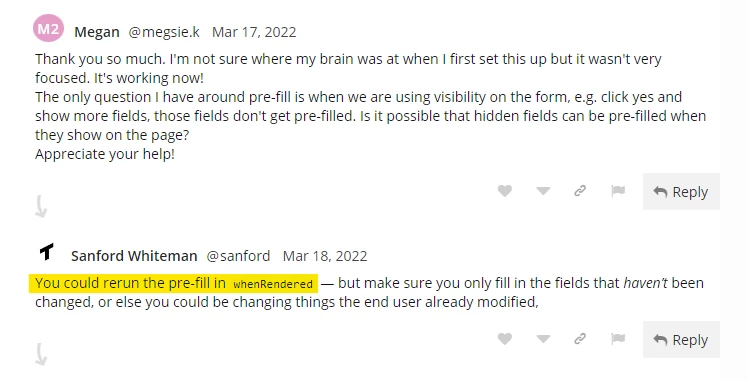
@sanfordwhiteman describes a prefill solution on his blog here: https://blog.teknkl.com/pre-fill-any-site-any-form/ that should work to help you prefill fields on an embedded form which use visibility rules. It looks like there's some feedback in the comments at the bottom (attached below) that describe how this works with the visibility rules:


You could rerun the pre-fill in whenRendered — but make sure you only fill in the fields that haven’t been changed, or else you could be changing things the end user already modified.


1 reply

Dave_Roberts
Dave_RobertsAccepted solution
New Participant
March 1, 2023


@sanfordwhiteman describes a prefill solution on his blog here: https://blog.teknkl.com/pre-fill-any-site-any-form/ that should work to help you prefill fields on an embedded form which use visibility rules. It looks like there's some feedback in the comments at the bottom (attached below) that describe how this works with the visibility rules:


You could rerun the pre-fill in whenRendered — but make sure you only fill in the fields that haven’t been changed, or else you could be changing things the end user already modified.


New Participant
March 1, 2023

Thank you Dave

SanfordWhiteman
New Participant
March 1, 2023

Dave is 100% right for Pre-Fill and the same approach applies to AutoFill, but I suspect you’re talking about the latter.


In Marketo-speak:

  • AutoFill = fill values from browser context including URL and cookies
  • Pre-Fill = fill existing values from lead record in Marketo