Find form CSS code to update | Community
Skip to main content
New Participant
May 26, 2021
Solved

Find form CSS code to update

  • May 26, 2021
  • 1 reply
  • 2016 views

Hi all, 

I am so confused about this. I had a developer customize the buttons and styles on some forms for us, and now I am trying to make updates to those styles but I cannot find where to update. 


It's definitely not on the landing page CSS because the styles are embedded in the form itself. I can see the style in the form preview when it's not embedded in anything. Also, we use WordPress pages, not Marketo. 


Can anyone help me to navigate where the code is to update in Marketo? 


Thanks, 

Felicia
This post is no longer active and is closed to new replies. Need help? Start a new post to ask your question.
Best answer by AWmindtree

Hi @florenzonip 

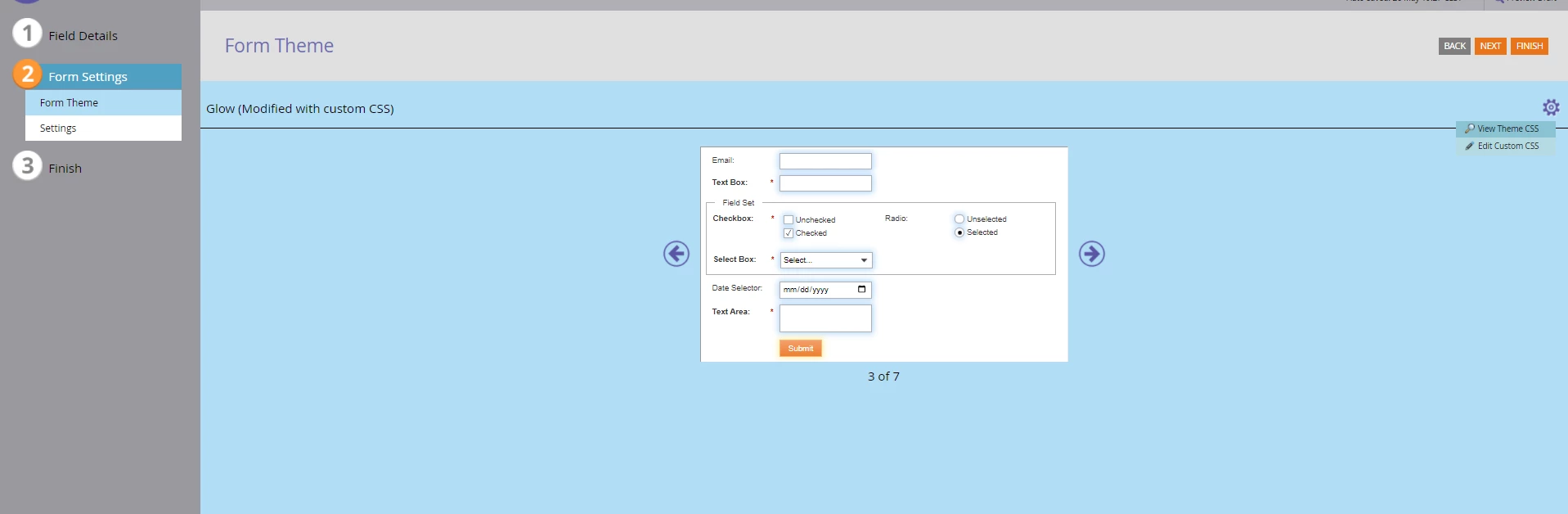
If you are able to see the styled buttons in From Preview, then CSS is in the Form settings. You can navigate there by:
Form-> Form Settings-> Form Theme-> Click on Gear Icon-> Select Edit Custom CSS.


Hope this helps... 🙂 


1 reply

AWmindtree
AWmindtreeAccepted solution
New Participant
May 26, 2021

Hi @florenzonip 

If you are able to see the styled buttons in From Preview, then CSS is in the Form settings. You can navigate there by:
Form-> Form Settings-> Form Theme-> Click on Gear Icon-> Select Edit Custom CSS.


Hope this helps... 🙂 


New Participant
May 26, 2021

Yes! Thank you so much!! I was going crazy looking for that!