Footer disappears on landing page | Community
Skip to main content
June 1, 2017
Solved

Footer disappears on landing page

  • June 1, 2017
  • 1 reply
  • 3147 views

When I approve and close my landing page, the footer completely disappears on the desktop view, but still shows up on the mobile view. I've looked in the HTML and there's no 'disable' language written in, but no matter what I do, the footer won't show up on desktop.

Has anyone else had this problem?
This post is no longer active and is closed to new replies. Need help? Start a new post to ask your question.
Best answer by Frank_Breen2

Thanks, Frank! However, I'm not able to see the code that you're seeing. Below is what I'm able to see in the <head>

<meta class='mktoBoolean' id='showFooter' mktoName='Show Footer?' true_value='block' false_value='none' default='true'>

Do you know what we could do to fix it from here?


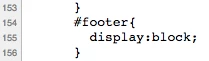
Sorry it's in the CSS, line 154:

1 reply

Frank_Breen2
New Participant
June 1, 2017

Can you share the page url, it sounds like you have the footer set to display:none for desktop, which may be set in a Media Query, but without the code, it's hard to debug.

June 1, 2017

Sure, thanks for taking a look! pages.janusintl.us/nopaint.html 

Frank_Breen2
New Participant
June 1, 2017

In the CSS in the <head> replace:

#footer{ display:block; }

with

#footer{ display:block; clear: both; }

That should at least show the footer on desktop.