Form CSS - In Required Questions Unbolding Answers in Radio, Checkbox Lists | Community
Skip to main content
New Participant
June 5, 2021
Solved

Form CSS - In Required Questions Unbolding Answers in Radio, Checkbox Lists

  • June 5, 2021
  • 1 reply
  • 1979 views

Easy question for all the super smart people out here. Maybe I'm just tired on a Friday and can't find the answer.


I want the options / values in radio button and checkboxes to appear font-weight: normal. I have applied styling in CSS that makes the Labels normal font weight but the choices below stay bold. If anything I want the label to be bold 🙂 but the choices to be normal weight. 
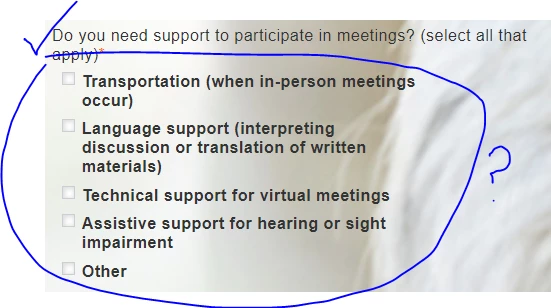
 

This is doing some of the trick for the label:


.mktoForm .mktoRequiredField label.mktoLabel { font-weight:normal !important; }
This post is no longer active and is closed to new replies. Need help? Start a new post to ask your question.
Best answer by SanfordWhiteman

The bold is coming from your separate stylesheet bootstrap.css:

label { display: inline-block; max-width: 100%; margin-bottom: 5px; font-weight: bold; }


You can override this with the more selective:

.mktoForm label { font-weight: normal; }


1 reply

SanfordWhiteman
New Participant
June 5, 2021
Almost surely a non-Marketo style doing this but need a link.
JCKevinAuthor
New Participant
June 7, 2021

It's early days with the landing page and obviously the form's got a variety of problems. But here is the link: 

https://go.premera.com/MAC.html

SanfordWhiteman
SanfordWhitemanAccepted solution
New Participant
June 7, 2021

The bold is coming from your separate stylesheet bootstrap.css:

label { display: inline-block; max-width: 100%; margin-bottom: 5px; font-weight: bold; }


You can override this with the more selective:

.mktoForm label { font-weight: normal; }