Form Field Date: How to Change the Placeholder? | Community
Skip to main content
May 8, 2018
Solved

Form Field Date: How to Change the Placeholder?

  • May 8, 2018
  • 1 reply
  • 44073 views

Hi all,

I'm currently working on a project that includes Field Date on the form.
I'm trying to change the placeholder of the Field Date and I included this code on the CSS.

input[type="date"]:before {

    content: attr(placeholder) !important;

  }

  input[type="date"]:focus:before,

  input[type="date"]:valid:before {

    content: "Date of Birth" !important;

  }

It's working but the mm/dd/yyyy is still on the field and the placeholder is not working in firefox.

Does anyone have a solution for this?

Thank you!
This post is no longer active and is closed to new replies. Need help? Start a new post to ask your question.
Best answer by SanfordWhiteman

Can't do it that way.

True <input type=date> fields (Chrome, Edge, the very latest Firefox) don't have string placeholders, they only show the date, ever.

However, polyfilled date fields (Firefox, Safari, IE) are actually <input type=text> fields with JS/CSS/HTML-powered datepicker widgets.  Those can have placeholders.

Marketo automatically switches between native and polyfilled versions. You need to override that auto-switching so that it uses the polyfill in all browsers:

MktoForms2.Modernizr.inputtypes.date = false;

MktoForms2.$("body").on("mkto_date_polyfilled", function(e) {

   MktoForms2.whenReady(function(form) {

      var formEl = form.getFormElem()[0],

         dateOfBirthEl = formEl.querySelector("#DateofBirth"),

         dateOfBirthPicker = formEl.querySelector("#DateofBirth ~ .mktoDateButton");

      dateOfBirthEl.type = "text";

      dateOfBirthEl.placeholder = "Date of Birth";

      dateOfBirthPicker.style.height = MktoForms2.$(dateOfBirthEl).outerHeight() + "px";

   });

});

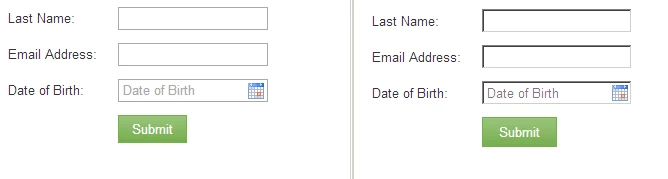
Then you get cross-browser free-text placeholders. Chrome on left, Firefox on right:

1 reply

SanfordWhiteman
SanfordWhitemanAccepted solution
New Participant
May 8, 2018

Can't do it that way.

True <input type=date> fields (Chrome, Edge, the very latest Firefox) don't have string placeholders, they only show the date, ever.

However, polyfilled date fields (Firefox, Safari, IE) are actually <input type=text> fields with JS/CSS/HTML-powered datepicker widgets.  Those can have placeholders.

Marketo automatically switches between native and polyfilled versions. You need to override that auto-switching so that it uses the polyfill in all browsers:

MktoForms2.Modernizr.inputtypes.date = false;

MktoForms2.$("body").on("mkto_date_polyfilled", function(e) {

   MktoForms2.whenReady(function(form) {

      var formEl = form.getFormElem()[0],

         dateOfBirthEl = formEl.querySelector("#DateofBirth"),

         dateOfBirthPicker = formEl.querySelector("#DateofBirth ~ .mktoDateButton");

      dateOfBirthEl.type = "text";

      dateOfBirthEl.placeholder = "Date of Birth";

      dateOfBirthPicker.style.height = MktoForms2.$(dateOfBirthEl).outerHeight() + "px";

   });

});

Then you get cross-browser free-text placeholders. Chrome on left, Firefox on right:

May 8, 2018

Hi Sanford,

Thank you for this!
Again you save the day!

Thank you!