Form Fields as Trigger for Campaign | Community
Skip to main content
January 25, 2018
Solved

Form Fields as Trigger for Campaign

  • January 25, 2018
  • 2 replies
  • 3641 views

Hello All,

Looking to use form field selection as a trigger to add the user to a specific list? Does Marketo have this capability? If so, how would I go about doing this?

Thanks!

This post is no longer active and is closed to new replies. Need help? Start a new post to ask your question.
Best answer by

Hi Amber,

Yes, this is a feature. I can help you walk through this.

Step #1: Build a smart campaign

Step #2: Build your smart List
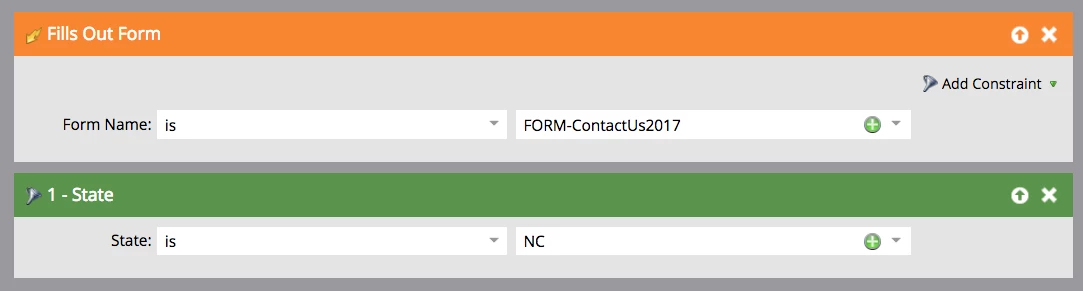
  • Select the Trigger Filter "Fills Out Form." Select the name of the form that you want to use from the drop down.
  • Next, we will add a filter to the smart list. For example, say you only want people who filled out the form with a State field value of NC to be added to the list. You will need to add the state filter field to your smart list and select NC. (See screenshot)

  • Next, you will need to set up your flow step.
    • Under your flow step select the Add to List option and drag it into the workspace. Select the list that you want to add these people to from the drop down.

  • Lastly, under the Schedule tab select the Activate button

Once the smart campaign is activated you should be good to go. Just make sure you test the smart campaign out to ensure it's working correctly.

2 replies

Accepted solution
January 25, 2018

Hi Amber,

Yes, this is a feature. I can help you walk through this.

Step #1: Build a smart campaign

Step #2: Build your smart List
  • Select the Trigger Filter "Fills Out Form." Select the name of the form that you want to use from the drop down.
  • Next, we will add a filter to the smart list. For example, say you only want people who filled out the form with a State field value of NC to be added to the list. You will need to add the state filter field to your smart list and select NC. (See screenshot)

  • Next, you will need to set up your flow step.
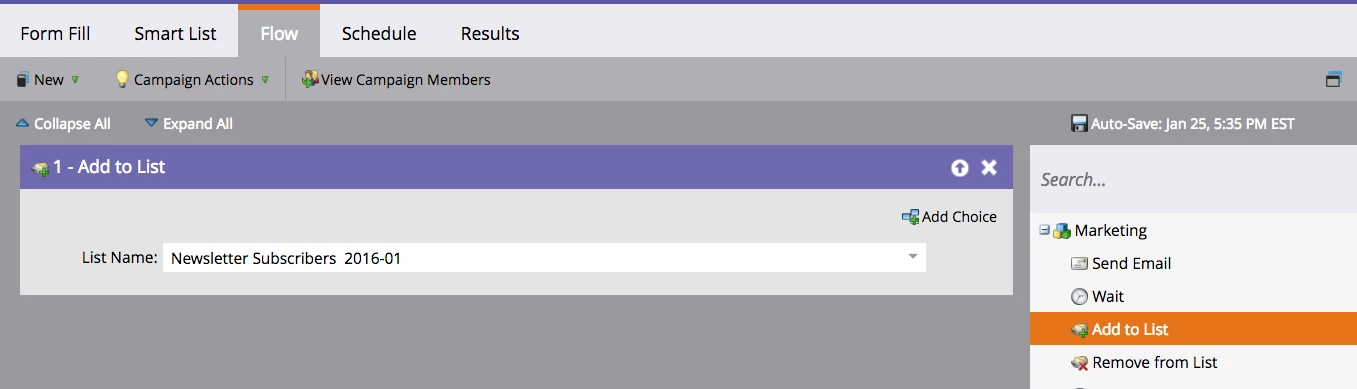
    • Under your flow step select the Add to List option and drag it into the workspace. Select the list that you want to add these people to from the drop down.

  • Lastly, under the Schedule tab select the Activate button

Once the smart campaign is activated you should be good to go. Just make sure you test the smart campaign out to ensure it's working correctly.

SanfordWhiteman
New Participant
January 25, 2018

Yes, this is basic Marketo functionality...trigger (a Smart Campaign) on Fills Out Form, filter on the field value, Add to List in the flow.

Have you taken the Marketo Univiersity, et al. training? Read the docs?

January 25, 2018

I had the other portion set up - how exactly do you filter on the field value?

And yes - I've read the documents and taken the training.