Form Fills Chart Over time In Domo | Community
Skip to main content
New Participant
February 27, 2024
Solved

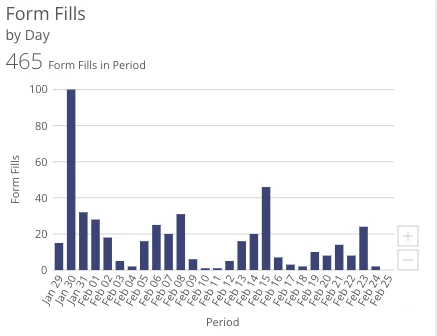
Form Fills Chart Over time In Domo

  • February 27, 2024
  • 1 reply
  • 1731 views

Hey! 

Has anyone had success showing form fills for specific forms over time in domo? I can get it over time, but with the listed data points:
- activity date
- activity name
- campaign
- details
- form fields
- referrer URL 
I'm not sure its possible to create a segment for specific forms only? Also please note that a lot of forms do not have fields specific to just that form. Has anyone been able to pull form ID attached to activity in domo? 
This post is no longer active and is closed to new replies. Need help? Start a new post to ask your question.
Best answer by Darshil_Shah1

@user81844, the form fill-out activity includes the Webform ID in the response it returns. You'd probably be using this (or, more likely, the bulk activity extract API to get data in the Domo).

{ "id": 2, "name": "Fill Out Form", "description": "User fills out and submits a form on web page", "primaryAttribute": { "name": "Webform ID", "dataType": "integer" }, "attributes": [ { "name": "Form Fields", "dataType": "text" }, { "name": "Webpage ID", "dataType": "integer" }, { "name": "Query Parameters", "dataType": "string" }, { "name": "Client IP Address", "dataType": "string" }, { "name": "Referrer URL", "dataType": "string" }, { "name": "User Agent", "dataType": "string" }, { "name": "Program Name", "dataType": "string" }, { "name": "Program Type", "dataType": "string" }, { "name": "CAPTCHA Provider", "dataType": "string" }, { "name": "CAPTCHA Raw Score", "dataType": "float" }, { "name": "CAPTCHA Normalized Score", "dataType": "string" } ] }

1 reply

Darshil_Shah1
Darshil_Shah1Accepted solution
Community Manager
February 28, 2024

@user81844, the form fill-out activity includes the Webform ID in the response it returns. You'd probably be using this (or, more likely, the bulk activity extract API to get data in the Domo).

{ "id": 2, "name": "Fill Out Form", "description": "User fills out and submits a form on web page", "primaryAttribute": { "name": "Webform ID", "dataType": "integer" }, "attributes": [ { "name": "Form Fields", "dataType": "text" }, { "name": "Webpage ID", "dataType": "integer" }, { "name": "Query Parameters", "dataType": "string" }, { "name": "Client IP Address", "dataType": "string" }, { "name": "Referrer URL", "dataType": "string" }, { "name": "User Agent", "dataType": "string" }, { "name": "Program Name", "dataType": "string" }, { "name": "Program Type", "dataType": "string" }, { "name": "CAPTCHA Provider", "dataType": "string" }, { "name": "CAPTCHA Raw Score", "dataType": "float" }, { "name": "CAPTCHA Normalized Score", "dataType": "string" } ] }
user81844Author
New Participant
February 29, 2024

Thanks! It looks like we need to pull in some more fields to segment form fills. Currently, we are not pulling webform ID
