
Form Prefill from tracked email link doesn't work | Community
Skip to main content
Crystal_Pacheco
New Participant
October 22, 2020
Question

Form Prefill from tracked email link doesn't work

  • October 22, 2020
  • 1 reply
  • 4254 views

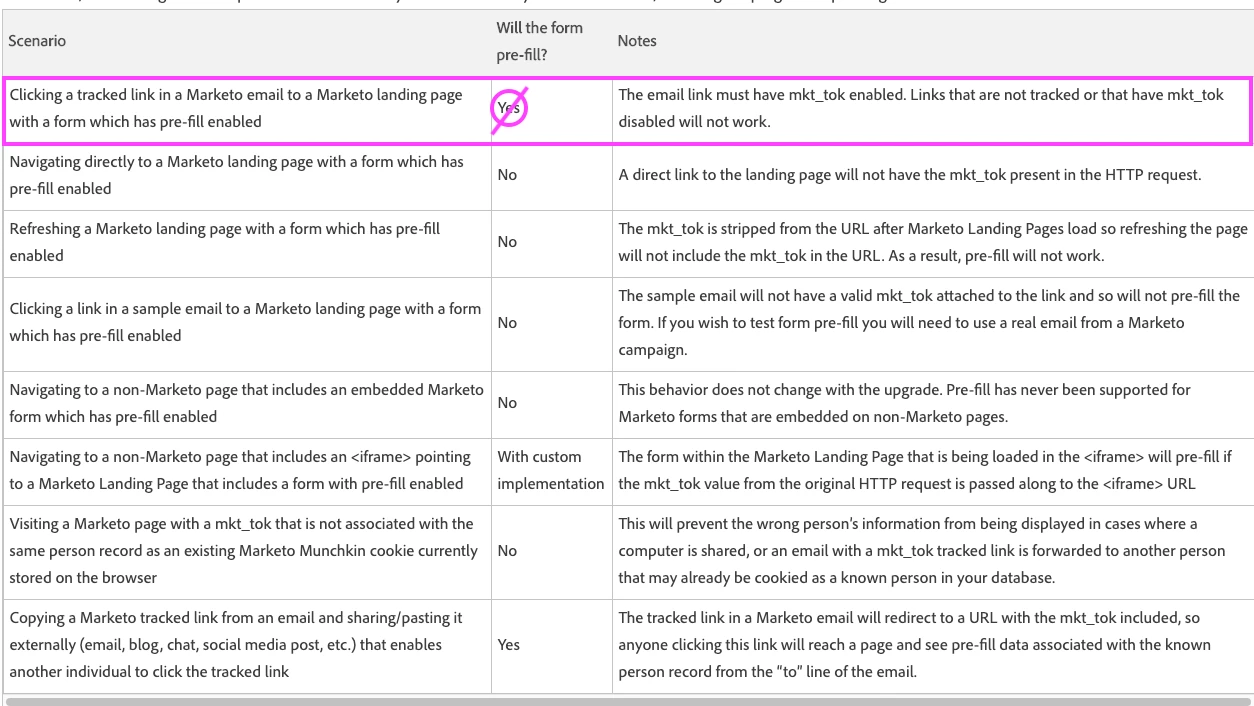
Hi everyone, as you may know, Marketo switched off form prefill in 2019. Marketo says that prefill is still enabled if a lead would receive an email, click the tracked link in the email to arrive at a landing page with a form and then they would have prefill functionality work in a form.

I tried just that, having a lead exist in Marketo, send a real email, click a button to a Marketo landing page and the form doesn’t prefill. The form field is an email field with prefill enabled and not a hidden field.
I tested in two different instances with the same no prefilling results. Either something is missing from my testing scenarios, Marketo is bugging, or the prefill functionality no longer works from Marketo tracked email links.

Is anyone else experiencing this problem?


This post is no longer active and is closed to new replies. Need help? Start a new post to ask your question.

1 reply

SanfordWhiteman
New Participant
October 22, 2020

Works for me as usual.


Does the Landing Page have Pre-Fill enabled (under Landing Page Actions » Form Settings)?

Crystal_Pacheco
New Participant
October 22, 2020

Thanks for your response and I'm glad to hear that it does work. On my end, prefill is enabled in the landing page admin settings, the landing page's form settings and inside the form field in the form editor and it still doesn't prefill. 😕😕

SanfordWhiteman
New Participant
October 22, 2020

We can look at the instance together if you want. Are you sure the mkt_tok is initially in the URL?