
Form's look and feel | Community
Skip to main content
KanakoTone
New Participant
March 13, 2017
Solved

Form's look and feel

  • March 13, 2017
  • 2 replies
  • 3111 views

Hi,

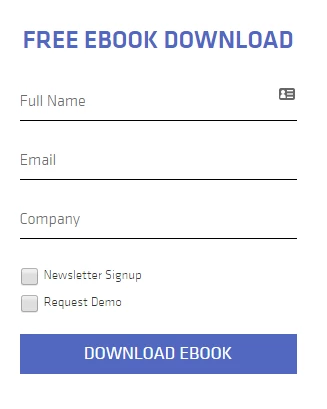
I'd like to set up my Marketo form like this . Especially the part that the Full Name, Email and Company is inside the field... Is it feasible with custom CSS? I don't know CSS very much, so I'm wondering...
This post is no longer active and is closed to new replies. Need help? Start a new post to ask your question.
Best answer by Grégoire_Miche2

Hi Kanako,

You do not need CSS to add Full name, email and company. This is eacily done setting a "Hint text" for the fields and removing the label.

To get checkbox on left and label on the right, use a "Checkboxes" field type, remove the label and add the label as a display value and True as a stored value.

For the rest, this is typically something CSS can do for you

-Greg

2 replies

SanfordWhiteman
New Participant
March 13, 2017

+1 Greg, this is pretty simple CSS enhancement... for a fluent designer. Don't know what that icon of an "index card" is supposed to do, though.

Grégoire_Miche2
Grégoire_Miche2Accepted solution
New Participant
March 13, 2017

Hi Kanako,

You do not need CSS to add Full name, email and company. This is eacily done setting a "Hint text" for the fields and removing the label.

To get checkbox on left and label on the right, use a "Checkboxes" field type, remove the label and add the label as a display value and True as a stored value.

For the rest, this is typically something CSS can do for you

-Greg

Grégoire_Miche2
New Participant
March 13, 2017

And also, remember that there is no full name field in standard in Marketo and that it is not such a good idea not to capture first and last names separately, because it may be difficult to separate them later on (which would be needed for your CRM)

-Greg
