Form - Submit Button Color | Community
Skip to main content
Lisa_Heay2
New Participant
June 29, 2017
Solved

Form - Submit Button Color

  • June 29, 2017
  • 2 replies
  • 3802 views

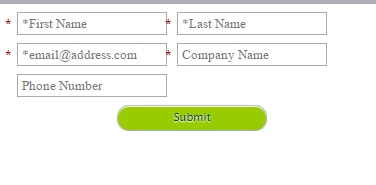
We're working on forms for a new website.  We have a specific lime green color to use for the button which I've selected in the form editor, but when we view the form on our staging site, the button appears as a teal color.  Any ideas on how to solve this?
   

This post is no longer active and is closed to new replies. Need help? Start a new post to ask your question.
Best answer by Grégoire_Miche2

+1 on Gerard,

I prefer to add the CSS directly to the landing page template or the website (for embedded forms) so that I am sure that it will apply consistently to all forms.

-Greg

2 replies

Lisa_Heay2
New Participant
June 29, 2017

Thank you both - we got it working!

Gerard_Donnell4
New Participant
June 29, 2017

Did you add the color through the custom css area on the form editor? Also make sure to make all your styles "!important" so that they don't get overwritten. See example.

Edit the CSS of a Form Theme - Marketo Docs - Product Docs

.mktoButton {
  1.    color: #FFFFFF !important;
  2.    width: 185px !important;
  3.    background: #3899f4 !important;
  4.    -webkit-border-radius: 3px !important;
  5.    -moz-border-radius: 3px !important;
  6.    border-radius: 3px !important;
  7.    font-size: 16px !important;
  8.    font-style: italic !important;
  9.    font-weight: 100 !important;
  10.    -webkit-box-sizing: border-box !important;
  11.    -moz-box-sizing: border-box !important;
  12.    box-sizing: border-box !important;
  13.    border: 0 !important;
  14.    padding: 2px !important;
  15.    text-align: center !important;
Grégoire_Miche2
Grégoire_Miche2Accepted solution
New Participant
June 29, 2017

+1 on Gerard,

I prefer to add the CSS directly to the landing page template or the website (for embedded forms) so that I am sure that it will apply consistently to all forms.

-Greg

Gerard_Donnell4
New Participant
June 29, 2017

Agreed @Grégoire Michel​ and good point.  If you can let your web team add the code to their css files it means they can be responsible for it otherwise if they update styles on the website the buttons and any other styles you have on your forms will suddenly look odd and out of place until you update them again in Marketo.