
Form Translations - 2 forms shown on top of each other | Community
Skip to main content
Thorsten
New Participant
January 12, 2022
Solved

Form Translations - 2 forms shown on top of each other

  • January 12, 2022
  • 1 reply
  • 2050 views

Hey everyone,


I have an issue with form translations. I have been implementing Sanford's solution as outlined here:


1) Sanford's Codepen
2) teknkl Blog - Smoothing Embedded Marketo Form Loads
3) Marketo Forum - Forms in other languages


The issues I ran into are demonstrated on this page: https://explore-qa.techdata.eu/xlatetest2.html
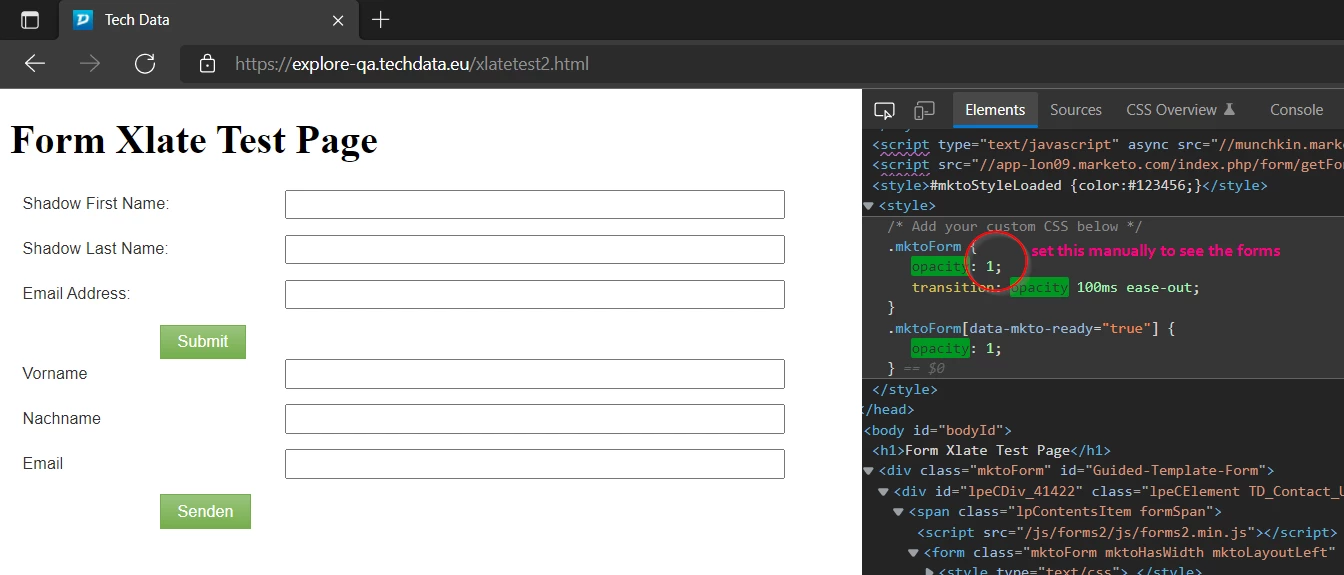
duplicated forms

1) It does not change the opacity back to 1, so at first the page seems empty unless you manually change the CSS opacity.
2) I don't need the opacity change necessarily, but the second problem is that the form gets duplicated, stacked on top of each other.


At least one of them is translated to German successfully, but it's not getting rid of the English original version above.

Please see the screenshot and example below.


Instead of embedding the form on an external page, I did try to use this approach in a Marketo guided landing page. Maybe that's the problem? Not sure. I thought I once read what works with embedded forms will also work with guided templates, but I might have misunderstood this.
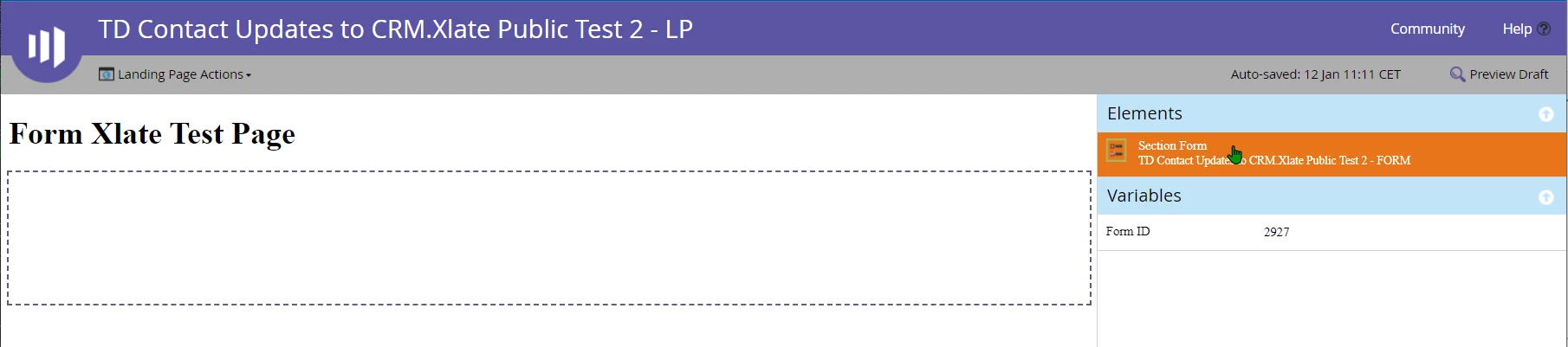
view in LP designer, guided template

Does anyone have any idea how to fix this?


Kind regards,
Thorsten

Best answer by SanfordWhiteman

Instead of embedding the form on an external page, I did try to use this approach in a Marketo guided landing page. Maybe that's the problem?

That is the fundamental problem, yes.


By the time you try to load the form with the translations, it’s already been loaded the regular way by the named form element.


The opacity CSS should also be outside the form, not in the form’s custom CSS (otherwise it can never hide the form by default while it’s building).

1 reply

SanfordWhiteman
SanfordWhitemanAccepted solution
New Participant
January 12, 2022

Instead of embedding the form on an external page, I did try to use this approach in a Marketo guided landing page. Maybe that's the problem?

That is the fundamental problem, yes.


By the time you try to load the form with the translations, it’s already been loaded the regular way by the named form element.


The opacity CSS should also be outside the form, not in the form’s custom CSS (otherwise it can never hide the form by default while it’s building).

Thorsten
ThorstenAuthor
New Participant
January 13, 2022

Thanks Sanford,


ok, so let me scratch that approach and go back to my rudimentary homebrew JS then 🙂


This is what I have come up with, it gets the job done for my forms, but does not cater for all the field types probably, or stuff like hint texts or instructions...etc... The code still leverages your translations as formatted in the Codepen. Code below assumes the leadlocale already set.


<script> // Check if locale is contained in translations (file) var localeTranslations = mktoFormLanguages.find((obj) => { return obj.lang === leadlocale; }); // If that locale is not found in translations file, default to English if (!localeTranslations) { localeTranslations = mktoFormLanguages.find((obj) => { return obj.lang === "United Kingdom - EN"; }); } // FORM TRANSLATIONS START // MktoForms2.whenReady(function (form) { // Translate labels var xlate_labels = document.getElementsByClassName("mktoLabel"); for (let lbl of xlate_labels) { lbl.innerText = localeTranslations.translations.fields.find((x) => x.Name === lbl.getAttribute("for")).InputLabel; } // Translate picklist values var xlate_fields = document.getElementsByClassName("mktoField"); for (let fld of xlate_fields) { if (fld.type === "select-one") { var optns = fld.options; for (let optn of optns) { optn.innerText = localeTranslations.translations.fields.find((x) => x.Name === fld.name).PicklistValues.find((y) => y.value === optn.getAttribute("value")).label; } } } // Translate Submit button var xlate_btns = document.getElementsByClassName("mktoButton"); for (let btn of xlate_btns) { btn.innerText = localeTranslations.translations.core.SubmitLabel; } }); // FORM TRANSLATIONS END // </script>


At least it's working for me now and I can expand on it later, having the structure to capture the translations data in place already.


Cheers!

Thorsten