General Email Statistics for Each Send in Trigger Smart Campaign? | Community
Skip to main content
New Participant
September 28, 2021
Solved

General Email Statistics for Each Send in Trigger Smart Campaign?

  • September 28, 2021
  • 2 replies
  • 2634 views

Hello all,


Maybe there's an obvious answer but I can't seem to find anything.


I've got a trigger campaign setup for a monthly email so if someone gets added to the program, they get the email, and then get removed from the program and flow.


When I go to look at results, I can either see person-oriented details OR the overall for the whole campaign as one group.


What I'm looking for is on a per group-upload basis.. For example if I uploaded 5,000 emails on September 20th for the month of September, is there an easy way to view the opens, clicks, etc for that specific timeframe?

This post is no longer active and is closed to new replies. Need help? Start a new post to ask your question.
Best answer by Jo_Pitts1

@nhabischwings ,

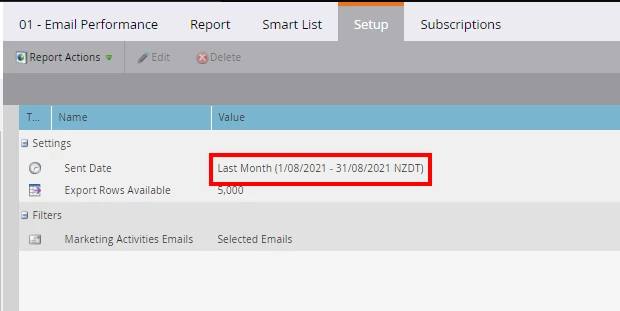
do an email performance report, and set the date range to be last month (or this month, or whatever suits best)

Cheers

Jo

2 replies

Jo_Pitts1
Jo_Pitts1Accepted solution
Community Manager
September 29, 2021

@nhabischwings ,

do an email performance report, and set the date range to be last month (or this month, or whatever suits best)

Cheers

Jo

New Participant
September 29, 2021

Wow, yep totally didn't think of that. (I promise this is not sarcasm) - Thank you for your help!

Jo_Pitts1
Community Manager
September 29, 2021

You're welcome.  We all have our 'doh' moments!

Oari
New Participant
September 28, 2021

Hi,

Have you tried using an email performance report? in the setup section you can specify the emails to analyze as well as the timeframe for the sending.