
Getting error in approving the Master Template | Community
Skip to main content
Disha_Goyal6
New Participant
September 16, 2022
Solved

Getting error in approving the Master Template

  • September 16, 2022
  • 1 reply
  • 1638 views

I have created a Master template in Marketo. Earlier, I was able to approve the same.


Now, when I have added the new snippet section then I am not able to approve the draft. 
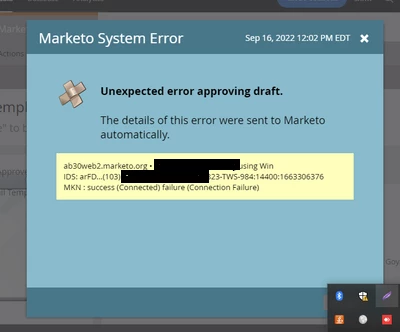
I am getting this error. I removed the same section but still, did not get any success.


Any help would be appreciated!


This post is no longer active and is closed to new replies. Need help? Start a new post to ask your question.
Best answer by Disha_Goyal6

Hi @niharikagoyal,


The HTML file is corrupted. Now, we have created new Email template and copied the code. It is working fine.


Thanks,

Disha

1 reply

NiharikaGoyal
New Participant
September 16, 2022

Hi @disha_goyal6 


For this you need to add the modules one by one to check the error. After adding modules one by one you have to approve the template to check if this is working.


Basically this type of error occur when the IDs in email body is not defined properly.


Hope that would work.


Thanks

Disha_Goyal6
Disha_Goyal6AuthorAccepted solution
New Participant
October 25, 2022

Hi @niharikagoyal,


The HTML file is corrupted. Now, we have created new Email template and copied the code. It is working fine.


Thanks,

Disha