Google Ads - Marketo Native Integration Not Working | Community
Skip to main content
Evelina077
New Participant
October 4, 2023
Solved

Google Ads - Marketo Native Integration Not Working

  • October 4, 2023
  • 1 reply
  • 2148 views

Hi All, 


I have a use case which uses Google Ads and Marketo native integration (the integration is not working for some reason), and I am looking for some help. See more details below.


The goal is to send offline conversion data from Marketo to Google Ads. We have integrated Marketo with Google Ads through the LaunchPoint. Currently, we have four conversions built out inside of Google Ads, and each conversion has its associated stage values (see below). The conversion data is supposed to be sent to Google Ads if someone's stage field value changes to any of the associated values with each conversion. We built the RCM model, mapped all the conversions with Google Ads (e.g., Prospecting - Native Marketo Test 1, Qualification -> native Marketo Test 2), and did some tests. But nothing was showing up inside of Google Ads. I'm not exactly sure which step went wrong. I tested by changing the stage field value to any of the associated values of these conversions and made sure the GCLID field is not empty, but still, nothing was showing up on Google Ads' side. 


Four Conversions & their associated stage values:

1. Prospecting: NEW - Uncontacted Lead, UNC - UNC, INTL - International Lead

2. Qualification: CONT - Contacted

3. Closed-won: ENR - Enr/Accept by Reg, START - Started program, REST - Restart Program, PGRD - Pre-Grad, GRAD - Grad

4. CLosed-lost: ENRD - Enrolled drop, NOST - Did not start prog


The Google rep helped us create two test conversions inside of Google Ads: 


  • Native Marketo Test 1
  • Native Marketo Test 2

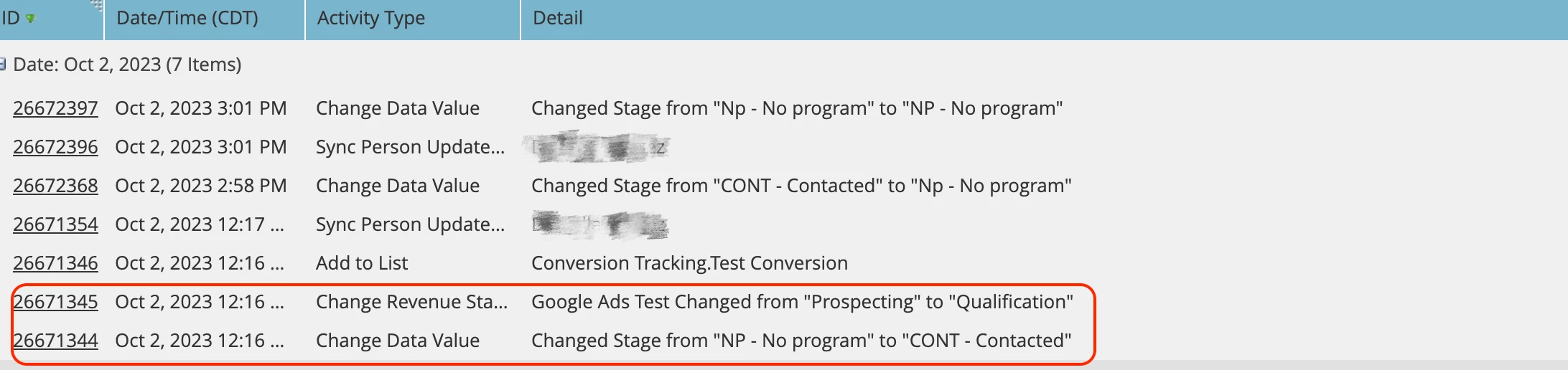
Test Record Example (nothing was showing up in Google Ads after the revenue stage changed)
 

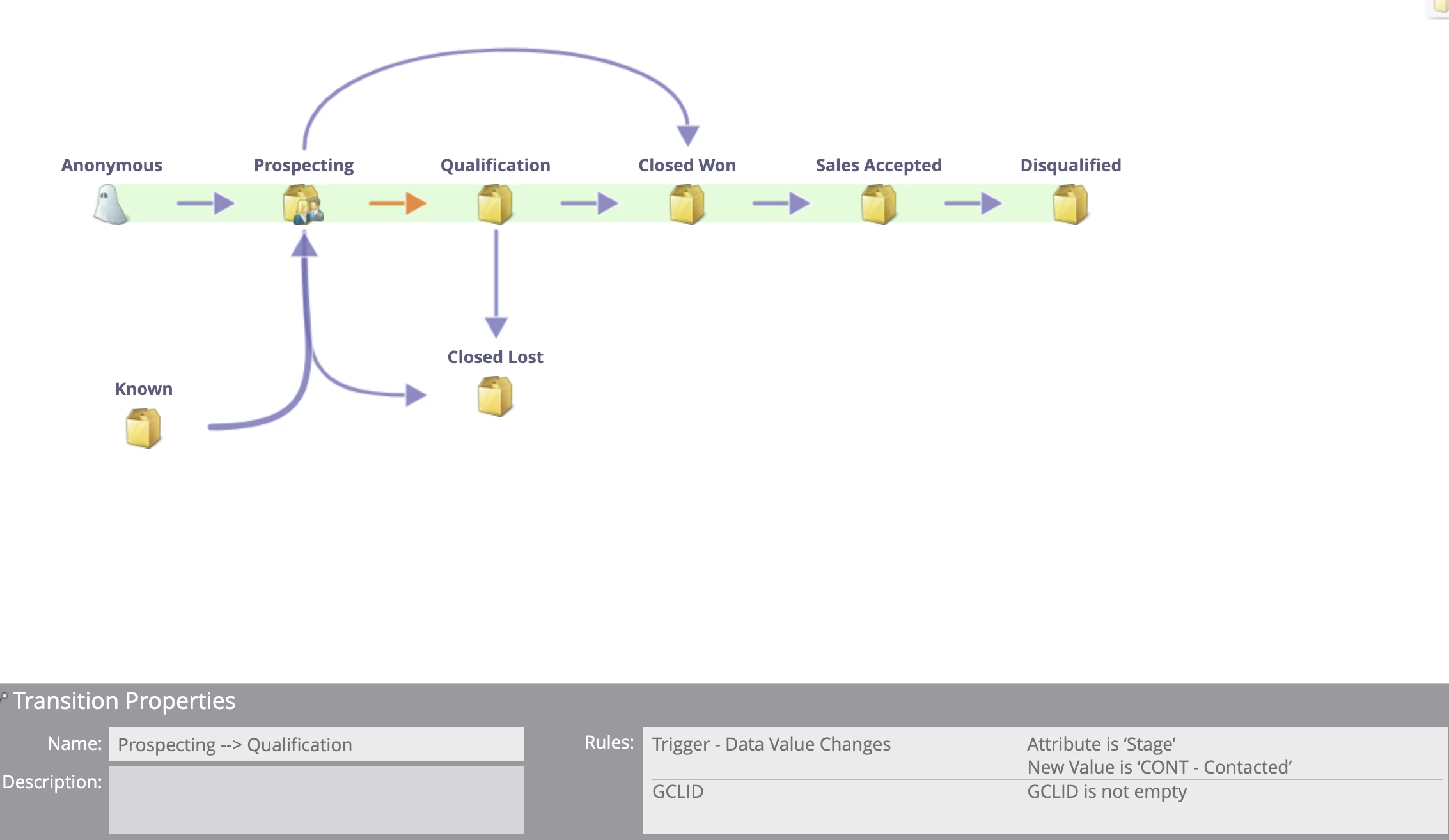
Transition rule from Prospecting -> Qualification as an example:
Any insights on how to troubleshoot this would be greatly appreciated,


Thanks



Best answer by Darshil_Shah1

The Google rep helped us create two test conversions inside of Google Ads: 


  • Native Marketo Test 1
  • Native Marketo Test 2

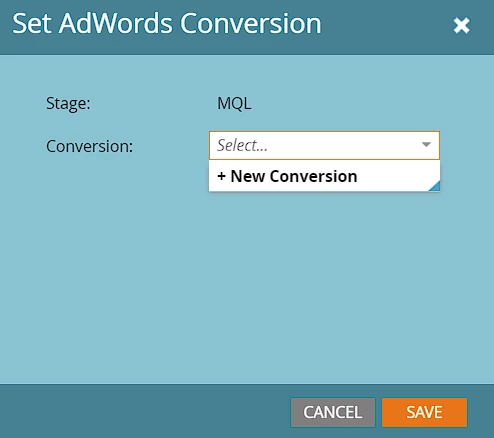
Just as an FYI, you can also create Google AdWords custom conversion stages directly from Marketo (select Revenue Stage in Marketo RCM Modeler > Stage Actions > Set AdWords Conversion > +New Conversion.

Also, if you haven't already, you can also use the AdWords' Custom Columns feature to create conversion count columns for each offline conversion you import from Marketo. 


If you still don't see the data:

  • Re-check the launchpoint service for any obvious errors (integration failures).
  • Make sure the Send Frequency was set correctly when the service was created (in case the Frequency is set to Weekly, you'll not see data the immediate next day in AdWords).
  • Check if you're able to Download the Activity log from the service in the Launchpoint, this will help you verify whether the conversion data is being sent from Marketo to Google AdWords.
    • If the data is flowing from Marketo, but you see continual AdWords errors with 'invalid user', it could be the case that you have multiple Google Ads accounts and you'd need to create My Client Center (MCC) since a GCLID on a record can already be attributed to a user not authorized in the account you linked to the Marketo integration.

Hope you find this helpful.

1 reply

Darshil_Shah1
Darshil_Shah1Accepted solution
Community Manager
October 4, 2023

The Google rep helped us create two test conversions inside of Google Ads: 


  • Native Marketo Test 1
  • Native Marketo Test 2

Just as an FYI, you can also create Google AdWords custom conversion stages directly from Marketo (select Revenue Stage in Marketo RCM Modeler > Stage Actions > Set AdWords Conversion > +New Conversion.

Also, if you haven't already, you can also use the AdWords' Custom Columns feature to create conversion count columns for each offline conversion you import from Marketo. 


If you still don't see the data:

  • Re-check the launchpoint service for any obvious errors (integration failures).
  • Make sure the Send Frequency was set correctly when the service was created (in case the Frequency is set to Weekly, you'll not see data the immediate next day in AdWords).
  • Check if you're able to Download the Activity log from the service in the Launchpoint, this will help you verify whether the conversion data is being sent from Marketo to Google AdWords.
    • If the data is flowing from Marketo, but you see continual AdWords errors with 'invalid user', it could be the case that you have multiple Google Ads accounts and you'd need to create My Client Center (MCC) since a GCLID on a record can already be attributed to a user not authorized in the account you linked to the Marketo integration.

Hope you find this helpful.

New Participant
October 6, 2023

Hi Darshil,


Thanks a lot for your response! The integration works fine. The Send Frequency was set to daily, and we checked 24 hrs after a contact's revenue stage change. There's no option under Details where it says I can download the activity log from LaunchPoint to check.


However, we tried to create a new custom conversion stage directly from Marketo, and we can see the conversion stage is showing up inside Google Ads, which signifies that the data is being pushed into Google Ads from Marketo (just an assumption, more tests are needed). 


I will do more tests to confirm the sync is working. 


Thanks again!