Google Search Console: DNS configuration for Landing Pages | Community
Skip to main content
Diana_Jakubaity
New Participant
July 12, 2019
Solved

Google Search Console: DNS configuration for Landing Pages

  • July 12, 2019
  • 1 reply
  • 3835 views

Hey All,


Do you know how to add text (google-site-verification=xxxxxxxxx-yyyyyyyyyy_RmjqRLLCVDVyEabcRR1MTlSo) to DNS configuration on the Marketo landing page?

We are trying to add our Marketo pages to Google Search console. Can you please advise?


Many Thanks,
Diana

This post is no longer active and is closed to new replies. Need help? Start a new post to ask your question.
Best answer by SanfordWhiteman

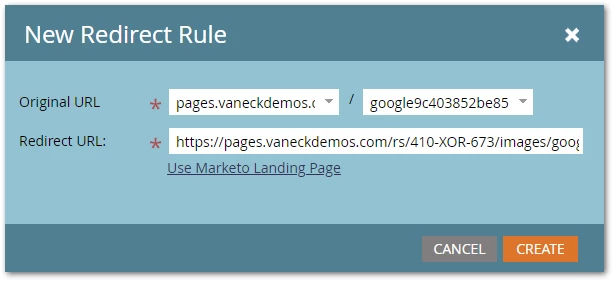
@sanfordwhiteman No you're correct, I must be misunderstanding the steps then – could you outline the steps to upload the file as a standalone landing page?


Upload it to Design Studio » Images and Files. Then in Admin » Landing Pages add a Redirect Rule:


1 reply

SanfordWhiteman
New Participant
July 12, 2019

You don't have to add it anywhere in Marketo.

Google lets you set up a TXT record in your DNS zone when adding a new property ("DNS" method). This doesn't touch Marketo at all.

You could, alternately, use the "HTML File Upload" method and create a dedicated LP for this purpose. I don't like this option b/c you must remember not to delete it during Marketo "cleanup".

Diana_Jakubaity
New Participant
July 12, 2019

Thank you Sanford!