Guided landing page templates and form elements | Community
Skip to main content
May 20, 2016
Solved

Guided landing page templates and form elements

  • May 20, 2016
  • 5 replies
  • 3911 views

I've put a Marketo form inside my custom guided landing page template. Is there are way to control the settings (eg, the form's submit text and background color) using the Elements or Variables panels in the guided template editor?

Thanks.

This post is no longer active and is closed to new replies. Need help? Start a new post to ask your question.
Best answer by SanfordWhiteman

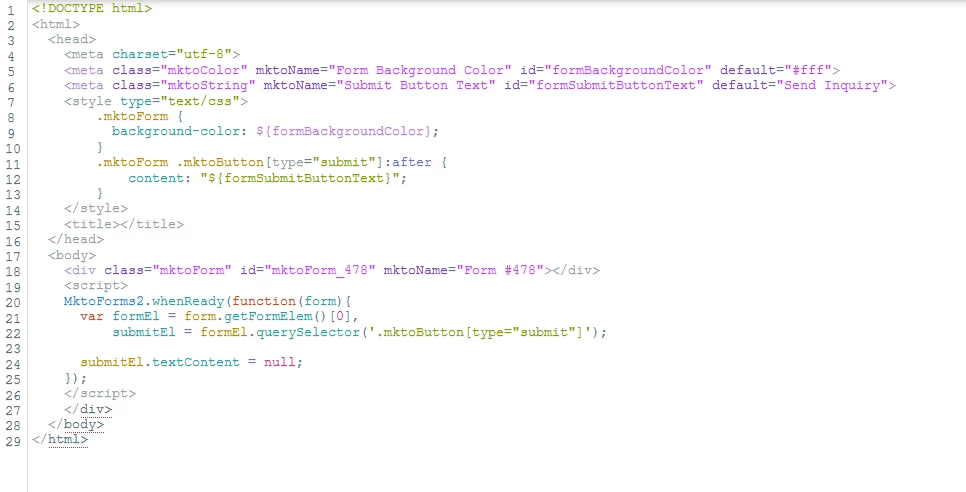
Using a GLPT like this...

... you can choose both color and submit text in any LPs based on the template.

(Yeah, I could've just set the textContent to the variable directly, but I felt like keeping all the variables in the CSS section today.)

5 replies

Grégoire_Miche2
New Participant
May 23, 2016

Should relocate this question to the "products" section.

May 24, 2016

Question moved to Products.

May 23, 2016

@Joe Reitz, @Sanford Whiteman – Thank you both for your help, and I appreciate the screenshots and code. I'll try the Javascript solution and see how that goes.

Is there a Marketo doc that lists all the events (eg, "whenReady")? I'd like to know which others are available.

Thanks again.

SanfordWhiteman
New Participant
May 23, 2016

The Forms 2.0 developer doc lists the officially supported events. You will find for most style-related customizations you want whenReady or whenRendered.

SanfordWhiteman
SanfordWhitemanAccepted solution
New Participant
May 21, 2016

Using a GLPT like this...

... you can choose both color and submit text in any LPs based on the template.

(Yeah, I could've just set the textContent to the variable directly, but I felt like keeping all the variables in the CSS section today.)

SanfordWhiteman
New Participant
May 20, 2016

Sure, you can do this using GLP variables. You don't need to resort to tokens (which after all are a different animal). Been doing this a bunch with clients as we move them to Guided mode. I'm OoO today but will post on this on the wknd.

Joe_Reitz
New Participant
May 20, 2016

ah, very good point! This video kinda gets at what you're saying, I think... around the 4:30 mark. I'm so into time-saving I completely forgot about this!

Create a Guided Landing Page Template - YouTube

If it doesn't look cool, you're probably doing it wrong.
Joe_Reitz
New Participant
May 20, 2016

You can't do what you're trying to accomplish directly from the LP editor. But if you want to use a master form and edit the CTA button text from program to program, you can make the text a token, and modify that token at the program level. So you'd set up the button text like this:

And edit it here (this is just a random screenshot, this specific token isn't on here):

For the rest of the CSS overrides, you could either put those on the form itself or redefine on your LP template's stylesheet.

If it doesn't look cool, you're probably doing it wrong.