Height of text area in a form not showing properly on landing page | Community
Skip to main content
New Participant
September 27, 2021
Solved

Height of text area in a form not showing properly on landing page

  • September 27, 2021
  • 1 reply
  • 2759 views

Hello,


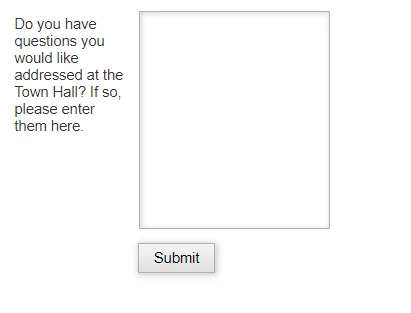
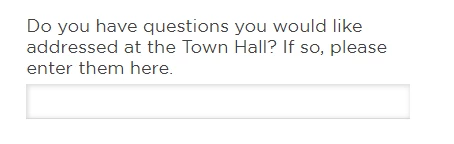
I have a text area field in a form (10 visible lines), but it doesn't show the height properly on a landing page. Can someone help me on this? Thx!!!


View from a form:

View from a LP:


This post is no longer active and is closed to new replies. Need help? Start a new post to ask your question.
Best answer by SanfordWhiteman

Because this rule overrides the height of the textarea:

#section1Form .mktoForm input[type="text"], #section1Form .mktoForm input[type="url"], #section1Form .mktoForm input[type="email"], #section1Form .mktoForm input[type="tel"], #section1Form .mktoForm input[type="number"], #section1Form .mktoForm input[type="date"], #section1Form .mktoForm textarea.mktoField, #section1Form .mktoForm select.mktoField { border-bottom: 1px solid #D9D9D9 !important; border-radius: 0px; color: #414141 !important; font-family: 'Gotham',sans-serif !important; font-size: 16px !important; height: 31px !important; padding: 0 !important; width: 100% !important; border-top: 0 !important; border-left: 0 !important; border-right: 0 !important; line-height: 19px; background-color: transparent !important; }


And so does this one:

.mktoForm textarea.mktoField { height: 25px !important; }


You’ve gotta get used to browser Dev Tools (F12, Inspect, etc.) and constantly refactoring+simplifying your CSS. You don’t to keep adding more and more!importants and ending up with a hard-to-manage mess.
1 reply

SanfordWhiteman
New Participant
September 27, 2021

Please link to your LP so we can inspect the conflicting CSS. Can’t tell from a screenshot!

QuestionsAuthor
New Participant
September 27, 2021

Here you are: LP


Thanks!

SanfordWhiteman
SanfordWhitemanAccepted solution
New Participant
September 27, 2021

Because this rule overrides the height of the textarea:

#section1Form .mktoForm input[type="text"], #section1Form .mktoForm input[type="url"], #section1Form .mktoForm input[type="email"], #section1Form .mktoForm input[type="tel"], #section1Form .mktoForm input[type="number"], #section1Form .mktoForm input[type="date"], #section1Form .mktoForm textarea.mktoField, #section1Form .mktoForm select.mktoField { border-bottom: 1px solid #D9D9D9 !important; border-radius: 0px; color: #414141 !important; font-family: 'Gotham',sans-serif !important; font-size: 16px !important; height: 31px !important; padding: 0 !important; width: 100% !important; border-top: 0 !important; border-left: 0 !important; border-right: 0 !important; line-height: 19px; background-color: transparent !important; }


And so does this one:

.mktoForm textarea.mktoField { height: 25px !important; }


You’ve gotta get used to browser Dev Tools (F12, Inspect, etc.) and constantly refactoring+simplifying your CSS. You don’t to keep adding more and more!importants and ending up with a hard-to-manage mess.
