Help: 2 forms on a page breakage | Community
Skip to main content
October 12, 2017
Solved

Help: 2 forms on a page breakage

  • October 12, 2017
  • 1 reply
  • 3846 views

I am trying to put 2 forms on 1 page (externally embedded).

The first form: inline/horizontal (all fields and button on same row)

The second form: a normal, vertical form

The problem I am having, is that either form looks beautiful by itself when place on a page, but whenever I add another form, it breaks the other – the inline/horizontal form is forcing the button on the vertical form to skew to the right.

I have placed both forms on this test page: unagpo.com/testing/ (both forms viewable only on desktop)

I know this is because both forms use the same CSS... but what is the easiest way to get around this?

Screenshot of issue, and mockup of desired outcome attached.

This post is no longer active and is closed to new replies. Need help? Start a new post to ask your question.
Best answer by SanfordWhiteman

Here is CSS for the top/horizontal form:

#mktoForm_1583.mktoForm {

  /* these styles only apply to form 1583 */

}

.mktoForm input[type=text],

.mktoForm input[type=url],

.mktoForm input[type=email],

.mktoForm input[type=tel],

.mktoForm input[type=number],

.mktoForm input[type=date],

.mktoForm select.mktoField,

.mktoForm textarea.mktoField{

  -webkit-appearance: none;

  background-color:#fff;

  line-height:1.5em;

  width:100%;

  color:#a7acae;

  border:0px;

  box-shadow:inset 0px 0px 0px 0px #fff;

  min-height:38px;

  float: left;

  height:0 !important;

}

.mktoForm input[type=text]:focus,

.mktoForm input[type=url]:focus,

.mktoForm input[type=email]:focus,

.mktoForm input[type=tel]:focus,

.mktoForm input[type=number]:focus,

.mktoForm input[type=date]:focus,

.mktoForm select.mktoField:focus,

.mktoForm textarea.mktoField:focus{

  outline:none;

  width:100%;

  color:#;

  float: left;

  height:0 !important;

  min-height:38px;

}

.mktoForm textarea.mktoField{

  resize: none;

}

.mktoForm .mktoButtonWrap .mktoButton {

  border:2px !important;

}

.mktoForm .mktoButtonWrap .mktoButton:hover {

  border:2px !important;

}

.mktoButtonWrap {

  margin-left:0px !important;

}

.mktoForm .mktoOffset {

    float: left;

    height:0 !important;

    width:20px;

  padding-right: 3px !important;

  padding-left: 3px !important;

}

.mktoForm.mktoLayoutAbove .mktoRequiredField .mktoAsterix {

    float: left;

    padding-left: 0;

    padding-right: 0px;

  visibility: hidden;

}

forms2.css:120

.mktoForm .mktoRequiredField .mktoAsterix {

    display: block;

        height: 0px;

  visibility: hidden;

}

.mktoForm .mktoAsterix {

    color: #efefef;

    display: block;

        height: 0px;

  visibility: hidden;

}

forms2.css:71

.mktoForm .mktoAsterix {

    float: right;

    color: #efefef;

    padding-left: 0px;

      height: 0px;

    display: block;

  visibility: hidden;

}

/* remove width constraint to allow for float */

.mktoForm {

width: auto !important

}

/* align row */

.mktoFormRow {

float: left !important;

}

/* remove offset */

.mktoOffset {

width: auto !important;

}

/* remove gutter margin */

.mktoGutter {

width:0px !important;

}

/* button style */

.mktoButton {

height: 38px !important;

width: 165px !important;

margin-top: 0px !important;

}
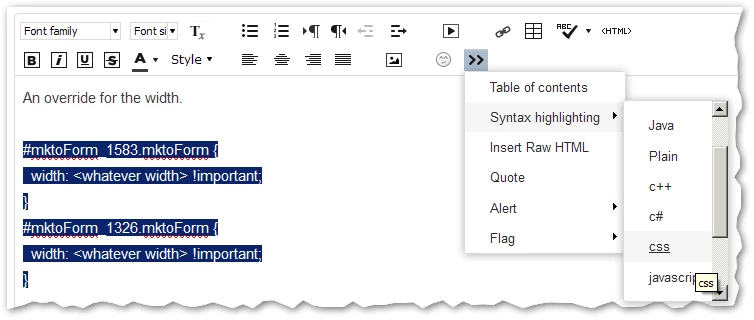

An override for the width.

#mktoForm_1583.mktoForm {

  width: <whatever width> !important;

}

#mktoForm_1326.mktoForm {

  width: <whatever width> !important;

}

Please use syntax highlighting when pasting blocks of code. Code as regular text isn't usable, and I won't try to read it.

1 reply

SanfordWhiteman
New Participant
October 12, 2017

I know this is because both forms use the same CSS... but what is the easiest way to get around this?

Target your CSS to only one form ID:

#mktoForm_1583.mktoForm {

  /* these styles only apply to form 1583 */

}

Styles aren't the only strange thing with multiple forms, but this is hopefully your only prob to solve.

SanfordWhiteman
New Participant
October 12, 2017

Well, the rule alone won't do anything (there are no styles in it!). I'm indicating how you style one form without affecting the other(s) on the same page.

On your page the problem is the rule that sets

.mktoForm { width: auto !important; }

for all .mktoForm elements. So you need to override that with different widths for each form.

October 12, 2017

Here is CSS for the top/horizontal form:

#mktoForm_1583.mktoForm {

  /* these styles only apply to form 1583 */

}

.mktoForm input[type=text],

.mktoForm input[type=url],

.mktoForm input[type=email],

.mktoForm input[type=tel],

.mktoForm input[type=number],

.mktoForm input[type=date],

.mktoForm select.mktoField,

.mktoForm textarea.mktoField{

  -webkit-appearance: none;

  background-color:#fff;

  line-height:1.5em;

  width:100%;

  color:#a7acae;

  border:0px;

  box-shadow:inset 0px 0px 0px 0px #fff;

  min-height:38px;

  float: left;

  height:0 !important;

}

.mktoForm input[type=text]:focus,

.mktoForm input[type=url]:focus,

.mktoForm input[type=email]:focus,

.mktoForm input[type=tel]:focus,

.mktoForm input[type=number]:focus,

.mktoForm input[type=date]:focus,

.mktoForm select.mktoField:focus,

.mktoForm textarea.mktoField:focus{

  outline:none;

  width:100%;

  color:#;

  float: left;

  height:0 !important;

  min-height:38px;

}

.mktoForm textarea.mktoField{

  resize: none;

}

.mktoForm .mktoButtonWrap .mktoButton {

  border:2px !important;

}

.mktoForm .mktoButtonWrap .mktoButton:hover {

  border:2px !important;

}

.mktoButtonWrap {

  margin-left:0px !important;

}

.mktoForm .mktoOffset {

    float: left;

    height:0 !important;

    width:20px;

  padding-right: 3px !important;

  padding-left: 3px !important;

}

.mktoForm.mktoLayoutAbove .mktoRequiredField .mktoAsterix {

    float: left;

    padding-left: 0;

    padding-right: 0px;

  visibility: hidden;

}

forms2.css:120

.mktoForm .mktoRequiredField .mktoAsterix {

    display: block;

        height: 0px;

  visibility: hidden;

}

.mktoForm .mktoAsterix {

    color: #efefef;

    display: block;

        height: 0px;

  visibility: hidden;

}

forms2.css:71

.mktoForm .mktoAsterix {

    float: right;

    color: #efefef;

    padding-left: 0px;

      height: 0px;

    display: block;

  visibility: hidden;

}

/* remove width constraint to allow for float */

.mktoForm {

width: auto !important

}

/* align row */

.mktoFormRow {

float: left !important;

}

/* remove offset */

.mktoOffset {

width: auto !important;

}

/* remove gutter margin */

.mktoGutter {

width:0px !important;

}

/* button style */

.mktoButton {

height: 38px !important;

width: 165px !important;

margin-top: 0px !important;

}