Help creating batch emails | Community
Skip to main content
New Participant
February 28, 2024
Solved

Help creating batch emails

  • February 28, 2024
  • 1 reply
  • 2385 views

Hi, I'm looking to set up a few filter-based batch emails based on inactivity of leads in order to remarket to them. I'm looking to set it up with fields directly speaking with our custom MS Dynamics CRM. 

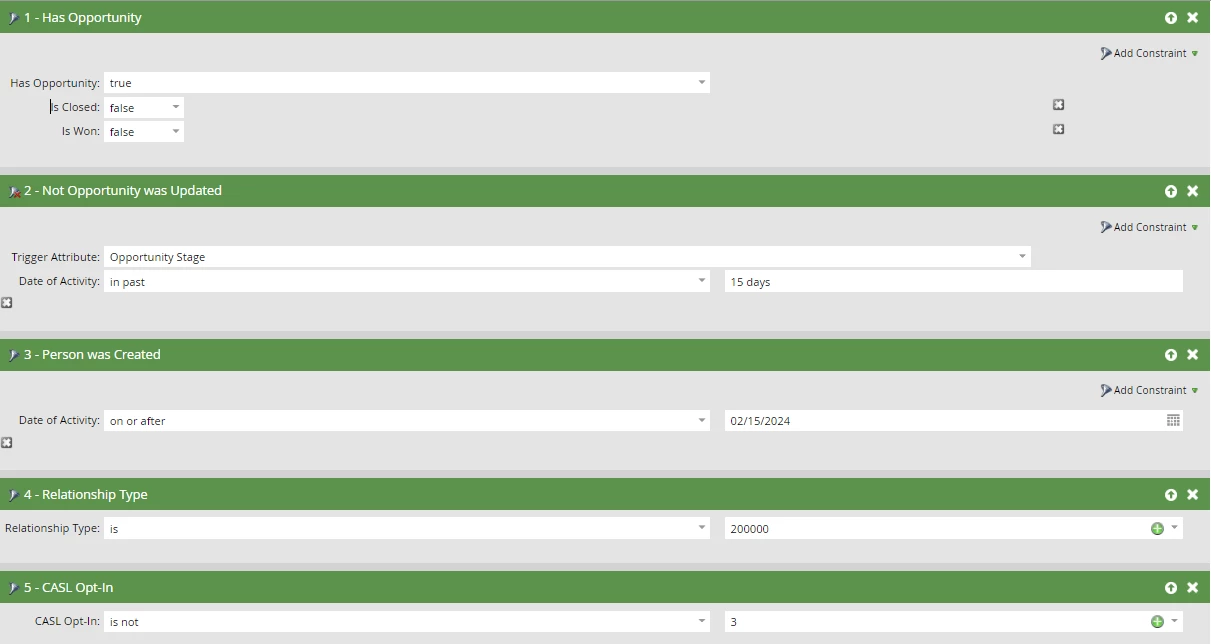
These are the filters I'm using but it still seems to be qualifying people on a daily basis (as soon as they are created) but it should qualify them only when they complete 15 days of no change. Can someone tell me what I'm doing wrong?



This post is no longer active and is closed to new replies. Need help? Start a new post to ask your question.
Best answer by SanfordWhiteman

Think you’re misunderstanding how Not Opportunity Was Updated works.


Your filter means “the person has no Opportunities where the Opportunity Stage field was updated in the past 15 days”, where the 15 days is an offset from the time the batch runs.


This would naturally include people who had a single Opportunity created (and not updated) today, because, well... they have no Opportunities where the Opportunity Stage field was updated in the past 15 days!

1 reply

Darshil_Shah1
Community Manager
February 28, 2024

@jkathuria, You haven't supplied the filtering logic. Is it ANY/AND/Advanced filtering logic? Without that, we can't say for sure why it isn't working as per your expectations. Additionally, these are all filters and not triggers. Also, you can't trigger inactivity; only filter based on that.

jkathuriaAuthor
New Participant
February 28, 2024

Thanks Darshil, I corrected my post. I'm running it as a batch campaign. I'm using ALL filters as the logic because it should only meet all these filters before qualifying a lead. Does that help? 

SanfordWhiteman
SanfordWhitemanAccepted solution
New Participant
February 29, 2024

Think you’re misunderstanding how Not Opportunity Was Updated works.


Your filter means “the person has no Opportunities where the Opportunity Stage field was updated in the past 15 days”, where the 15 days is an offset from the time the batch runs.


This would naturally include people who had a single Opportunity created (and not updated) today, because, well... they have no Opportunities where the Opportunity Stage field was updated in the past 15 days!