Help fixing 'Uncheck all' code on preference centre page | Community
Skip to main content
New Participant
July 20, 2022
Solved

Help fixing 'Uncheck all' code on preference centre page

  • July 20, 2022
  • 1 reply
  • 2933 views

Hi,

I know there's a few threads about this and I've tried following the solutions like the one here: https://nation.marketo.com/t5/product-discussions/subscription-preference-center-page-forms-and-unchecking-all/m-p/310820#M175490 but I can't work out what I'm doing wrong with the code to make this work.


We have a preference centre for subscribers to opt in and out of our various emails and when they visit it's pre-populated with ticks for their relevant subscriptions.  When they check the 'Unsubscribe from all' I want it to untick all those boxes, I've tried the solutions in a few threads like the above from @sanfordwhiteman but it's not working for me.


Can anyone see what I'm doing wrong from this page: https://go.wilmingtonplc.com/Axco-Manage-Your-Communication-Preferences.html
This post is no longer active and is closed to new replies. Need help? Start a new post to ask your question.
Best answer by Dave_Roberts

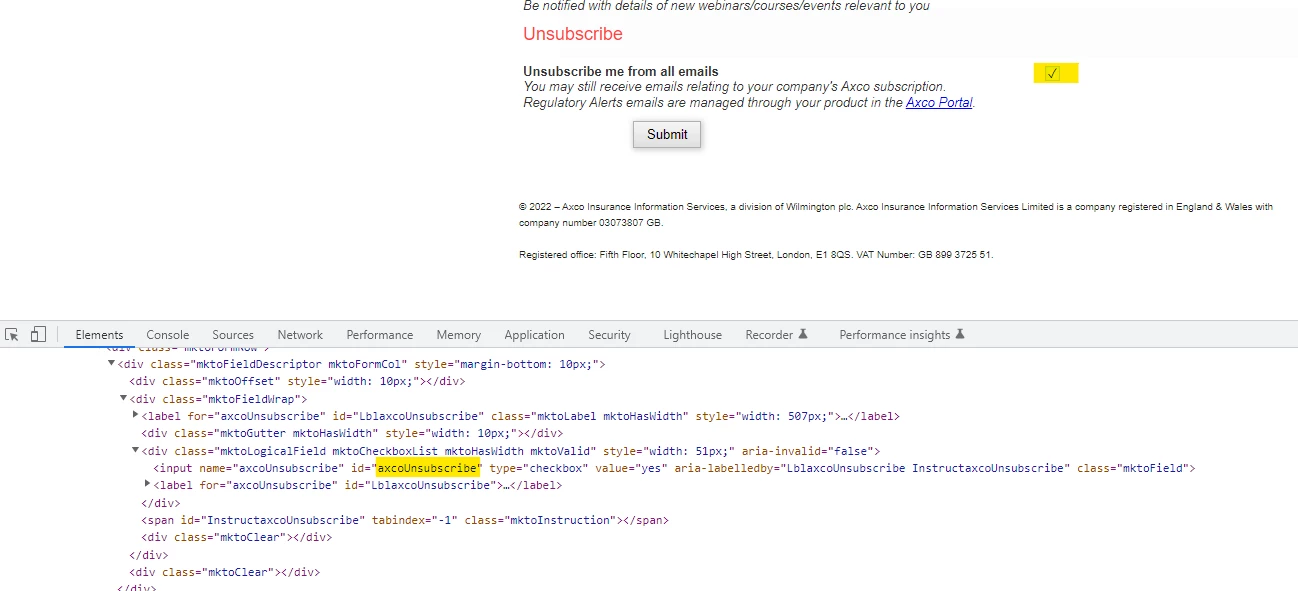
The form's unsubscribe field has an id of "axcoUnsubscribe". (Image 1)

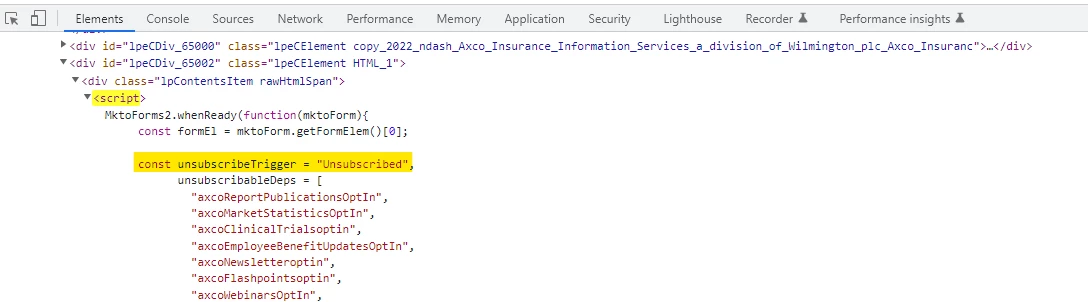
It looks like the script is looking for a field with the id of "Unsubscribed" the way you've got it setup. (Image 2)


If you edit the script to change "Unsubscribed" to "axcoUnsubscribe" it might work out the issue here. 


=================================================================================================


1 reply

Dave_Roberts
Dave_RobertsAccepted solution
New Participant
July 20, 2022

The form's unsubscribe field has an id of "axcoUnsubscribe". (Image 1)

It looks like the script is looking for a field with the id of "Unsubscribed" the way you've got it setup. (Image 2)


If you edit the script to change "Unsubscribed" to "axcoUnsubscribe" it might work out the issue here. 


=================================================================================================


trevlarrrAuthor
New Participant
July 20, 2022

You're a star! I'd looked at that so many times and hadn't picked up on it not being the field ID! That's working perfectly now, thanks so much!

SanfordWhiteman
New Participant
July 20, 2022

You're a star! I'd looked at that so many times and hadn't picked up on it not being the field ID! That's working perfectly now, thanks so much!


Field name, technically. 🙂 Because multiple checkboxes for the same Marketo field have the same name attribute, but not the same id. (Lots of code fails to account for this!)