Help! Image not aligning with text in mobile view | Community
Skip to main content
New Participant
August 30, 2021
Solved

Help! Image not aligning with text in mobile view

  • August 30, 2021
  • 1 reply
  • 2444 views

Hi Community,


I have been reworking an existing LP template in Marketo.


All was going well until I noticed that an image is not aligning in the mobile view of the page. 
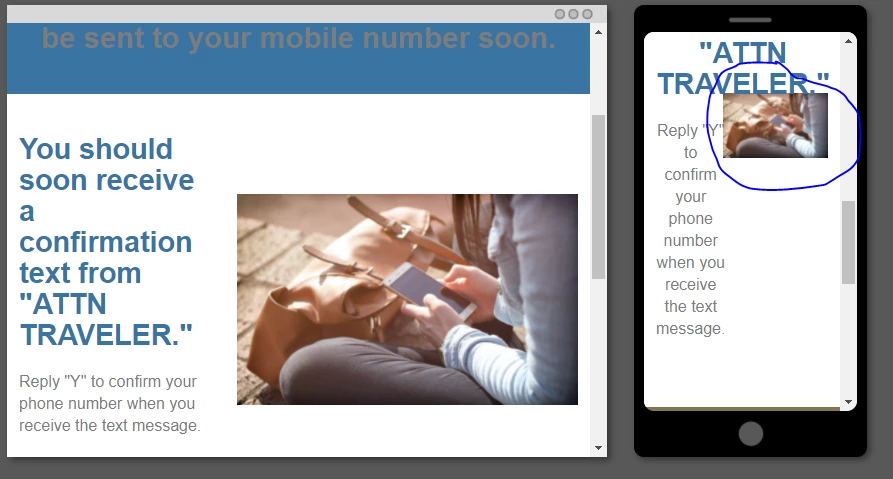


Ideally, the circled image should drop down below the blue header and fit the width of the mobile device. 


Instead, it's currently appearing just under the header but pushed up against it, is super small, and is not fitting the width of the device.


Can anyone please help me figure out what's causing the image to not align? 😧


A link to the page can be viewed here: http://promos.ovstravel.com/IM---Operational-Testing-Program_SMS-Thank-You-Page-Test-2.html


Thank you,


LK

This post is no longer active and is closed to new replies. Need help? Start a new post to ask your question.
Best answer by Guitarrista82

Hi Jasbir,


Thank you for your reply. 


I was able to resolve the issue. Appreciate your help!


LK

1 reply

New Participant
August 30, 2021


I was able to pinpoint the issue.


In trying to reduce the padding below the header, for some reason this messed up the formatting of the hero image.


Once I put the padding back the way it was, the image was realigned.


However, now I have an issue where the padding (as shown in the first screenshot above) is too much. 


Any ideas how I can reduce this padding while not messing up the image alignment?


New Participant
September 1, 2021

Hi @guitarrista82 


I am not able to access the Page, could you please share the URL again?


Thanks & Regards,

Jasbir

Guitarrista82AuthorAccepted solution
New Participant
September 14, 2021

Hi Jasbir,


Thank you for your reply. 


I was able to resolve the issue. Appreciate your help!


LK