Help pausing drip nurture campaign | Community
Skip to main content
New Participant
April 13, 2022
Solved

Help pausing drip nurture campaign

  • April 13, 2022
  • 1 reply
  • 3611 views

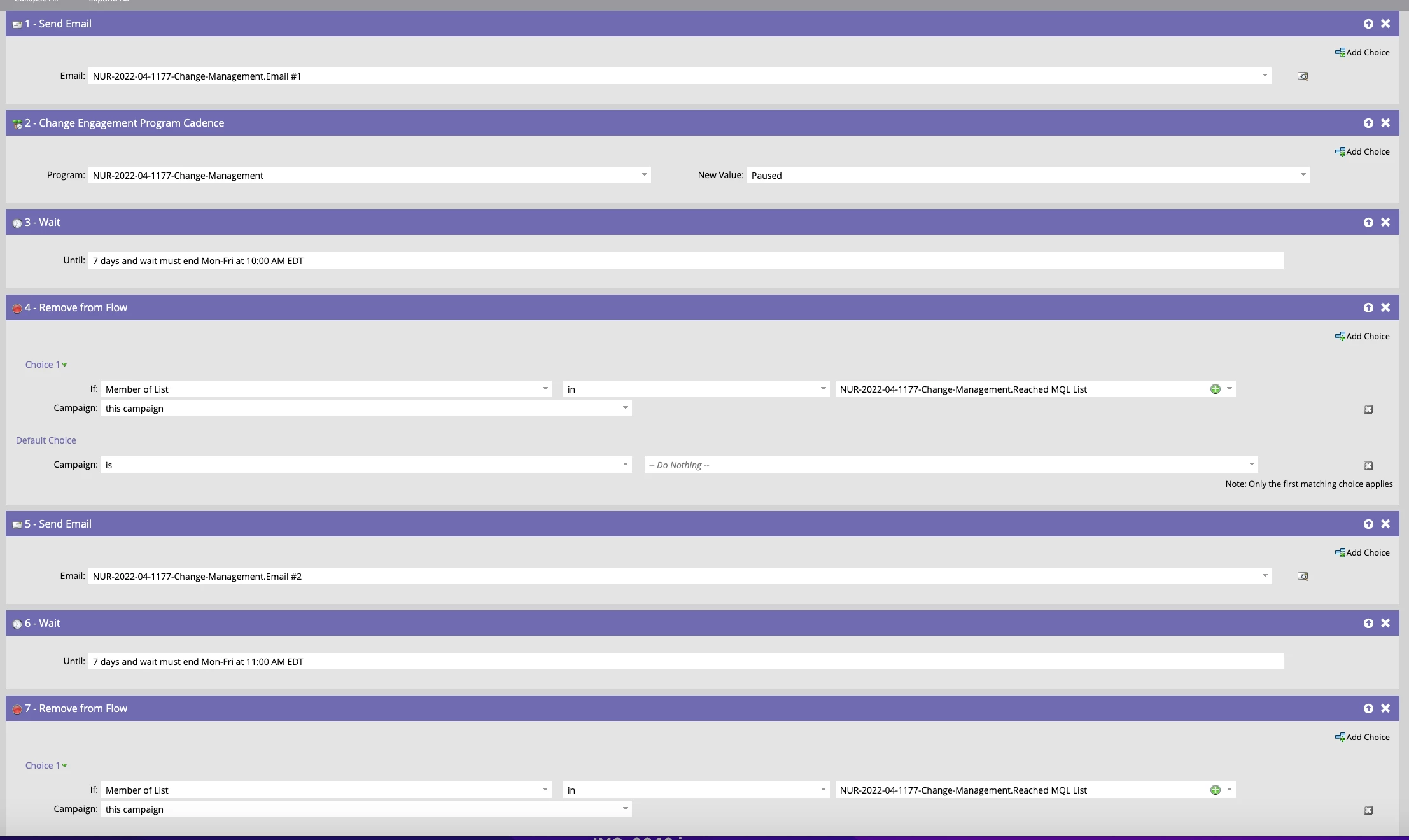
I need to pause a drip nurture campaign ASAP. I found this article that explains to add a  Change Engagement Program Cadence flow step. Where in my flow step should this be added? Can someone look at the attached screenshot? I don't want them to receive the second email in this program, so I added it as step #2
Article: https://experienceleague.adobe.com/docs/marketo/using/product-docs/email-marketing/drip-nurturing/using-engagement-programs/pause-people-in-an-engagement-program.html?lang=en   

This post is no longer active and is closed to new replies. Need help? Start a new post to ask your question.
Best answer by Darshil_Shah1

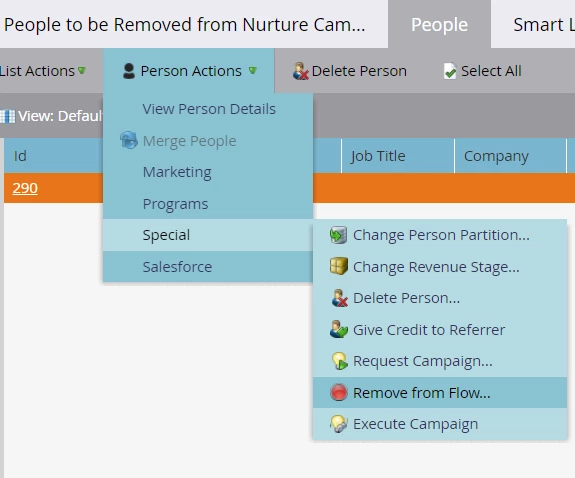
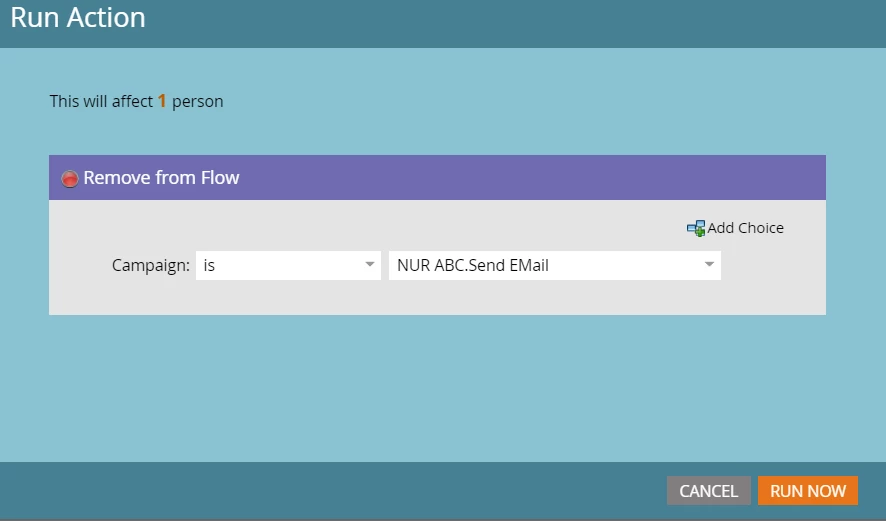
Well, the easiest way would be to select all people in the SL form the people tab > Person Actions > Special > Remove from Flow > In the dialog with Remove from Flow step - select the Campaign from which you want to remove people (i.e., your nurture send campaign) > Hit Run. This'll remove people from the campaign flow immediately.
 

Alternatively, you can also create a batch campaign referencing the SL created in to the campaign's smart list tab (you would want to use Member of Smart List in <select your smart list> filter), in flow drag the Remove from Flow step in to the canvas, and select the Campaign from which you want to remove people (i.e., your nurture send campaign). Run the batch campaign using from the schedule tab of the campaign (this'll remove the people from campaign flow immediately). Also - instead of using the nested smart list (i.e., referencing the smart list you created in to the campaign's smart list) - you can also build out the SL using the same filter criteria in the campaign's SL directly. 🙂


If you're gonna be doing this exercise of removing people more than once you can go with the smart-campaign approach just so that you have log of   runs at one place.
 

1 reply

Darshil_Shah1
Community Manager
April 13, 2022

I am assuming that you'd have this campaign in a default program and are referencing this campaign in an engagement program's stream for sending out the emails.


For the people already waiting in the campaign flow, you would need to remove people from the flow using the Remove from Flow flow step - so people don't receive the subsequent  emails after they complete the wait step - remember that it'll not pause people from the campaign, rather it'll remove people from the campaign flow altogether. 


Changing the cadence to Pause state will pause people from the EP and would not essentially pause people already in the campaign flow which has already been called/executed by the EP's stream. Pausing people from an engagement program would essentially prevent any further default program's send campaign to be called for the respective people.


Instead of having multiple send email flow steps in the nested default program's send campaign, it's advised to have them in the separate default programs which then can be individually added to the stream and let EP take care of the cadence instead of using the wait step in one single campaign.


Also, in general it is not advised to edit campaign flow with Members already in the flow/wait steps.

angcasperAuthor
New Participant
April 18, 2022

Thanks Darshil, this helps a lot. I have a smart list created of people that I want to remove from this program after we take it off of pause. How do I properly set up the "remove from flow" to reference a group smart list?

Darshil_Shah1
Darshil_Shah1Accepted solution
Community Manager
April 18, 2022

Well, the easiest way would be to select all people in the SL form the people tab > Person Actions > Special > Remove from Flow > In the dialog with Remove from Flow step - select the Campaign from which you want to remove people (i.e., your nurture send campaign) > Hit Run. This'll remove people from the campaign flow immediately.


Alternatively, you can also create a batch campaign referencing the SL created in to the campaign's smart list tab (you would want to use Member of Smart List in <select your smart list> filter), in flow drag the Remove from Flow step in to the canvas, and select the Campaign from which you want to remove people (i.e., your nurture send campaign). Run the batch campaign using from the schedule tab of the campaign (this'll remove the people from campaign flow immediately). Also - instead of using the nested smart list (i.e., referencing the smart list you created in to the campaign's smart list) - you can also build out the SL using the same filter criteria in the campaign's SL directly. 🙂


If you're gonna be doing this exercise of removing people more than once you can go with the smart-campaign approach just so that you have log of   runs at one place.