Help please - landing page not triggering in smart list | Community
Skip to main content
November 30, 2015
Solved

Help please - landing page not triggering in smart list

  • November 30, 2015
  • 2 replies
  • 6485 views

Hi There,

Im at the pointy end of a project that is due soon and something is amiss so any help is appreciated.

Here is what I am trying to achieve.

1. Customer receives email to complete a survey on survey monkey

2. After completion they are redirected to a landing page

3. There is a smart campaign listening for this to occur

4. Program status changed to > completed survey

I have been trying unsuccessfully for a day to sort this.

Thanks

Matt

This post is no longer active and is closed to new replies. Need help? Start a new post to ask your question.
Best answer by SanfordWhiteman

I answered my own question. Its the Munchkin code.

I just need to figure out the redirect.

Here is the code

<script src="//app-ab02.marketo.com/js/forms2/js/forms2.min.js"></script>

<form id="mktoForm_2190" style="display:none"></form>

<script>

     MktoForms2.loadForm("//app-ab02.marketo.com", 663-HBN-994", 2190, function(form) {

          MktoForms2.whenReady(function (form) {

               form.submit();

          });

     });

</script>


You already had the redirection code (in the onSuccess).  You seem to be cutting and pasting from different sources.

The full code to auto-submit and redirect is:

<script src="//app-sj01.marketo.com/js/forms2/js/forms2.min.js"></script>

<form id="mktoForm_1057"></form>

<script>

MktoForms2.loadForm("//app-sjst.marketo.com", "785-UHP-775", 1057, function(form) {

    //Add an onSuccess handler

    form.onSuccess(function(values, followUpUrl) {

        // Take the lead to a different page on successful submit, ignoring the form's configured followUpUrl

        location.href = "surveymonkey.com/r/5KQ3VGB";

        // Return false to prevent the submission handler continuing with its own processing

        return false;

    });

  form.submit();

});

</script>

You will need the Munchkin JS and Muchkin.init() as well.  But, as I've noted, your resulting code will have a race condition.  It will not satisfy your requirements reliably. I would not use it on a production site.
2 replies

Nicholas_Manojl
New Participant
December 1, 2015

This is a long thread with an easy answer.

The first link needs to be to a page with the Marketo cookie on it - ie, your company website or a Marketo landing page. You can just make a simple page which then links to the Survey Monkey.

Otherwise your program will only work with people who have already been cookied.

Grégoire_Miche2
New Participant
December 1, 2015

Not that simple, because your method adds a click. The point was to avoid that click...

Nicholas_Manojl
New Participant
December 1, 2015

The page can be automatically redirected quite simply without any action from the user.

Grégoire_Miche2
New Participant
November 30, 2015

Hi Matthew Varone,

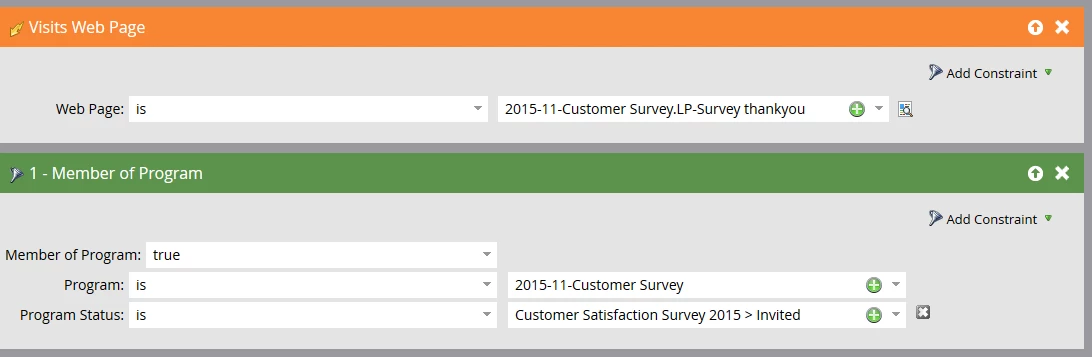
It is very likely that people are not member of your program in the "Invited" Status. 2 things to change :

  1. Make sure that the smart campaign that sends the email has a "change program status" -> Invited flow step
  2. Remove the "program status" constraint in the "member of program" filter.

An alternative would be to remove the "member of program" filter and replace it with a "was sent email" filter.

-Greg

November 30, 2015

Hi Gregoire

I think I have set that up the right way.

I have a feeling its because the cookies are not working correctly. I say this because, on the landing page there is an option to sign up to the newsletter. When I check this it appears that a new lead has been acquired.

Im really stumped

November 30, 2015

If it helps here is a screen of the entire program.

I have tested my wifes email on another computer and it didnt fire.

