Help w/ Advanced Filters Logic (combined with triggers) | Community
Skip to main content
Hana_Sperlova
New Participant
August 26, 2022
Question

Help w/ Advanced Filters Logic (combined with triggers)

  • August 26, 2022
  • 1 reply
  • 2277 views

Hello!


I'm struggling with the filter logic setup and seeking help from advanced users, please.


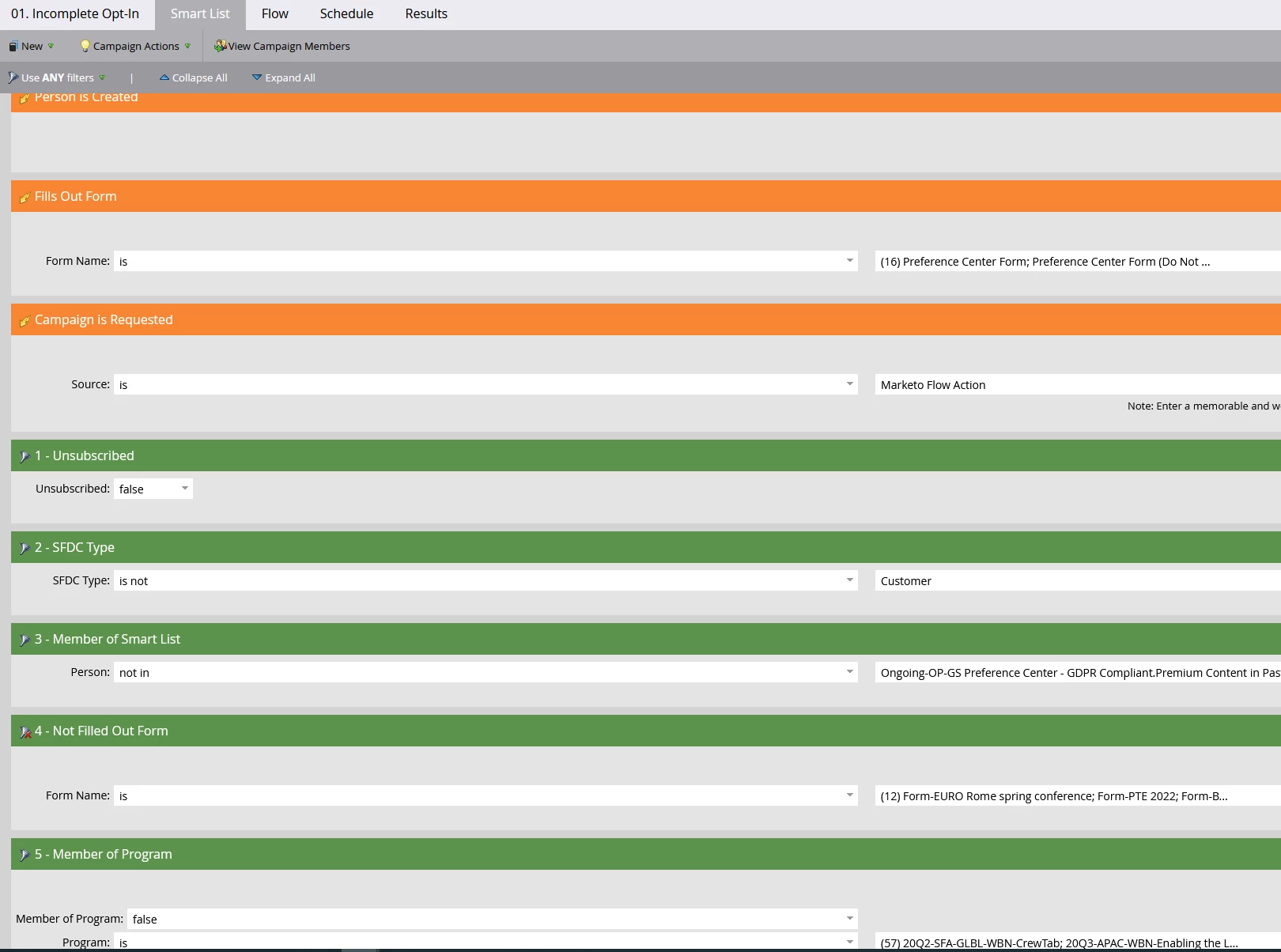
The campaign is automatically changing the status to incomplete opt-in anytime one of the triggers applies (the person is created, one of the specified forms is filled out or the campaign is requested).


However, we need to make some exclusions - these should be defined using the filters listed below.
I want to exclude anyone who is unsubscribed +  any customer contacts + anyone who is a member of a defined smart list or program, as well as anyone who filled other specified forms (different from those listed under trigger; used filter not filled out the form).


I tried multiple variations on filter logic but none seems to be working as expected.


Can anyone help and advise the correct logic I should use, please?


THANKS!
This post is no longer active and is closed to new replies. Need help? Start a new post to ask your question.

1 reply

Katja_Keesom
Community Manager
August 26, 2022

As far as I can see, your filters show the inclusion criteria, not the exclusion so I would say ALL criteria should apply.

Hana_Sperlova
New Participant
August 29, 2022

Dear Katja,


Many thanks for your input, greatly appreciated!


Actually, the forms & other programs that should be also excluded can contain customer contacts as well as leads.

So the exclusions rule I'm trying to apply should be something like this:

(1 and 2) OR 3 or 4 or 5


It means I would like the system to exclude any customer contacts who are not explicitly unsubscribed as well as ANY contact record (regardless it is a customer contact or lead) who are members of ANY of the listed filters for the smart list/form filled out / program.


However, I  am not sure how to set up the logic correctly as I know there should always be AND before using OR.


Can you advise how the logic should look so it is making the right "exclusions", please?


Thank you!

Katja_Keesom
Community Manager
August 29, 2022

I think you are getting yourself tangled up in double negatives. Let's simply talk about who should be INCLUDED. Simply describe your logic in words and then you can derive from there what the filters should be.