Question
Help with Form CSS / Troubleshooting (labels)
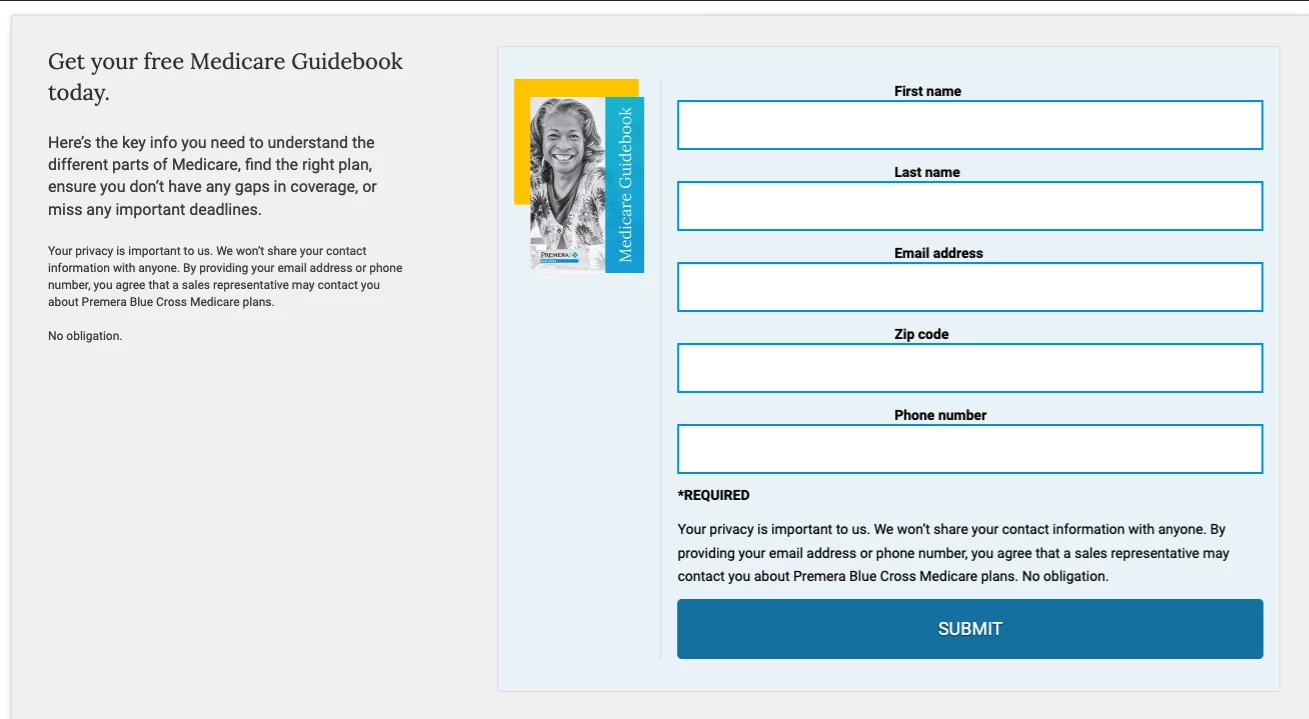
I'm trying to help one of our designers with Form troubleshooting. Field labels should align left above the fields. He says when page loads the labels first show up, for a second, aligned left, then indent towards the middle as shown in the image. Ideas?
Here's the form CSS
/* Add your custom CSS below */
.mktoForm .mktoFieldWrap {
width:100% !important;
}
.mktoForm {
background-image: none !important;
padding: 0 !important;
width:100% !important;
}
.mktoAsterix {
display:none !important;
}
.mktoForm * {
font-family: Roboto, Sans-serif !important;
}
.mktoForm input[type=text], .mktoForm input[type=url], .mktoForm input[type=email], .mktoForm input[type=tel], .mktoForm input[type=number], .mktoForm input[type=date], .mktoForm textarea.mktoField, .mktoForm select.mktoField {
width: 100% !important;
padding:10px !important;
border:2px solid #009bdb !important;
box-sizing: border-box;
font-size:18px !important;
-webkit-border-radius:0px !important;
border-radius:0px !important;
height:50px !important;
background-color: #ffffff !important;
color: #000000 !important;
}
.mktoForm select.mktoField {
-webkit-appearance: none !important;
-moz-appearance: none !important;
appearance: none !important;
background: url("data:image/svg+xml;utf8,<svg xmlns='http://www.w3.org/2000/svg' width='100' height='100' fill='%23666666'><polygon points='0,0 100,0 50,75'/></svg>") no-repeat !important;
background-size: 12px !important;
background-position: calc(100% - 20px) center !important;
background-repeat: no-repeat !important;
}
.mktoForm .mktoGutter {
height:0px !important;
}
.mktoForm .mktoOffset {
height:0px !important;
}
.mktoForm .mktoButtonWrap.mktoSimple .mktoButton {
background-color: #117bab !important;
background-image: none !important;
border: 2px solid #117bab !important;
width: 100% !important;
font-size: 18px !important;
height: 60px !important;
padding: 15px 1em !important;
color: #ffffff !important;
}
.mktoForm div, .mktoForm span, .mktoForm label, .mktoForm p {
margin-left:0px !important;
}
option {
margin-left:10px !important;
}
.mktoButtonRow {
width:100%;
}
.mktoForm .mktoField {
font-size:18px !important;
}
@media only screen and (max-width: 1000px) {
.mktoForm,
.mktoForm * {
-webkit-box-sizing: border-box !important;
-moz-box-sizing: border-box !important;
box-sizing: border-box !important;
-moz-box-sizing: border-box !important;
padding: 0 !important;
}
.mktoForm input[type=url],
.mktoForm input[type=text],
.mktoForm input[type=date],
.mktoForm input[type=tel],
.mktoForm input[type=email],
.mktoForm input[type=number],
.mktoForm textarea.mktoField,
.mktoForm select.mktoField {
width: 100% !important;
height: auto !important;
line-height: 1.5em !important;
font-size: 18px !important;
}
}
.mktoForm .mktoFormCol {
float: none !important;
margin: 0 auto 10px !important;
width:100% !important;
min-height: 0 !important;
}
.mktoForm div, .mktoForm span, .mktoForm label, .mktoForm p {

  margin-left: 0 !important;  /*remove this line */

    margin: 0 auto !important;

}
.mktoForm {
margin: 0 auto !important;
}
.mktoForm div, .mktoForm span, .mktoForm label, .mktoForm p {
color: #000000 !important;
}
.mktoForm ::-webkit-input-placeholder { /* WebKit browsers */
opacity: 1 !important;
color: #000000 !important;
background-color: #ffffff !important;
}
.mktoForm ::-moz-placeholder { /* Mozilla Firefox 19+ */
opacity: 1 !important;
color: #000000 !important;
background-color: #ffffff !important;
}
.mktoForm :-moz-placeholder { /* Mozilla Firefox 4 to 18 */
opacity: 1 !important;
color: #000000 !important;
background-color: #ffffff !important;
}
.mktoForm ::placeholder {
color: #000000 !important;
opacity: 1 !important; /* Firefox */
}
.mktoForm :-ms-input-placeholder { /* Internet Explorer 10-11 */
color: #000000 !important;
opacity: 1 !important;
}
.mktoForm ::-ms-input-placeholder { /* Microsoft Edge */
color: #000000 !important;
opacity: 1 !important;
}
.mktoForm .mktoError .mktoErrorArrow {
display:none !important;
}
.mktoForm ::-webkit-input-placeholder { /* WebKit browsers */
opacity: 1 !important;
color: #000000 !important;
background-color: #ffffff !important;
text-align: left !important;
}
.mktoForm ::-moz-placeholder { /* Mozilla Firefox 19+ */
opacity: 1 !important;
color: #000000 !important;
background-color: #ffffff !important;
text-align: left !important;
}
.mktoForm :-moz-placeholder { /* Mozilla Firefox 4 to 18 */
opacity: 1 !important;
color: #000000 !important;
background-color: #ffffff !important;
text-align: left !important;
}
.mktoForm ::placeholder {
color: #000000 !important;
opacity: 1 !important; /* Firefox */
text-align: left !important;
}
.mktoForm :-ms-input-placeholder { /* Internet Explorer 10-11 */
color: #000000 !important;
opacity: 1 !important;
text-align: left !important;
}
.mktoForm ::-ms-input-placeholder { /* Microsoft Edge */
color: #000000 !important;
opacity: 1 !important;
text-align: left !important;
}
#mktoForm_2914 .mktoHtmlText {
width:100% !important;
font-size: 11px !important;
line-height: 12px !important;
}
#mktoForm_3113 .mktoHtmlText {
width:100% !important;
font-size: 11px !important;
line-height: 12px !important;
}
#mktoForm_3114 .mktoHtmlText {
width:100% !important;
font-size: 11px !important;
line-height: 12px !important;
}
.mktoForm .mktoRadioList, .mktoForm .mktoCheckboxList {
padding: 0.5em 0 0 0 !important;
float: left !important;
}
.mktoForm .mktoLabel {
float: left !important;
}
#mktoForm_3028 .mktoHtmlText { width:100% !important; font-size: 11px !important; line-height: 12px !important; }
#mktoForm_3028 .mktoHtmlText { width:100% !important; font-size: 11px !important; line-height: 12px !important; }
.mktoForm .mktoButtonWrap.mktoSimple button.mktoButton {
background: #117bab !important;
}
form.mktoForm .mktoHtmlText {
padding: 0px !important;
width: 100% !important;
}